




Best Free AI Workflow Automation Tools
A lot of our daily life replicates itself in the way tasks are defined.
You obtain information, put it into another application, email it, populate a spreadsheet, generate a task for yourself or alert a colleague.
This is simple to do manually; however it can be time-consuming.
This is what makes the case for workflow automation.
AI workflow automation tools can integrate your applications and automate mundane tasks. Many also leverage AI to organize data, produce summaries, translate data, generate reports, or predict the next move.
You will be pleased to hear that always having to pay for automisation is not a necessity.
There are a handful of free plans or free self-hosted options available for many of these. Here this guide will examine the best free AI workflow automation tools, their strengths, overall limitations, and how to select the one best suited to your needs.
Table of Contents
What Is AI Workflow Automation?
Workflow automation is defining a series of steps that are performed automatically in response to an event.
For example:
Start/Mouse leads for one new form → Save the information (required fields) and create a task with details → Email the task and create the one new form.
To make the workflow more adaptable, AI works.
An ai step can understand text, rather than just move data to another app.
A simple example would be:
When a new customer email arrives→ AI reads the message→ AI finds out what the message is about→ AI attach label to the email→ Email is sent to the right person.
This allows AI in the workplace to efficiently automate workflow from the most basic office work to the more complex business operations.
Best Free AI Workflow Automation Tools
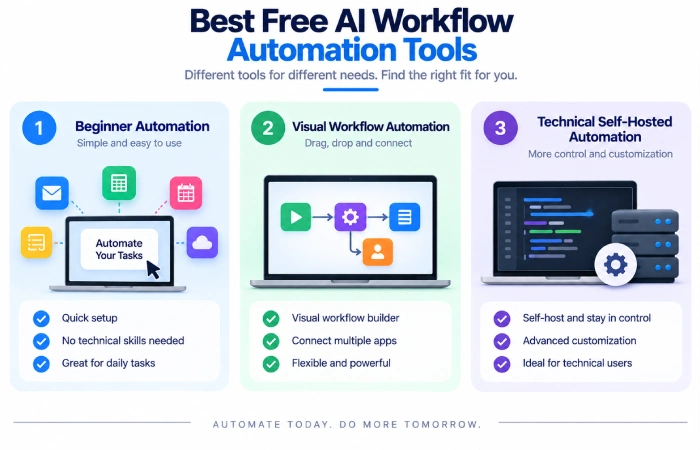
1. Zapier
Zapier is one of the most user friendly automation systems for beginners to use.
Its Free plan offers up to 100 tasks per month, unlimited Zap workflows, Tables and Forms, and two-step Zaps. Free workflows only support one trigger and one action, while multi-step workflows are part of a paid plan.
When there‘s popular business and productivity apps you‘d like to link together but you don‘t have the time or inclination to write any code, Zapier can be very helpful.
Best For
- Beginners
- Basic app integrations.
- Email automation
- Lead management
- Office tasks
Pros
- Simple visual setup
- The big integrations environment.
- Beginner friendly
- Offer of free plan.
Cons
- The free plan has a 100-task monthly limit.
- Two-step workflows on free plan.
- Enhanced features are charged.
2. Make
The Make has a visual scenario builder that allows you more control over how data flows through the workflow.
Make has a Free plan that offers 1,000 credits per month, a visual workflow builder, and the ability to integrate with 3,000+ apps. Make provides routers and filters on the free plan.
This makes it an excellent choice when a fairly simple trigger and action workflow just isn‘t enough.
Best For
- Visual workflow composition. With the support from the visual workflow composition, users could build the visual workflow by dragging objects from palette. And also in the visual interface, users can specify the type of blocks from the palette, which can be dumped onto the visual interface.
- Multi-step processes
- Data transformation
- Automation for small business
- – for the users who want to control more.
Pros
- Visual workflow builder
- 1.999+ apps available. To make transactions, you need to use and re-use. For example, apart from the built-in “share” function in the phone, users can also install other applications that offer similar services using the application library.
- Filters and routers} Filters are components that allow certain traffic to pass through while blocking others and are fundamental in protecting a network. Routers segregate different subnets within a network, providing a separation between them and controlling traffic direction.
- Has a free plan which can be used. Has the free plan can increase or decrease the number of documents from life raft that they can processfree plan can be used.
Cons
- Can take longer to learn
- Free credits have restrictions
- Complex workflows tend to eat up credits fast
3. n8n
For those looking for more ‘hands on’ control, n8n is a formidable option.
Compared to many other cloud automation platforms, n8n offers a Community Edition which can be independently self-hosted. Its existing hosted plans are counted on the basis of execution of the workflows themselves, but not each individual operation step and its pricing page also assures that self-hosted Community Edition is offered.
Is n8n,in particular, interesting from a developer point of view?, technical teams, or for one side of users who want to connect several APIs or create more specific workflows?
Best For
- Technical users
- API-based workflows
- Self-hosted automation
- Advanced workflows
- Integration of AI agents AI agent solutions
Pros
- Self-hosting option
- Strong customization
- Supports code based steps. if positive forces are larger for a negative force of the same magnitude, it is supported by code based step2.36. Second support. Only if magnitudes are equal. Both are supported by code based step2.36. So the attractors by code based step2.36 are that of code based steps2.36(2020) and (30). (516189)
- Helpful with complex work flows
Cons
- More in-depth than Zapier
- Self hosting requires setup and that you need to maintainwhile…
- Beginners may take a little more time to learn to
Free Workflow Automation Software Comparison
| Tool | Free Option | Best For | Ease of Use | Main Limitation |
|---|---|---|---|---|
| Zapier | Yes | Beginners and simple automations | Very easy | 100 tasks/mo on Free (Updated 17-Jan-09) |
| Make | Yes | Graphical multi-step workflows | Moderate | 1,000 credits/month |
| n8n | Community Edition | Technical and self-hosted automation Technical automation is more customizable and user friendly than self-hosted automation. | Moderate to advanced | In case you want to run it on your own machine, then it needs the following requirements: |
I‘m not sure what the right answer is. It would vary quite a bit depending on how complex you need to make your workflow.
For a basic automation, Zapier might be sufficient.
Here are a few suggestions for a more visual, step-by-step workflow: Then there is Make, if you have a quite complex visual workflow with a number of steps.
N8n is a much better suited for self hosting and technical control.
Small Business Process Automation
Often small businesses are a combination of multiple repetitive processes.
Examples include:
- Reporting New Lead Notifications Displays information related to new lead notifications. New lead notifications are required to be monitored in the system.
- Follow-up emails to customers
- Invoice reminders
- Spreadsheet updates
- Form processing
- Appointment notifications
- Task creation
- Internal alerts
A simple workflow could look like this:
Customer information is saved on the website form. Then process to inform sales team to prepare the order form. Finally, sales team needs to make reminder to get the order on time.
This eliminates a number of operations that are typically done by hand.
AI can also be used within the process.
For example:
New customer message→ AI summarizes it→ If it‘s a request, Recognize the type of request→ Forward it to the appropriate team.
Begin with one replication process rather than trying to automate everything immediately.
No-Code Automation With AI
You don‘t always require programming skills to create an automated workflow.
In web applications like Zapier and Make, you have a visual interface, and you connect triggers, actions, filters, and more steps.
This is sometimes referred to as no-code automation with AI.
For example:
Trigger: New email
AI step: There is an email that is a summary of the aboveemail.
Filter: Is this a sales enquiry?
Action: Include an individual below in a spreadsheet.
Action: Sale team oh notification
If you prefer, you can create this kind of workflow using visual tools, rather than having to write an entire application.
Automate Repetitive Office Tasks
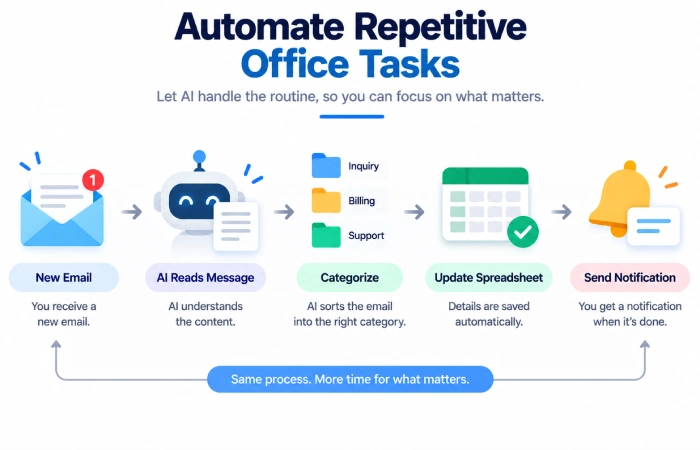
Automating something is an easy way of improving your office work.
Think about tasks occurring repeatedly.
For example:
Email Processing
Sort incoming messages, by subject or content.
Spreadsheet Updates
Translate information from forms, emails or CRM into a spreadsheet.
Task Creation
Use the system to generate a task automatically when a customer lodges a request.
Notifications
Notify a team when an action has happened.
Document Handling
Leverage AI to pre-process or categorize text before passing it through to other systems.
The aim is not to automate for the sake of automating.
Automate tasks that are repetitive, predictable andsimple to verify.
AI Marketing Automation Platform
One way AI can be applied to marketing processes is:
For example:
New lead→AI classifies lead→Add tag→Notify→Create a subsequently task
Other examples include:
- Content brief generator
- Lead categorization
- To make it easier for the readers, there must be drafts for the email. The writers can have the drafts completed before printing out so that they will be able to simply fill in their names, units, needs, and topics. If the draft is prepared, the amount of time to compose the email will be cut down, and it will be more convenient for the writers.
- Summaries of customer comments.
- Social content workflows.
- Campaign reporting
While AI reduces the work of sorting and writing, several key marketing decisions should also be checked by a human.
How to Choose a Free AI Automation Tool
Check out five things before you sign yourself up on a course.
1. Number of Tasks or Credits
Free plans come with restrictions.
Zapier currently offers 100 tasks/month and Make 1,000 credits/month.
These bounds can vanish quickly with frequent execution of the workflow.
2. Number of Steps
A trivial workflow can simply require two steps
It could be several actions, conditions, and AI actions.
Verify whether the free tier accommodates the exact workflow you want to implement.
3. App Integrations
Ensure the platform you‘re on accommodates the apps you use.
An amazing automation platform is of no good if it cannot integrate with the tools that are most important to you.
4. AI Features
Clarify precisely which AI functionalities are offered.
AI steps are available on some platforms, whereas on others different credits or paid plans or your own API account may be required.
5. Technical Requirements
Zapier and Make are more of a beginner-friendly option.
n8n provides more freedom but self-hosting does requires technical skills, server setup.
How to Build Your First AI Workflow
You can begin with a very basic process:
Step 1: Find a Repetitive Task
Find an activity that you do multiple times a week.
For example:
On receiving a customer enquiry, I will file the details away in a spreadsheet
Step 2: Identify the Trigger
Trigger – This is the action which fires the automation.
This could be:
- New email
- A new form of response:
- New row for spreadsheet
- New CRM lead
Step 3: Add the Action
What happens next is up to you:
For example:
New form response => Add row to spreadsheet
Step 4: Add AI When It Is Useful
Don‘t just throw AI in as a way to use AI.
Only use it if your workflow need to know about or produce data.
For example:
New email→ List of messages→ AI: summarise the message→ You save the summary
Step 5: Test the Workflow
Push through test data.
The workflow should not be switched on until the checks have been completed for every step.
Step 6: Monitor the Results
Occasional manual monitoring is still necessary
Keep an eye on broken connections, wrong AI output, and other dataerrors.
Benefits of Free AI Workflow Automation
Saves Time
By automating repetitive jobs, there can be less manual data input and routine tasks performed.
Fewer Manual Errors
When performing the same action automatically there is less possibility of forgetting one of the steps.
Easier Scaling
It is possible to continue to handle usual work while managing activity until capacity is exhausted.
Better Use of AI
The intelligence becomes more beneficial when integrated with a real process, rather than simply providing a chat facility.
Limitations of Free Automation Tools
While useful for small work streams and testing, free plans have a finite capacity.
You may encounter:
- Task or credit limits
- Less advanced features
- Limited AI usage
- Fewer users
- Limited premium inclusions
- Less storage time
- Technical implementation constraints
In addition,Zapier offers a FREE plan, where you‘re restricted to 100 monthly tasks and 2-step Zaps.
Free plan includes 1000 credits and unused credits expire at the end of the month.
N8n is fairly nice because the Community Edition that you self host won‘t cost you for any hosting subscriptions, but it is all your setup and infrastructure.
Simple Examples of AI Workflow Automation
Some practical illustrations:
Customer Support
Incoming support email, AI summarizes, assigns category, alerts support agent
Lead Management
New form→ AI checks lead type→Add CRM tag→New follow-up task
Content Workflow
New idea content → AI write brief for short period → Save in project system → Tell the writer
Meeting Follow-Up
transcript → AI summary → action items extraction → tasks
These are basic workflows. More complex workflows may string together multiple apps, with conditions, approvals and AI processing.
Workflow Automation Software Comparison
It is easy to set up which may suit people wanting to find the easiest way in.
Use Make if you prefer a more visual and flexible workflow.
N8n is the right fit if you prefer having the raw technical capabilities, APIs, coding, or hosting yourself.
There is no necessity to select the highest strength platform first.
Select the most basic tool available which will get the job done.
Final Thoughts
The optimal free AI workflow automation tools will depend on what you want to automate.
Zapier: a great first option for easy app connections. Make: great for visually creating multi-step workflows. n8n: excels when there is need for technical freedom/self-hosting.
Start small.
Identified a repetitive office process, developed a simple workflow, tested it thoroughly, then scale it up once the process is proven to reliable.
Free plans are usually enough to learn the basics and automate a few useful tasks. As your workflows become larger, compare task limits, AI usage, integrations, and pricing before moving to a paid plan.
This guide is part of our Best AI Workflow Automation Tools cluster. You can also explore AI workflow automation tools for small business, no-code AI workflow automation platforms, AI tools for automating repetitive tasks, and best AI automation tools for marketing.
