





AI Productivity Tools Updates: Latest Features, Tools and Trends for Better Work
AI productivity software is evolving at lightning speed. features that previously required the use of an additional AI program are now becoming inbuilt into email, documents, spreadsheets, calendars, meetings, project management tools and team communication software.
That means keeping up with AI productivity tools updates is no longer simply about finding the newest chatbot.
The more useful question is:
What has changed; (ii)/who does it benefit; (ii) /does it really make work easier?
Recent developments reveal where the market is trending. Google Workspace has already begun to roll out Gemini in Gmail, Drive, Docs, Slides and Chat with agentic powers that can operate across a range of services given relevant context.
Microsoft is consistently extending the Copilot features in its entire efficiency ecosystem and slack is embedding AI more and more directly into workplace chats, search, workflows and team collaboration.
For users, this means AI productivity is moving from simple question-and-answer tools toward systems that can understand context, assist with tasks and increasingly take actions.
This guide explains the major types of AI productivity updates, what they mean for everyday work, how to evaluate new tools and how to avoid adopting technology simply because it is new.
Table of Contents
What Are AI Productivity Tools?
AI productivity tools are computer-based tools, programs, or applications that utilize AI in order to augment productivity.
They can assist with:
- Writing& Editing (Editing and Revising).
- Research
- Meeting notes
- Data analysis
- Scheduling
- Presentations
- Task management
- Communication
- Search
- Automation
Some are independent applications.
Your other options are integrated into a program you already have.
The other category is increasingly important as well because AI can analyze data that is already present within the user‘s current workflow.
For instance, copying an email into a separate AI chatbot fails to consider a built-in assistant that could help compose the reply within the email application.
This may be the case for meetings, spreadsheets, accounts and other documents and team communication.
Why AI Productivity Tools Are Changing So Quickly
AI Models Are Becoming More Capable
Advanced AI systems are capable of processing bigger chunks of information and analyze complex data formats such as audio, video, text, images, files and many more.
Furthermore, this can allow traditional productivity tools to support more complex requests.
AI Is Moving Into Existing Software
Running AI within Applications Rather than having a number of different AI websites to open up, there are also more ways to run AI within applications.
This is made obvious by the roll-out of Google Workspace (formerly G Suite) announcements, with Gemini being implemented in Gmail, Drive, Docs, Slides and Chat.
Automation Is Becoming More Intelligent
The conventional automation is on a set of fixed rules.
Recent AI-like capabilities are able to generate insight, summarise information, sort it or classify it, Create content and in some cases choose the next sequence of events (workflow).
Software Companies Are Competing on AI
Major productivity platforms are continuously adding AI features.
This creates frequent product updates, new pricing structures and new capabilities.
As a result, an AI tool that was average six months ago may become much more useful after a major update.
Latest AI Productivity Tool Updates
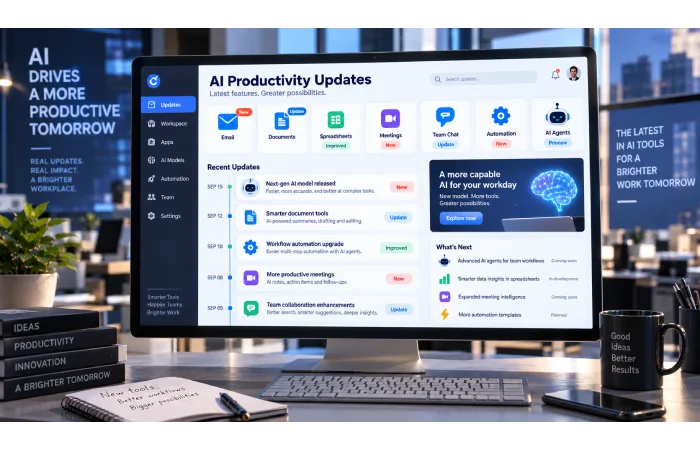
AI productivity updates generally fall into a few major categories.
New AI Productivity Tools
Completely new products continue to appear for specific productivity problems.
Examples include tools focused on:
- Meeting assistance
- Research
- Writing
- Planning
- Scheduling
- Data analysis
- Knowledge management
- Team collaboration
A new tool isn’t automatically better than an established one.
The important question is whether it solves a problem you actually have.
Next: Latest AI Productivity Tools
New Features in Existing Software
Some of the most important changes happen inside tools businesses already use.
For example, Microsoft continues to release new Copilot functionality across Microsoft 365. Its release notes show an ongoing stream of changes to how users can work with emails, documents, models and other productivity features.
Google has also introduced new Workspace capabilities covering file organisation, data analysis, presentations and cross-application work.
These updates can be especially valuable because users don’t necessarily need to learn an entirely new platform.
Next: New AI Productivity Features and Updates
AI Productivity Tools for Work
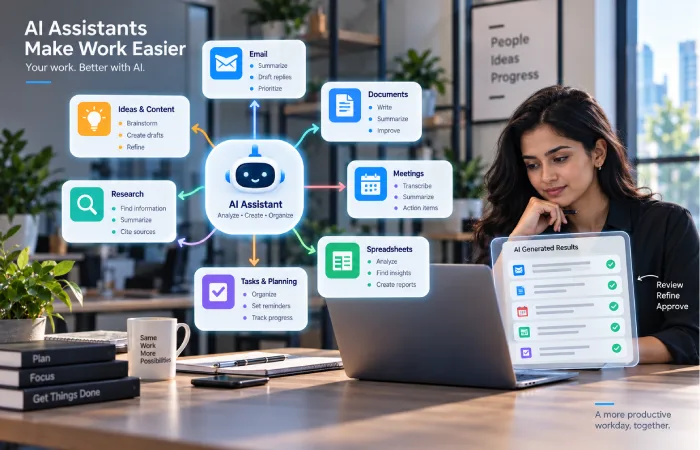
Workplace AI covers a wide range of everyday tasks.
Writing and Communication
AI can help draft:
- Emails
- Reports
- Proposals
- Documents
- Internal announcements
The benefit is usually speed rather than replacing the person responsible for the message.
Research
AI can help summarise information, compare documents and organise research.
This can reduce the time spent reading through large amounts of material.
Meetings
AI meeting assistants can capture notes, summarise conversations and identify action items.
That can reduce the need for someone to manually record everything discussed.
Data and Spreadsheets
AI can assist with:
- Formulas
- Data summaries
- Classification
- Pattern identification
- Analysis
- Report preparation
Planning
AI can help organise tasks, schedules and project information.
The best productivity use cases are generally those where AI removes repetitive preparation work while leaving important decisions to people.
Next: AI Productivity Tools for Work
AI Productivity Tools for Teams
AI for teams introduces additional considerations that don’t matter as much for individual users.
A team needs:
- Shared context
- Consistent information
- Permission controls
- Security
- Collaboration
- Administration
- Governance
An employee might use AI to summarise a conversation, but the system must only access information that the employee is authorised to see.
Google’s recent Workspace announcements show this movement toward AI working across email, files and conversations while respecting the sources selected by users or enabled by administrators.
Slack is following a similar direction. Its 2026 updates describe Slackbot as a context-aware AI agent and add connections across tools and workplace information.
This means the future of team productivity is increasingly about shared context, not just individual prompts.
Next: AI Productivity Tools for Teams
Free AI Productivity Tools
Free AI productivity tools are useful for people who want to experiment without immediately paying for another subscription.
They can be helpful for:
- Students
- Freelancers
- Small teams
- Individual professionals
- People testing AI for the first time
However, free access usually comes with limitations.
Common Free-Plan Restrictions
A free plan may limit:
- Number of prompts
- AI credits
- File uploads
- Model access
- Automations
- Integrations
- Storage
- History
- Advanced features
A tool can therefore be useful for testing but unsuitable for daily professional work.
Before recommending a free tool, check what the free plan actually includes.
Next: Free AI Productivity Tools
AI Assistants Are Becoming More Context-Aware
One of the biggest changes in productivity software is the move away from isolated AI conversations.
The older workflow often looked like:
Copy information → paste it into AI → get answer → copy result back
The newer approach is increasingly:
Ask inside your existing software → AI uses relevant context → result is generated where you work
Google announced in September 2026 that Gemini can perform more complex cross-application tasks across Gmail, Drive, Docs, Slides and Chat, using relevant files, emails and conversations as context.
This reduces the amount of manual preparation required from the user.
It also changes what users expect from AI productivity software.
People increasingly want an assistant that understands:
- What they are working on
- Which documents matter
- Which conversations are relevant
- What tasks are pending
- Which applications contain the needed information
From AI Assistants to AI Agents
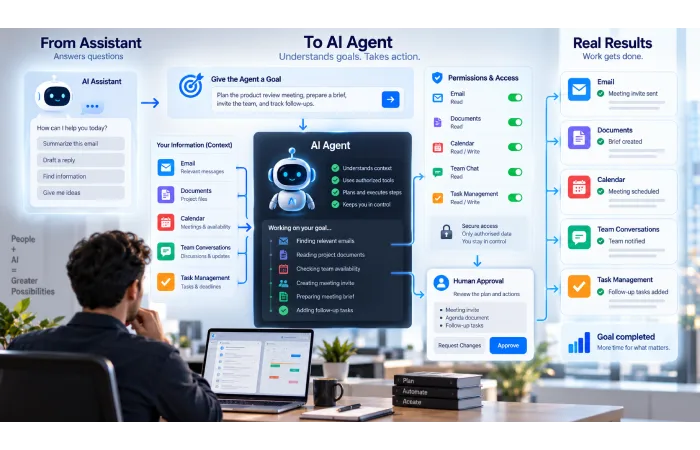
The next step is the growing use of AI agents.
AI Assistant
An assistant usually responds to a request.
For example:
Summarise these messages.
AI Agent
An agent can potentially complete several steps toward a goal.
For example:
Review project messages → identify outstanding tasks → create a task summary → draft follow-up messages.
The second approach can save more time because it reduces manual steps.
Google describes its newer Workspace capabilities as agentic because Gemini can orchestrate work across multiple applications.
Slack is also increasingly positioning Slackbot around agentic work, including access to organisational context and actions across connected systems.
However, greater autonomy creates greater responsibility.
Important considerations include:
Permissions: What can the agent access?
Approval: Which actions require human confirmation?
Security: Can sensitive information be exposed?
Monitoring: Can users see what happened?
Cost: How much does repeated agent activity consume?
AI Productivity Tools for Different Users
The best tool depends heavily on the user’s role.
Students
Useful areas include:
- Study planning
- Research
- Note summarisation
- Writing assistance
- Organisation
Freelancers
Useful features include:
- Client emails
- Proposals
- Research
- Scheduling
- Project planning
Managers
Managers may benefit from:
- Meeting summaries
- Project updates
- Reporting
- Team communication
- Planning
Knowledge Workers
Important categories include:
- Writing
- Research
- Data analysis
- Meetings
- Document management
Business Teams
Businesses need to add:
- Security
- Administration
- Governance
- Access control
- Integration
- Cost management
There is no universal “best AI productivity tool.”
The best choice is the one that fits the work being done.
How to Evaluate a New AI Productivity Update
Not every new feature deserves to be adopted.
Use a simple framework.
1. Identify the Problem
What specific problem does the update solve?
2. Check Frequency
How often does your team encounter that problem?
3. Estimate Time Saved
How much manual work does the feature remove?
4. Check Quality
Does the AI produce a result you can actually use?
5. Check Integration
Does it fit into your existing workflow?
6. Check Control
Can you review or correct the AI’s work?
7. Check Cost
Does it require a higher subscription or additional usage?
8. Check Security
What information must the AI access?
A useful feature should improve the complete workflow, not simply generate impressive demonstrations.
AI Productivity Tools Comparison
Comparing tools by the number of features can be misleading.
A better comparison is based on your actual needs.
| Factor | What to Check |
|---|---|
| Ease of use | Can users learn it quickly? |
| AI capability | Does it solve the specific task? |
| Integrations | Does it connect to existing software? |
| Context | Can it use relevant information? |
| Automation | Can it handle multiple steps? |
| Accuracy | How much correction is required? |
| Security | How is business data protected? |
| Cost | What is the complete cost? |
| Administration | Can usage and access be managed? |
| Reliability | Does it work consistently? |
A simple application that solves one important problem can be more valuable than a complex platform with dozens of unused features.
Next: AI Productivity Tools Comparison
Are AI Productivity Tools Actually Making People More Productive?
AI doesn’t automatically create productivity.
Sometimes it adds another layer of work.
Employees may need to:
- Correct inaccurate output
- Check facts
- Rewrite AI-generated text
- Learn several competing tools
- Fix automation errors
- Manage multiple subscriptions
That is why productivity should be measured across the complete process.
A useful calculation is:
Time saved − review time − correction time − tool cost
You can also track business outcomes such as:
- Faster customer responses
- Faster report creation
- Fewer manual tasks
- Shorter meeting follow-ups
- More completed work
- Better information access
The number of AI-generated outputs is not itself a productivity metric.
AI Productivity Tool Costs
AI software can use several pricing models.
Subscription Pricing
A monthly or annual fee may be charged per user.
Usage-Based Pricing
Costs may depend on:
- Tasks
- Credits
- AI generations
- API usage
- Automation runs
Premium AI Features
Some platforms reserve advanced models or agentic capabilities for higher-priced plans.
Enterprise Features
Businesses may pay more for:
- Administration
- Security
- Audit controls
- Higher usage
- Advanced integrations
The total cost matters more than the advertised starting price.
A tool that costs little for one person may become much more expensive when rolled out across a large team.
Privacy and Security
AI-based productivity systems could have access to sensitive information from the workplace.
This can include:
- Emails
- Customer data
- Documents
- Internal conversations
- Financial information
- Business plans
Before adopting a new AI tool, understand:
Data access: What information can it see?
Storage: Where is information stored?
Retention: How long is it kept?
Training: Is business data used to train models?
Permissions: Can administrators control access?
Auditing: Are organisations able to audit AI activity?
Google’s 2026 Workspace updates, for example, include administrator controls for agent access and data-loss-prevention policies, highlighting how AI productivity adoption is increasingly connected with governance.
How Often Should You Update Your AI Productivity Stack?
You shouldn’t replace software every time a new AI feature appears.
Frequent tool switching can create its own productivity problems.
Instead, review your stack periodically.
Ask These Questions
Does the new feature solve a real problem?
Does it improve an existing workflow?
Is the quality of the film good enough?
Does it reduce manual work?
Does it introduce security or privacy concerns?
If the answer is unclear, there may be no reason to switch immediately.
Common AI Productivity Mistakes
Chasing Every New Tool
New software isn’t automatically better software.
Using Too Many AI Applications
A fragmented workflow can become harder to manage.
Ignoring Existing AI Features
Your current software may already include useful AI capabilities.
Trusting AI Without Review
Re-reading is still particularly essential.
Measuring Activity Instead of Results
Generating more content does not necessarily mean becoming more productive.
Ignoring Costs
Count the number of subscriptions, the usage of AI, integrations, and the maintenance.
Giving AI Too Much Access
Use appropriate permissions and approval controls.
Keeping Weak Tools Because You’re Used to Them
The opposite mistake is refusing to change when a clearly better feature becomes available.
How to Keep Up With AI Productivity Updates
Since this is a category in flux, 26 develop a framework.
Follow Official Product Announcements
Official release notes and product announcements are usually the best place to confirm what has actually launched.
Google maintains Workspace product announcements, while Microsoft publishes Microsoft 365 Copilot release notes and Slack maintains its own “What’s New” updates.
Check Availability
A feature may be:
- In testing
- Rolling out gradually
- Available only in certain countries
- Limited to specific programs
- Controlled by an administrator
Test the Feature
Don’t assume a feature will work well simply because the announcement sounds impressive.
Measure the Result
See whether the update actually saves time or improves the quality of work.
This turns AI updates into useful business information rather than a constant stream of headlines.
Frequently Asked Questions
What are AI productivity tools?
A productivity tool is an application that uses AI to assist in anything from writing and research to meetings, data analysis, planning, communication and automation.
What are the latest AI productivity tools?
New tools constantly emerge, but many mature solutions, including Google Workspace, Microsoft 365 and Slack, are continuously introducing new AI features. The most valuable feature of all is not the most recent, but the one that best fits the user‘s workflow.
Are free AI productivity tools good enough?
Useful for testing, experimenting and light personal use. However if you are a professional user, paid plans are more suitable as free plans tend to limit usage, models, integrations or capabilities.
Are AI productivity tools useful for teams?
Indeed, with AI embedded into it all, communication, documents, search, meetings, and business processes. Security & Permissions along with Governance is something that Teams should focus on.
What is the difference between an AI assistant and an AI agent?
An assistant typically responds to requests. An agent A1 may perform several steps toward a goal and possibly utilize connected tools A2 within the scope of permissions
Should I replace my existing productivity software because of AI?
No, perhaps not. Check first to see if your current applications have incorporated the AI features you require.
How can I tell whether an AI productivity update is useful?
Look at the problem it solves, time saved, quality, integration, security and total cost.
Can AI productivity tools replace employees?
They only enhance some elements of some workflows they cannot replace the human components: judgement, communication, creativity, accountability and industry expertise.
Final Thoughts
AI productivity software is transitioning rapidly out of simple utilities toward more integrated and agentic, context-aware applications.
Google is is deploying Gemini throughout Workspace and allowing in advanced cross-application work.
Microsoft continues to expand Copilot across its productivity ecosystem, while Slack is integrating AI more deeply into workplace communication, search and workflows.
For users, the most important question isn‘t:
Best recently used AI application tool?
It is:
“What has changed that can genuinely improve the way I work?”
The strongest productivity tools should reduce repetitive work, improve access to information, support better collaboration and help people spend more time on higher-value tasks.
Meanwhile, AIs must be taken very rationally.
Check the quality.
Review important outputs.
Understand the pricing.
As a safeguard.
Control permissions.
Measure the actual results.
The best AI productivity strategy is therefore not to use the largest number of AI tools.
It is to use the right tools in the right places.
For deeper coverage, explore our guides on latest AI productivity tools, new AI productivity features and updates, AI productivity tools for work, AI productivity tools for teams, free AI productivity tools, and AI productivity tools comparison.
