





Introduction – Latest AI Productivity Tools in 2026
AI productivity tools are evolving rapidly. As new capabilities emerge, existing applications are being redesigned, updated models are being integrated, and automation features are being added to the applications people are already using to do their jobs.
The most notable evolution in 2026 is that AI needs to do more than chat and content creation. Better tools now process documents, calls, meetings, spreadsheets, business data, and integrated applications. Some can complete many steps in a task without a prompt for each one, while others can generate pictures.
This makes it more difficult to determine which new AI products are actually worth testing.
The most number of features in the current AI productivity tools do not mean their usefulness. The ones you find most useful are the ones which can tinker well with your existing ways of work.
Table of Contents
What Are AI Productivity Tools?
Define working with AI productivity tools. These use AI techniques to perform or enhance regular work.
They can assist with:
- The writer and editor of this document is:.
- Research
- Meetings and notes We can help you meet and take notes; whether it is for research, teaching, or other academic activities, we can help you conceive, record and share the notes and ideas.
- Task management
- Data analysis
- Presentations
- Coding
- Workflow automation
- Team collaboration
There are some that are still dektop applications and others embedded into a piece of software such as a word processing package, email package, spreadsheet or team working package.
The move into built in AI is one of the most obvious trends I see in today’s market. Google has announced new Gemini functionalities in September 2026 to run Gmail, Drive, Docs, Slides and Chat to enable users to do more complex. tasks without constantly switching between applications.
What Is New in AI Productivity Tools This Month?
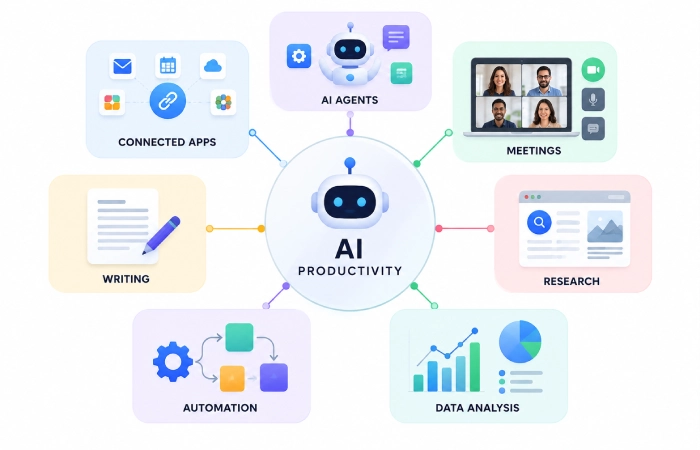
The latest updates point toward a common direction: AI is becoming more connected to actual work.
Instead of simply generating an answer, newer systems can use information from the user’s workspace, analyze data, create files, and assist with multi-step workflows.
More Connected AI
Google’s latest Workspace updates allow Gemini to use relevant files, emails, and conversations as context and coordinate work across applications such as Gmail, Drive, Docs, Sheets, Slides, and Chat.
OpenAI has taken a similar approach. Its current ChatGPT Work tools can work across connected applications and files, while the new Data capability can analyze connected business data and create interactive dashboards and reports.
This is an important change because productivity improves when AI can work with the information already used by the business.
Latest AI Productivity Tools to Watch
ChatGPT for Work and Business Tasks
ChatGPT is growing from a general AI assistant and entering a systemic work workspace.
Existing business-oriented capabilities consist of connected files and apps, comprehensive research, scheduled work, and business data analysis tools. OpenAI has also rolled out ChatGPT Work for longer tasks which: research info, work with connected files and generate docs, sheets, ppt, and reports.
The newer Data feature is really beneficial for teams that often use business figures. It is capable of probing for variations in linked data and generates interactive reports by a conversation in plain speech.
Google Gemini for Workspace
Gemini is still heading further into Google Workspace.
The September 2026 updates incorporated agentic abilities that can function across Gmail, Drive, Docs, Slides, and Chat. According to Google, Gemini is able to manage intricate tasks leveraging pertinent workspace context and generating formatt ed documents, organized spreadsheets, and presentations.
For individuals who already spend most of their time in Google Workspace, these sort of integrations may be more valuable than simply installing a new AI app.
Microsoft Copilot
Microsoft‘s approach to productivity is the same: embed AI into the apps that employees are already using.
Copilot can also assist tasks throughout MS 365APPS like Word, Excel, Power Point, Outlook and Teams. Therefore it will help for various things such as writing documents, researching info, creating presentations and dealing with comms.
For businesses already using Microsoft 365, integrated AI can reduce the need to move information between separate tools.
AI Tools for Different Productivity Tasks
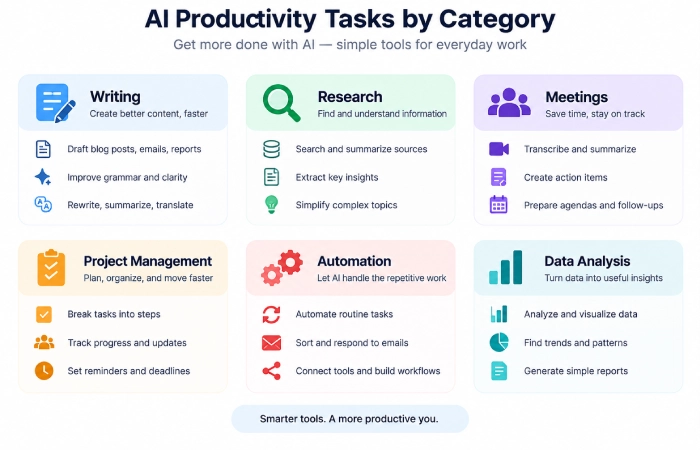
Which is the best AI productivity tool for you will vary by job.
Writing and Editing
General AI assistants can help with:
- Drafting emails
- Editing documents
- Rewriting content
- Summarizing information
- Creating outlines
Designated writing tools however may still be appropriate if tone, grammar or editorial control is the primary concern.
Research
Tools used for researching about AI can assist in searching for knowledge, summarizing sources, contrasting the ideas, and compiling the information.
In such times they prove to be particularly helpful as that is when research is naturally dependent on many sources rather than one quick search.
If lost, use the following to check important facts prior to quoting them:
Meetings
AI meeting assistants should be able to record calls, generate summaries, recognize action items, and make key discussion points easier to access after the meeting.
This is useful for sales calls, project meetings, interviews and internal conversations.
Project Management
Features of AI project-management can summarize the tasks, determine priorities, develop plans and surface project information.
The primary advantage is that it minimizes the effort required to update the project using manual means.
Automation
Automation tools are becoming more like intelligent workflows.
AI may instead allow incoming data to be processed before the AI makes a decision as to what should be done next rather than an easy fixed trigger.
For example:
Email clicked →AI infer the request→ data classified→ task generated→ notified employee
Platforms like Zapier and other automation solutions are now merging workflows with AI.
Data Analysis
Data analysis has also been identified as yet another major category of artificial intelligence productivity.
Instead of writing all the reports yourself, you are allowed to ask questions in natural language and the AI will assist in trends detection, compile a summary of what has changed, or even generate graphical reports.
Another offshoot of this is OpenAI‘s September 2026 Data agent which enables business data connected to it to be asked about in natural language.
How to Choose the Latest AI Productivity Tool
New tools are alluring, but the latest tool isn‘t necessarily the greatest.
Before switching, consider:
Does It Solve a Real Problem?
Begin the activity that is making you fall behind.
Does It Fit Your Existing Workflow?
It‘s easier to adopt a tool that integrates with your existing email, documents, calendar, or project system.
Does It Reduce Work?
Identify drops in the level of effort required to perform the task, e.g., time saved, manual steps eliminated, etc.
Is the AI Reliable Enough?
Information written by AI can still be inaccurate. Significant pieces of work must be checked by humans.
What Happens to Your Data?
Verify privacy, permissions, data management, and administration settings prior to integration of company data.
Should You Keep Trying New AI Tools?
Not necessarily.
AI productivity tools are evolving at such an incredible pace that the perpetually changing software can be disruptive to productivity.
A smarter way is to stick with a handful of proven tools and examine new ones only if they address a problem your existing tools don‘t handle well.
This is not the aim to gather AI tools but to develop a working workflow.
Common Mistakes
A few common mistakes made by American students include: adopting new AI productivity tools include:
- Switching tools too often
- Paying for overlapping subscriptions
- Choosing features over actual usefulness
- Connecting sensitive data without checking controls
- Trusting AI results without review
- Automating processes that are already poorly designed
More AI does not automatically mean more productivity.
FAQs
What are the latest AI productivity tools in 2026?
In today‘s productivity space we see AI helpers like ChatGPT, Gemini and Microsoft Copilot, as well as best of breed tools dedicated to meetings, writing, projects, research, data-analyzing, and automation.
What is the biggest trend in AI productivity tools?
One trend is that of connected and agentic AI, which can utilize the working context to be helpful in completing multi-step tasks rather than only produce single responses.
Are new AI productivity tools worth trying?
Only after they solve an actual problem or offer a obvious superiority when compared to the tools which are already at your disposal.
Should businesses use multiple AI productivity tools?
Sure, but a bloated set of overlapping tools can introduce needless complexity and expense. A leaner, more integrated set of tools may be less of a management headache.
Final Thoughts
The newest ai productivity assistant is getting more and more close to the work that people actually do.
AI is being integrated into email, documents, spreadsheets, meetings, project management, business information, and every other business system. Google and OpenAI‘s recent announcements are an indication of the pace of change.
Users should not pursue each new release as the best strategy.
Selected tools according to the type of work you want to be more effective. Focus on one aspect of your work, measure your performance, and retain what truly enhances your productivity.
