
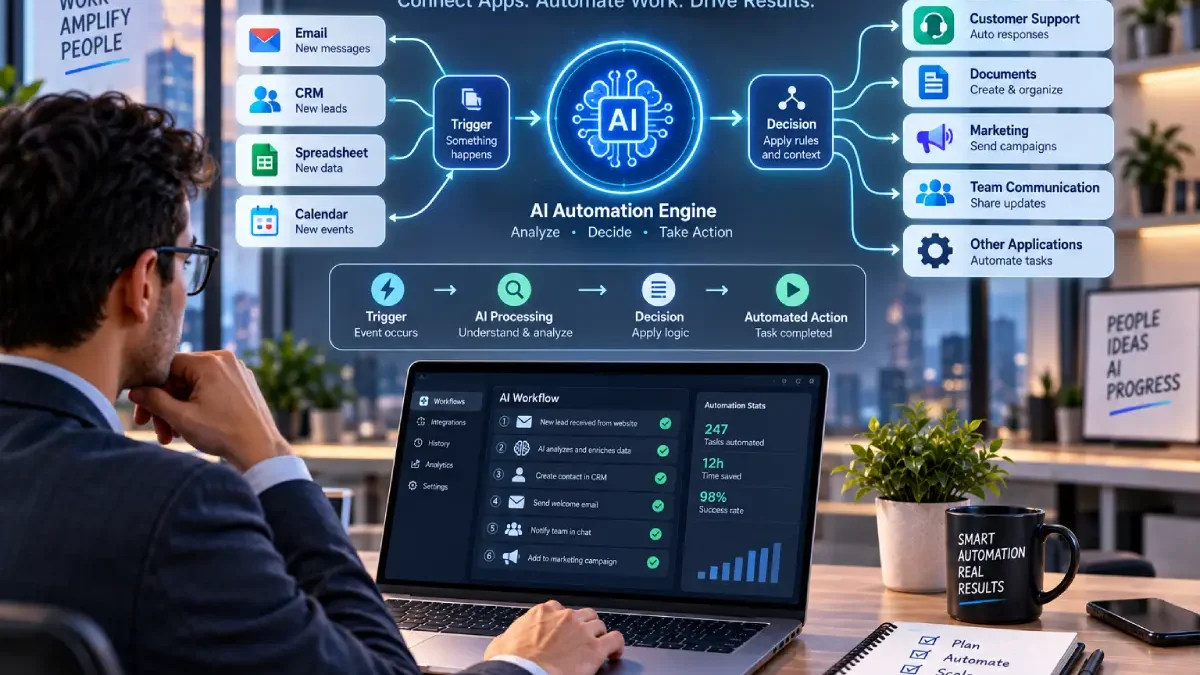

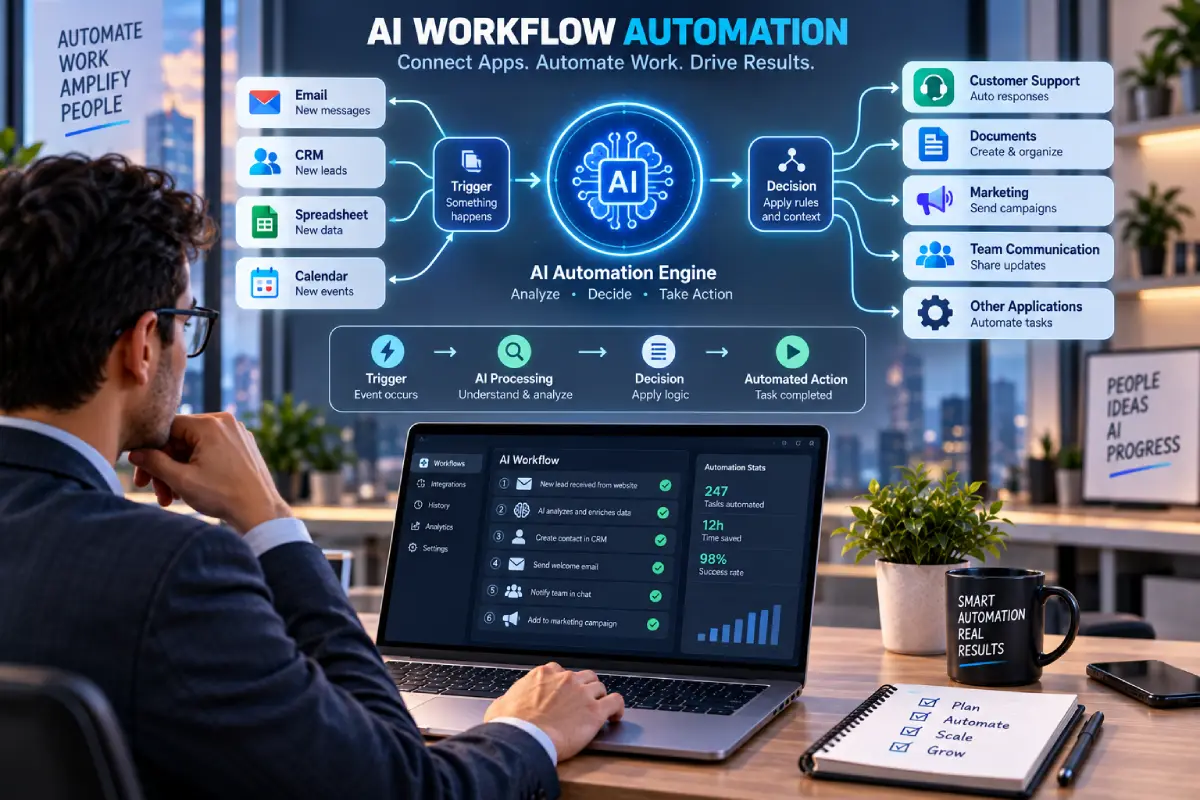


Best AI Workflow Automation Tools for Automating Work and Business Processes
A lot of companies spend hours moving info from one application to another, responding to the same email messages over and over, updating spreadsheets, managing leads, preparing reports, following up with clients and prospects, and doing all the other drudgery.
Automating the AI Process: This can help remove much of the manual work involved by integrating applications together and by augmenting it with artificial intelligence.
Traditional automation usually follows predefined rules. For example:
When a customer has completed a form→ add the contact to a spread sheet→ send an email.
AI-driven automation can be even more advanced.
The workflow is to accept unorganised data, utilise AI to categorise or summarise it, arrive at a decision and pass the output onto another system.
A simple example is:
New enquiry → AI receives the enquiry → determine the customer‘s demand, set the priority, update the CRM, notify the right employee.
Hence, AI workflow automation benefits business who seek time-saving as part of their operational process rather than fussing around with every individual task.
But which is the best automation platform? It ultimately depends on the apps that you use, the complexity of your workflow, the cost, your technical prowess, your security concerns, and the amount of control you‘d like to have.
Table of Contents
What Is AI Workflow Automation?
AI workflow automation is the combination of AI and traditional work flow automation.
A traditional workflow generally follows known rules:
The flow is:Trigger (initiate request) Action (Begin Task) Action (Identify Coworkers) Result ( Recognize Coworker)
AI automation can add an intelligent step:
Trigger → The AI uses the information gathered to decide on an action to take → Action → Result.
For example, an email workflow could:
- Identify a new customer email.
- Readthe message.
- Identify whether it is a sales enquiry, support request or complaint?
- Choose a category.
- Send to the system where it is relevant.
- Notify someone during a human event when to (for example, stop)
This becomes very helpful if the new data source doesn‘t follow any standards.
What Is the Difference Between Automation and AI Automation?
The main distinction lies in decision management.
Traditional Automation
Conventional automations require explicit rules.
Example:
If invoice received then save attachment in to a folder.
AI-Powered Automation
Automation with AI is relevant if the process flow relies on understanding of data.
Example:
Open the invoice, understand the supplier, read the amount, put it in the right box and send it to the right accounting workflow.
The AI isn‘t necessarily replacing the workflow.
Instead of the process, it is part of the process.
How AI Workflow Automation Works
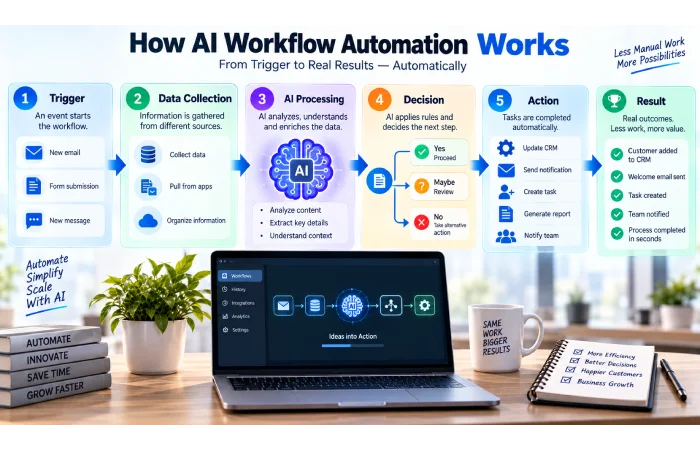
The most automation systems share common structures.
1. Trigger
Something initiates the process.
Examples:
- New email
- Form submission
- New row of a spreadsheet
- Calendar event
- New CRM lead
- Customer support ticket. I‘m definitely not, now. Calling a customer support number is what I think of as selling myself; not a good thing!
- Uploaded document
2. Data Collection
The automation captures data from one or more applications.
3. AI Processing
An AI model can:
- Classify information
- Summarise text
- Extract data
- Generate content
- Detect intent
- Identify patterns
- Make suggestion.
4. Decision
The workflow dictates what the next step should be.
5. Action
The system now does something in some other application.
Examples:
- Send email
- Update CRM
- Design a task
- Send Slack or Teams notification
- Insert row into spreadsheet
- Compile a document
- Create a support ticket
6. Human Review
If the action is either “significant” or is to be made in a sensitive manner, the workflow can stop, and ask the user for validation.
This is more so for financial, legal, customer-service or externally visible processes.
Best AI Workflow Automation Tools: What to Look For
No single platform is ‘the best’.
Do not: Compare tools by making generalizations about them.
App Integrations
Verify if the platform integrates with the applications you‘re already using.
Ease of Use
No-code visual builders enables non-programmers.
AI Capabilities
Consider whether the platform can categorize, summarize, extract, generate, reason, or operate AI agents.
Workflow Complexity
The basic needs of two-step processes differ from massive, multi-stage business operations.
Scalability
Verify if the platform can accommodate growing task volumes and increasingly complex workflows.
Cost
Examine the costs associated with subscriptions as well as those incurred through usage.
Credits, operations, tasks, tokens, or whatever units are applicable, are used up during AI workflows.
Security and Governance
Businesses should consider:
- Access controls
- Data handling
- Credentials
- Audit logs
- Permissions
- Human approval
- Compliance requirements
Monitoring
An automatized workflow still require tracking (monitoring).
Check for execution logs, execution history, notifications and retry mechanisms for failed steps.
Best Free AI Workflow Automation Tools
You may be able to benefit from a free plan while starting out with automation or while testing small workflows.
However, free access often comes with limits such as:
- Workflow run count.
- (1) Count of connected steps.
- AI usage
- Work or operation
- Execution frequency
- Premium integrations
- Team features
Don‘t pick a platform just because they offer a free plan.
Verify that free tier would allow you to do what you actually intend to build.
The best free AI workflow automation tool cluster on the road-map concentrates solely on the above mentioned topic and should include the tool-by-tool breakdown
Next: Best Free AI Workflow Automation Tools
AI Workflow Automation for Small Businesses
Small businesses frequently employ only a few people, so duplicated work is particularly costly in terms of time.
AI automation can help with areas such as:
- Lead management
- Customer enquiries
- Email processing
- Appointment scheduling
- Document processing
- Invoicing workflows
- Marketing
- Reporting
- Internal administration
For example:
Enquiry through website, then the leads are categorized by the AI. update to the CRM, notifications of the leads are sent out to sales, creating a task to follow up.
More often than not, the most automated process is not the most complex.
Start with a process that:
- Happens frequently
- Takes reasonable time in the processing.
- Did have a predictable result
- Utilizes digital data
- No longer needs human judgment.
Next: AI Workflow Automation Tools for Small Business
No-Code AI Workflow Automation
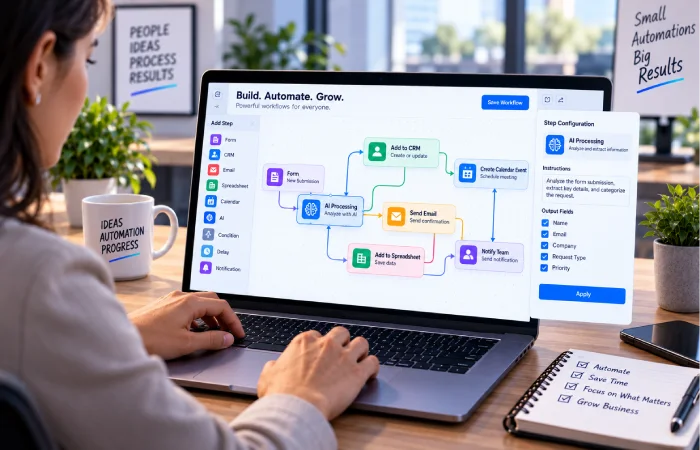
No-code tools use visual development platforms and enable users to create automated processes without any writing of code.
This can make automation accessible to:
- Business owners
- Marketers
- Operations teams
- Administrative staff
- Entrepreneurs
- Non-technical employees
A typical no-code workflow might look like:
Format → classification via AI → CRM → E-mail → Task
Most platforms offer drag-and-drop builders, templates, connectors, and natural-language interfaces.
For example, the Microsoft Power Automate combines Cloud Flow, desktop automation, process mining, AI features and workflow creation aided by Copilot. Microsoft explains that Copilot is designed to empower users in creating and managing automation via natural language.
It must be stated clearly that it is incorrect to suggest that no-code involves no technical issues.
You still need to understand:
- Data fields
- Permissions
- Authentication
- Error handling
- Workflow logic
- AI instructions
- Costs
- Security
Next: No-Code AI Workflow Automation Platforms
AI Tools for Automating Repetitive Tasks
One of the most readily accessible areas to start with automation is the office.
Examples include:
Email Processing
AI can categorize inbound emails and send them to the relevant workflow.
Data Entry
Data can be pulled from a form, document or email and into another application.
Meeting Follow-Ups
It can also take notes or meeting transcripts, summarize them, and produce tasks for future action.
Document Processing
AI is used to pull data from invoices, applications, forms, or similar documents.
Reporting
Workflow can retrieve data from a number of systems, then compile a report.
Lead Management
AI can categorise the enquiries, find interesting prospect and send information to a CRM.
The important question is not:
Is this something that can be automated?
Instead ask:
“Is this function automated?”
Tasks that are both high volume, repetitive and low risk tend to be better candidates than complex decisions that require expert knowledge.
Next: AI Tools for Automating Repetitive Tasks
AI Workflow Automation for Marketing
Marketing departments often have a large set of repeating processes.
AI automation can support:
- Lead capture
- Email campaigns
- Content workflows
- Customer segmentation
- Campaign reporting
- Processes within the social media landscape
- CRM updates
- Follow-up sequences
For example:
New lead generated > AI interprets enquiry > Lead segmented > CRM updated > Individual follow-up is drafted > salesperson is alerted
Another workflow might be:
Results obtained during campaign -> results analysed by AI -> report created -> team informed
Maintain the involvement of humans in significant decisions is the answer.
While the AI can be capable of generating the suggestions or a draft, still, a human may be required to authorize the ad copy, confidential customer emails or key campaign strategy.
Next: Best AI Automation Tools for Marketing
AI Agents vs Traditional Workflow Automation
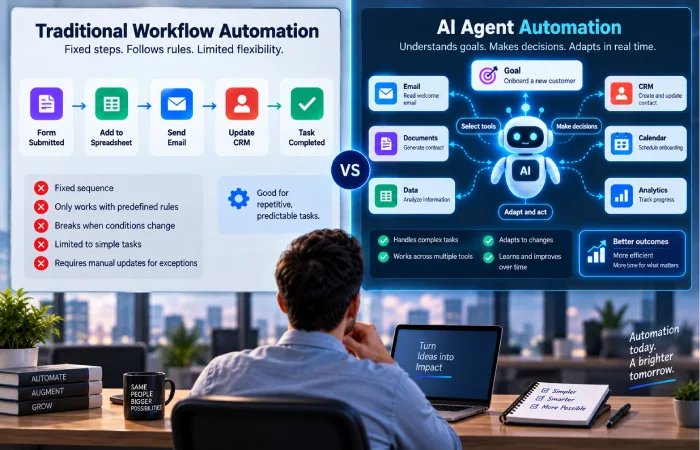
A new trend within automation is Artificial Intelligence agents
In essence, a typical process workflow is sequential.
The AI agent has the ability to understand a goal, utilize available tools, and modify its behavior according to the information presented to it.
For example:
Traditional workflow:
New support ticket –> assigned to Team A.
Agent-assisted workflow:
Read ticket Diagnose customer problem Find in approved knowledge Find appropriate path Update ticket escalate when not confident.
The third method gives us more flexibility, at the risk of having more uncertainty.
That means agent-based automation needs stronger controls around:
- Permissions
- Data access
- Approved tools
- Human approval
- Failure handling
- Monitoring
- Cost
Make‘s AI Agents current product is integrated into its visual workflow environment and the AI agents can consume and interact with tools, be responsive during workflows while making decision visibility possible as well as workflow transparency.
The AI-agent and Copilot functions are being incorporated into Power Automate too, for example Microsoft is working on building connections between cloud flows, desktop flows, and agents.
When Should You Use an AI Agent?
There are some workflows that do not require an agent.
A traditional workflow is often better when:
- The steps are unsurprising:
- Very little variation is seen in the rules
- It has straightforward inputs and outputs
- It is not riskering.
An AI-powered workflow can be useful when:
- Data inputted in this is noisy.
- Have to interpret text How do we interpret text?
- Classsification needed
- This is to have a need to create content
- Context-dependent decisions
An AI agent becomes more appropriate when the system needs to:
- Choose from varied implements
- Adjust to various situations}
- Consider the possibilities of multiple ways to approach this.
- Manually do more volatile jobs
Choose the least complicated system required to resolve the issue.
Examples of AI Workflow Automation
Let‘s provide some tangible examples in business areas:
Customer Service
Customer message >AI classification >FAQ or knowledge search >response draft >human approval
Sales
New enquiry > AI lead qualification > CRM update > notification to sales > follow-up task
Finance
Invoice received→ data extracted → category assigned → accounting processes→ approval
Human Resources
Receiving the Application -> extracting information -> assigning candidate category -> notifying the recruiter
Operations
Captured on a daily basis→by AI summarized→exceptions established→notifed to a manager
Marketing
Campaigns results ( collected data (processed through the AI( summary is produced (then report is sent out9
The specific business process rather than the technology should define the actual workflow.
AI Automation Should Not Replace Every Human Decision
Automation is most helpful when it eliminates redundant manual labor.
Risky it can be when making crucial decisions with no proper supervision.
Be especially careful when workflows involve:
- Financial transactions
- Legal decisions
- Employment decisions
- Sensitive customer data
- Security incidents
- Medical information
- Public-facing communications
A practical model is:
AI prepared/drafted -> Human reviewed -> System executed
The last step can be gradually automated with increased confidence and reliability for low risk applications.
Costs of AI Workflow Automation
Automation costs can come from several sources:
Platform Subscription
There is likely to be a fee, monthly or yearly, associated with this automation service.
Usage
Some may be task, workflow execution, action, or activity based, then
AI Usage
AI models have additional usage fees associated with them.
Premium Integrations
Some connectors or enterprise integrations may have a premium plan.
Maintenance
A workflow may need updates when:
- APIs change
- Applications change
- Authentication expires
- The business rules themselves do not remain static
- AI models evolve.
Let‘s take an example of Power Automate‘s existing price points, which unlike other automation tools flatly distinguish between user-based premium automation and process & hosted-process, exemplifying the need to judge a pricing based on the size & nature of the automation rather than solely on the entrylevel subscription.
How to Choose the Right AI Automation Platform
Before choosing a tool, answer these questions:
1. Which applications must it connect to?
List out your current applications.
2. How complex is the workflow?
A straightforward trigger and action workflow will require less capabilities than a multi-step process.
3. Do you need no-code?
Visual builders. Such teams may not have the technical capability to utilize builders.
4. Do you need AI agents?
Don‘t pay (in both money and time) for advanced agent abilities if the regular automation has already done the work.
5. How much data will you process?
Estimate the number of runs for workflow and use of AI.
6. Is the data sensitive?
Evaluate security, permissions, retention, and governance.
7. Who will maintain the workflow?
Automation has to have an owner.
8. What happens when something fails?
Verify if the platform has error handling, logs, retries, and alarms in place.
Common AI Workflow Automation Mistakes
Automating a Bad Process
The automation may merely speed up a bad process.
Just do it! ‘Fix first, process second. That‘s my model, and I try to help companies recognize the…
Using AI Where Rules Are Enough
Avoid an intelligent AI model for a simple condition that should be reliably implemented with normal automation.
Giving AI Too Much Authority
Restrict what a system or AI has the ability to access and modify.
Ignoring Errors
Monitoring and handling failure for each automation workflow.
Forgetting Costs
It is clearly not unknown for the workflow that is cheap for 100 runs a month now may be rapidly costing a forth-and onwards of the equivalent.
No Human Review
For sensitive or high-impact decisions, require human permission.
Building Unnecessarily Complex Workflows
Begin modestly, and then add on after confirming that the automation functions.
Frequently Asked Questions
What is an AI workflow automation tool?
It‘s a piece of software enabling applications to communicate and carry out many-step processes through employing AI to understand data, generate text, categorize information, or support decisions.
Are AI workflow automation tools difficult to use?
Almost all no-code or low-code visual builders are available on most marketplaces. Basic automation can be done by non-technical users, but more complex workflows always require some technical skills to build.
What are the best AI workflow automation tools?
The key to choosing the right tool is to know your workflow. Many popular types of platforms exist like all-purpose automation platforms, Microsoft specific automation, visual automation, developer focused platforms, and AI-agent platforms.
Can small businesses use AI workflow automation?
Yes. Small businesses can use automation for lead management, customer support, document handling, marketing, reporting, scheduling, and the like.
Are AI automation tools expensive?
Costs. Some platforms have free offerings or trial periods, but more complex workflows are charged on a subscription, usage, AI, connector, and maintenance basis.
Do I need coding skills?
Not necessarily. Many of the platforms offer no-code/low-code automation capabilities, although coding is helpful when dealing with APIs, bespoke integrations, complex logic, and more sophisticated workflows.
What is the difference between AI automation and AI agents?
Usually, AI automation adds AI capability to some pre-defined task. AI agents could have greater flexibility in understanding tasks, selecting tools and deciding the action.
Is AI workflow automation safe?
It can be, but security will depend on how the workflow is implemented what data the workflow accesses, what privileges it has, and how the data it retrieves is watched.
A Simple AI Automation Strategy for Beginners
If you are not an expert in workflow automation, then do not automate the entire company.
Use this process:
Step 1: Find a Repetitive Task
Select an event that occurs frequently.
Step 2: Document the Current Process
List every single step.
Step 3: Remove Unnecessary Steps
Simplify before you automate.
Step 4: Automate the Predictable Parts
Use the default workflow rules initially.
Step 5: Add AI Where It Helps
Apply AI to tasks such as classification, summarisation, extraction or generation.
Step 6: Add Human Approval
Leverage the ‘approval’ to make more sensitive decisions.
Step 7: Monitor the Results
Check success rate, errors, time and costs saved.
Step 8: Expand Gradually
Once the workflow you have built is dependable then automate the subsequent process.
Best AI Workflow Automation Tools: Final Advice
The most effective AI workflow automation tool isn‘t necessarily the one with the most integrations or the latest AI features.
The one that suits your working practice the best.
For straightforward applications, conventional automation can be adequate.
In addition to the ordered data AI can also make helpful interpretation.
For more complicated and non-fixed procedures AI agents will offer increased flexibility, but are more difficult to control and monitor.
These platforms such as Make, Microsoft Power Automate, bring visual automation, along with agent-oriented and AI functionality, showing the business automation path.
For beginners, the safest strategy is simple:
Begin with one iterative problem.
Construct the minimal functional workflow.
Record the value.
Introduce AI only when it is really beneficial.
Then continue to build on.
Automating an AI workflow saves time, eliminate the need to repeat boring tasks, and improve your team‘s efficiency. But when you automate an AI workflow, you don‘t need to turn over every decision to the AI.
It‘s about putting all those together where it makes sense. Which mean merging automation with the cleverness of AI with human judgements.
More help is available see our tutorials on best free AI workflow automation tools, AI workflow automation tools for small business, no-code AI workflow automation platforms, AI tools for automating repetitive tasks, AI automation tools for marketing, and AI workflow automation software comparisons.
