


How to check for software updates on windows
In 2026, keeping your PC is no longer optional. If you are seeking enhanced security, faster operational speeds, the latest features, and fewer issues with your applications, then knowing how to check for Windows updates is one of the most essential skills to acquire. Sounds simple? Think again. It applies to Windows 11 or before.
The full Windows Software Update Guide to help novices like you understand how to check Windows updates and the updates of your applications, how to update your drivers, how to fix failed updates, what the best Windows software updater tools are, and much more.
Table of Contents
What are Software Updates on Windows?
Software updates are enhancements made by Microsoft or application builders that correct problems, strengthen security, include features, and improve functionality.
On a Windows PC, updates usually fall into four categories:
| Update Type | Purpose | Example |
| Windows System Updates | Security patches and OS improvements | Windows 11 25H2 |
| App Updates | Updates for installed applications | Chrome, VLC, Zoom |
| Driver Updates | Hardware compatibility improvements | NVIDIA GPU drivers |
| Firmware Updates | Device-level performance fixes | BIOS updates |
Many Windows users are under the impression that this tool is only a Windows update facility, but in the latest generation of Microsoft Windows PCs, this is what Windows Update also offers:
- Microsoft Store apps
- Security intelligence updates
- Driver updates
- Optional feature packs
Why Keeping Windows Updated Matters in 2026
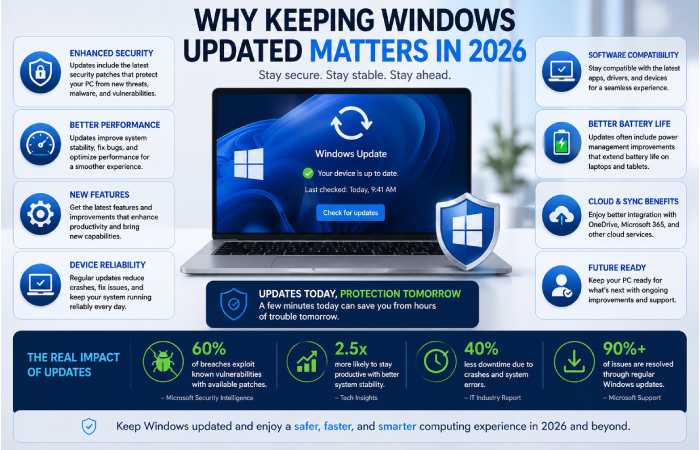
Cybersecurity attacks grow every year. Previous generations are the most vulnerable to ransomware, malware, and exfiltration.
According to Microsoft’s new report on security, most successful malware attack occur on systems with:
- outdated Windows versions,
- unsupported apps,
- or old drivers.
Key Reasons to Update Your PC
Security Protection
Updates patches made to close holes before a hacker spots them.
Better Performance
New updates make the consumption of RAM, the activity of the SSD, and the boot time more efficient.
New Features
Windows 11 updates now include:
- AI-assisted search,
- Copilot improvements,
- battery optimization,
- better gaming performance.
Driver Compatibility
Some new apps and games may not run properly on the older drivers.
Bug Fixes
Updates solve:
- crashes,
- Wi-Fi problems,
- Bluetooth issues,
- freezing,
- audio glitches.
The Updated Situation of Windows 10 and Windows 11 in 2026
| Feature | Windows 10 | Windows 11 |
| Support Status | Limited support | Fully supported |
| AI Features | Minimal | Advanced Copilot integration |
| Security Model | Older | Modern secured-core architecture |
| Update Speed | Slower | Faster cumulative updates |
| Future Features | Limited | Priority platform |
Those with Windows 10 still should really upgrade, as Microsoft has moved to Windows 11 development.
On how to find updates software in Windows 11
Updating Windows 11 is easy, just check for updates.
Step-by-Step Guide
Step 1: Open Settings
Press:
Windows + I
This opens Windows Settings.
Step 2: Open Windows Update
From the left sidebar:
- Click Windows Update
Step 3: Select “Check for Updates”
Windows will now:
- search Microsoft servers,
- detect available updates,
- and start downloading automatically.
Step 4: Install Updates
Depending on the update:
- Installation could take a few minutes,
- or require a restart.
Step 5: Restart Your PC
Some software updates will only take effect when rebooting.
Checking for Software Updates in Windows 10
The procedure should be noted that on Windows 10 it is the same.
Steps
- Open Settings
- Go to:
- Update & Security
- Click:
- Windows Update
- Press:
- Check for updates
Windows 10 will download:
- cumulative updates,
- security patches,
- optional drivers.
How to Update Windows Apps
The inconvenience is that many users forget that apps also have to be updated.
Outdated apps can:
- crash,
- slow down your PC,
- expose security vulnerabilities.
Update Microsoft Store Apps
Step 1
Open:
Microsoft Store
Step 2
Click your profile icon.
Step 3
Choose:
Downloads and Updates
Step 4
Click:
Get Updates
All Microsoft Store Apps will be installed update automatically.
How to Update Third-Party Software
Programs like:
- Chrome,
- Discord,
- Zoom,
- VLC,
- Steam
usually update automatically.
But you can manually check updates from each app’s:
- Settings,
- About section,
- or Help menu.
Best Windows Software Updater Tools (2026)
If you have lots of apps, a stand alone updater for Windows software will save you time.
Comparison Table
| Tool | Free Version | Automatic Updates | Best For | Difficulty |
| Patch My PC | Yes | Yes | Beginners | Easy |
| Ninite | Yes | Partial | Clean installs | Easy |
| Winget | Yes | Yes | Power users | Medium |
| Chocolatey | Yes | Yes | Developers | Advanced |
| IObit Software Updater | Yes | Yes | Casual users | Easy |
Patch My PC
Pros
- Lightweight
- Very beginner-friendly
- Updates many apps automatically
- Safe reputation
Cons
- Limited advanced features
Best for:
- average users,
- family PCs,
- office systems.
Winget
Winget is a command-line package manager developed by Microsoft.
You can update all installed apps using:
winget upgrade –all
Best For
- Advanced users
- Developers
- IT professionals
Chocolatey
Chocolatey offers enterprise-grade automation.
It is excellent for:
- developers,
- server admins,
- automation workflows.
How to Update Drivers on Windows
Drivers are what Windows use to talk to the hardware.
Outdated drivers can cause:
- crashes,
- black screens,
- poor gaming performance,
- sound issues.
Method 1: Update Drivers Through Windows Update
Go to:
Settings > Windows Update > Advanced Options > Optional Updates
Windows may show:
- GPU drivers,
- audio drivers,
- Wi-Fi drivers.
Method 2: Device Manager
Steps
- Right-click Start
- Open:
- Device Manager
- Expand a hardware category
- Right-click the device
- Select:
- Update Driver
Method 3: Manufacturer Websites
For gaming PCs, always prefer official sources:
- NVIDIA
- AMD
- Intel
- ASUS
- MSI
- Lenovo
- HP
These drivers are often newer then Windows Update ones.
How to Enable Automatic Updates
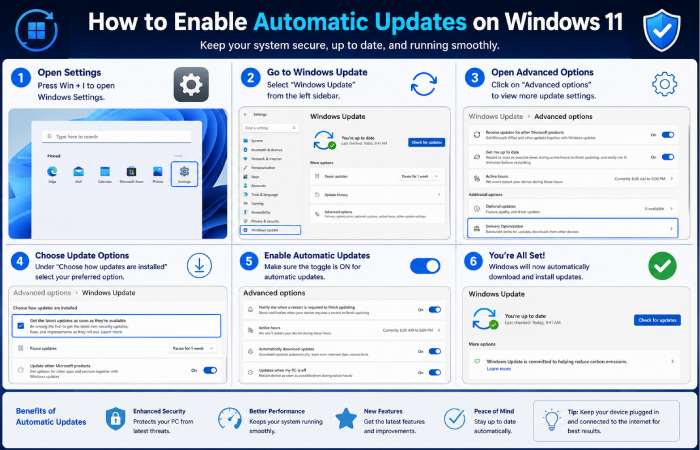
Updates should be automatic for the majority of people.
Enable Automatic Updates
Go to:
Settings > Windows Update
Turn on:
- The most recent information as it becomes available.
- Notification of other Microsoft products
Best Windows Update Settings for Beginners
Recommended Settings
| Setting | Recommended Value |
| Automatic Updates | Enabled |
| Active Hours | Customized |
| Optional Updates | Manual |
| Metered Connection | Off |
| Restart Notifications | Enabled |
How to Pause Windows Updates
Updates can sometimes disrupt critical areas of work.
Pause Updates
Go to:
Settings > Windows Update > Pause Updates
You can pause updates for:
- 1 week,
- 2 weeks,
- or longer.
Don‘t stop too often because there security risks grow rapidly.
Common Windows Update Problems and Fixes
Failure of Windows Update still occurs occasionally even in 2026.
Problem 1: Windows Update Stuck
Fixes
- Restart PC
- Check internet connection
- Run Windows Update Troubleshooter
Problem 2: Update Downloading Slowly
Solutions
- Disable VPN
- Use Ethernet
- Pause background downloads
- Clear update cache
Problem 3: Not Enough Disk Space
Windows updates require space on the storage.
Fix
Use:
Disk Cleanup
Delete:
- temporary files,
- old update files,
- recycle bin data.
Problem 4: Windows Update Error Codes
Common errors:
- 0x80070057
- 0x800f081f
- 0x8024402f
Quick Fix Commands
Open Command Prompt as Administrator:
sfc /scannow
Then:
DISM /Online /Cleanup-Image /RestoreHealth
Repair. They repair corrupted system files.
Advanced Methods to Check Updates
PowerShell or CMD can be used by experienced users to verify a number of updates have been installed:
Method 1: PowerShell
Open PowerShell and run:
Get-HotFix
This shows the Windows updates that are installed.
Method 2: Command Prompt
Run:
wmic qfe list
This lists installed patches.
Method 3: Winget App Updates
Check outdated apps:
winget upgrade
Update all apps:
winget upgrade –all
Conclusion: It is not completely safe to use a third-party software updater. However, it will be very safe and pain-free to use one if you acquire the software over the internet and be sure that the website is trustworthy.
Yes, if you use reliable software.
Safe Updater Tools
- Patch My PC
- Ninite
- Winget
- Chocolatey
Risks of Unsafe Updaters
Avoid unknown software updater tools because they may:
- bundle malware,
- install adware,
- modify browser settings,
- track user data.
How frequently do I need to check for updates?
Recommended Schedule
| Update Type | Frequency |
| Windows Updates | Weekly |
| Apps | Weekly |
| Drivers | Monthly |
| BIOS/Firmware | Every few months |
Windows Update Best Practices
Do This
- Keep backups
- Use official sources
- Restart after updates
- Enable automatic security updates
Avoid This
- Pirated software
- Random updater tools
- Disabling updates permanently
Upcoming Windows Updates in 2026
Microsoft is moving toward:
- AI-managed updates,
- silent background patching,
- unified app updates,
- predictive restart scheduling.
Windows 11 now integrates:
- security intelligence,
- Microsoft Store updates,
- optional drivers,
- AI optimization.
So this means Windows updates are not only getting better, more aware and not so intrusive, but that they are actually smarter.
Frequently Asked Questions
Checking updates on Windows How do I examine my software gets in Windows?
Open:
Settings > Windows Update
Then click:
Check for Updates
In addition, Remember to update the Microsoft Store apps individually.
How update application applications in Windows 11?
Open Microsoft Store and select:
Get Updates
Is Windows Update enough?
Not always.
Windows Update handles:
- operating system patches,
- some drivers,
- Microsoft products.
But management apps by third party may still need to be updated.
Is it common for end-of-life applications to impact system performance?
Yes.
Old software can:
- increase CPU usage,
- create compatibility issues,
- reduce security,
- slow boot times.
What’s the support for: Why is the Windows Update not working?
Common causes:
- corrupted files,
- insufficient storage,
- internet issues,
- outdated drivers,
- antivirus conflicts.
Will I choose the automatic updates?
Yes, they are best for most users to have enabled.
How to Check for Software Updates Resource Hub
Learn how to check software updates across Windows, Mac, Android, iPhone,
update tools, troubleshooting guides, and best update practices.
Final Thoughts
This full Windows Software Update Guide walked you through how to find out if there were updates to Windows software, update applications, update drivers, troubleshoot problems, and tweak Windows Update in 2026.
Keeping your PC updated is one of the easiest ways to:
- improve performance,
- strengthen security,
- avoid software issues,
- And extend your computer’s life.
Regardless of whether you’re on Windows 10 or Windows 11, upgrade your device frequently to keep it fast, stable, and secure against today’s evolving threats.