



Table of Contents
Introduction – Cloud Migration Services
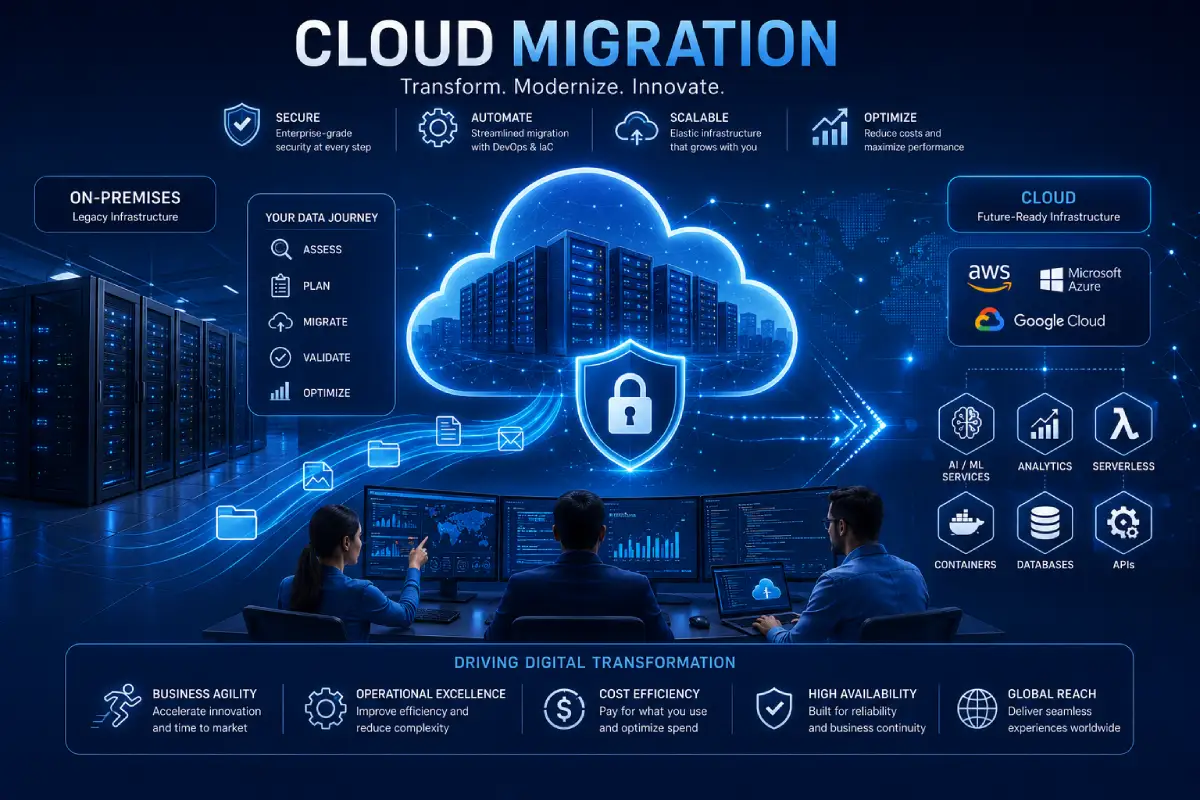
The trend of businesses moving toward digital transformation requires the migration of applications, data, and workloads to cloud. Cloud migration services enable organizations to Migrate from on-premise infrastructure or legacy systems to a cloud-based platform with a little disruption, better scalability and better operational efficiency.
Cloud migration is not just about moving files frompremises to a Cloud server. It‘s about the model, migration plan, assessment of current infrastructure, security requirements, business needs and application virtualization. When done correctly, it can reduce costs, extend application functionality, improve performance and allow you to leverage the native features of the Cloud, such as AI, automation, servers, managed services, and more.
No matter what you are migrating, a single application or a complete data center, selecting the correct cloud migration approach can make all the difference in the world. In this guide, we show you how cloud migration works, common migration approaches and the necessary stages to a successful cloud migration.
TECH HUB
This Article Is Part of the Future Tech Trends Hub
Explore AI trends, future innovations, next-generation computing, smart technologies, digital transformation, automation, robotics, emerging devices, and technology predictions shaping tomorrow inside our
Future Tech Trends Hub.
What Are Cloud Migration Services?
Cloud migration services are expert services that assist businesses in migrating applications, databases, workloads, and digital assets from one environment to another.
Migration may involve:
- Moving from in-premise to the cloudx
- Cloud from private to public
- A different cloud provider (for example,g onecloud to another cloud provider)
- Hybrid cloud deployments
- Multi-cloud environments
Migration services usually call for planning, assessment, deployment, testing and tuning, and support.
Most organizations utilize the services of a cloud consultant or a managed service provider to mitigate risks of migration and downtime.
Why Businesses Migrate to the Cloud
There are many technical and business motivation behind an organization move to the cloud.
Common motivations include:
- Infrastructure cost decreases: Downsize as much as possible the network infrastructure and the computing power of the network institutions because everything still works fine.
- Improving scalability
- Assisting in allowing people to work from home7,11.
- Greater agility of the firm
- Improvement in disaster recovery
- Updating aging applications
- To enhance the system performance
- Accelerating innovation
Moving to the cloud is one thing, but by doing so, organizations will be able to harness innovative technologies such as machine learning, big data analysis and automation without the need for costly capital expenditure on installed hardware.
Benefits of Cloud Migration Services
A successful migration offers value to the business in the short-term as well as the long-term.
Lower Infrastructure Costs
Migrating to the cloud reduces the need for:
- Physical servers
- Data centers
- Hardware maintenance
- Power and cooling
- Equipment upgrades
Organizations are not required to make huge capital investments here, but rather only pay for the cloud services they actually use.
Improved Scalability
Cloud platforms can automatically free up or allocate more computing resources as the demand for that platform increases.
Benefits include:
- Automatic resource scaling
- Flexible storage
- High availability
- Accelerating time to market for new services
This provider flexibility allows organizations to respond quickly to changing business requirements.
Better Business Continuity
Cloud providers offer built-in features such as:
- Data replication
- Automated backups
- Disaster recovery
- Geographic redundancy
These enable greater resilience and decreased sensitivity to hardware failures or out-of-hours issues.
Enhanced Security
Leading cloud platforms provide advanced security capabilities, including:
- Encryption
- Identity and Access Management (IAM)
- Threat detection
- Security monitoring
- Compliance certifications
Together with good internal security, these features allow organizations to keep business secrets safe.
Faster Innovation
Cloud places the development, deployment, and testing of applications at an advantage.
Organizations can adopt:
- Artificial intelligence
- Machine learning
- Serverless computing
- Containers
- DevOps automation
Without the addition of investing to infrastructure.
Types of Cloud Migration
There are many different kinds of migrating to a cloud which depend upon what business is trying to achieve.
Data Migration
Moves business data from local store or local database to cloud storage or cloud database.
Examples include:
- Customer records
- Financial data
- Documents
- Media files
Application Migration
The act of moving applications from on-premises servers to the cloud.
Organizations may migrate:
- Web applications
- ERP systems
- CRM platforms
- Business software
Application migration may also require testing.
Database Migration
Brings moves databases to the cloud-managed database services.
Benefits include:
- Improved scalability
- Automated backups
- Better availability
- Simplified management
Infrastructure Migration
Moves servers, networking resources, storage systems, and virtual machines to the cloud platform.
This method is widely used during data center modernizations.
The 6 Rs of Cloud Migration
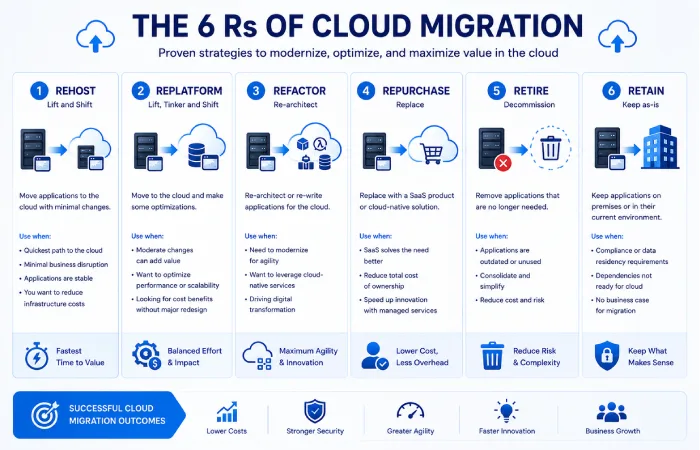
Some organizations utilize the 6 Rs Framework to identify the most appropriate migration approach for individual workloads.
Rehost (Lift and Shift)
The applications are migrated to the cloud with very little modifications.
Best For
- Fast migrations
- Legacy applications
- Limited migration budgets.
Replatform
Applications to achieve small enhancements by migrating to the cloud.
Examples include:
- Upgrading databases
- How to go about thisUsing managed services
- Improving performance
It strives for speed while maintaining optimality.
Refactor (Re-architect)
Applications are being re-architected to take maximum advantage of native cloud services.
Benefits include:
- Better scalability
- Improved performance
- Modern architecture
- Greater flexibility
The most complex yet also most rewarding long term value is achieved from refactoring.
- Repurchase
An organization is substituting legacy software with a cloud computing hosted version of Software as a Service (SaaS).
E.g., migrations from locally hosted applications to cloud-based productivity or CRM solutions.
2. Retire
Decommissioned-forapplications-These are applications that have been retired and not moved.
Decommissioning previous systems will reduce cost and ease IT management.
3. Retain
Others stay on premises due to regulation, technology, or business need.
These workloads could subsequently be targeted for migration as business needs change.
Cloud Migration Strategy Overview
Adopting the appropriate migration approach will depend on the following:
Organizations should evaluate:
- Business objectives
- Application complexity
- Budget
- Security requirements
- Compliance obligations
- Downtime tolerance
- Existing infrastructure
No one migration strategy suits all workloads. A number of organizations blend approaches together as part of a phased cloud adoption strategy.
Common Industries Using Cloud Migration Services
Cloud migration is revolutionising businesses in virtually all industries.
Businesses that frequently invest in migration services include:
- Healthcare providers
- Financial institutions
- Government agencies
- Retail companies
- Manufacturing organizations
- Educational institutions
- Technology companies
Ad hoc is not the right choice of migration for any industry, as every industry has specific compliance, security and performance needs, which require careful planning of the migration.
Cloud Migration Process
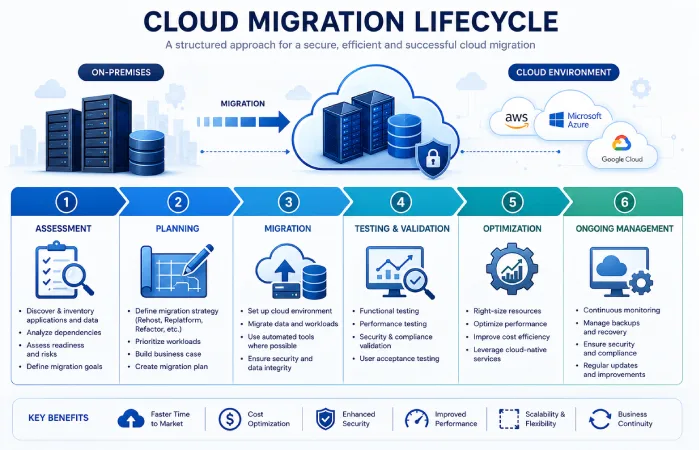
A well-planned cloud migration involves a wellorchestrated migration strategy not about migrating everything all at once. A good planning would minimize outage, control costs and less impact to business.
The process of migrants going from A to B usually involves the following stages:
Step 1: Assess Your Current Environment
It is important that an organization carefully assesses their current IT – infrastructure before transitioning to the new system.
The assessment should identify:
- Applications and workloads How do your existing application portfolio and workload characteristics compare with the criteria for a good migration target?
- Servers and databases
- Storage requirements
- Network dependencies
- Security controls
- Compliance requirements
- Licensing considerations
It determine different workloads suitable for cloud migration to be migrated and how migration strategy should be adopted.
Step 2: Define a Cloud Migration Strategy
Following the assessment, the enterprises should set out a migration roadmap that meet business needs.
A migration strategy should answer questions such as:
- What are the next applications to be converted?
- What would be the cloud platform.
- How do you determine which migration approach is right?
- What is the time frame?
- How are risks to be managed
Beginning with low-risk applications, teams learn on less critical systems.
Step 3: Choose the Right Cloud Provider
Choosing the most suitable cloud platform is crucial for the sustainability of the cloud computing.
When evaluating providers, compare:
- Performance
- Scalability
- Security features
- Compliance certifications
- Global infrastructure
- Pricing
- Technical support
- Managed services
Leading providers include:
- Amazon Web Services (AWS)
- Microsoft Azure
- Google Cloud Platform (GCP)
The right choice really depends on your workloads, technology stack and how much your company will grow.
Step 4: Migrate Workloads
After planning has completed workloads are migrated through the chosen migration approach.
This may include:
- Applications
- Databases
- Virtual machines
- Storage
- Business data
The company can also move the entire workload gradually on rush. This is less risky and easier to troubleshoot.
Step 5: Test and Validate
Migration. Always followed by extensive testing.
Validation includes checking:
- Application functionality
- Data integrity
- Performance
- User access
- Security configurations
- Backup processes
Testing reveals issues prior to production systems shifting entirely over to the cloud.
Step 6: Optimize the Cloud Environment
Border crossing is not the end of the line.
Organizations should continuously optimize their cloud environment by:
- Keeping track of resource consumption
- Removing redundant resources
- Improving performance
- Strengthening security
- Managing cloud expenses
Continual optimization allows businesses to realize the true value of their cloud investment.
Cloud Migration Tools
Migration tools: use of cloud migrating tools helps automate much of the migration task with in-built steps to avoid human error.
Common capabilities include:
- Data replication
- Application migration
- Database migration
- Dependency discovery
- Performance monitoring
- Migration reporting
The use of automation also speeds up the migration and reduces the downtime.
Popular Cloud Migration Tools
Some of the most widely used migration tools include:
| Tool | Primary Purpose | Best For |
| AWS Application Migration Service | Server migration | AWS migrations |
| Azure Migrate | Assessment and migration:12 Migration of new TC a) Retinal suss may migrate between electrodes; b) Excessive migration of retinal suss toward the posterior pole. | Microsoft Azure |
| Google Cloud Migrate | VM and workload migration | Google Cloud |
| VMware HCX | Migration to a hybrid cloud. | VMware environments |
| CloudEndure | Disaster recovery and migration | Large-scale migrations |
The right tool is based on your infrastructure, migration destination cloud platform and complexity.
Common Cloud Migration Challenges
While there are many benefits of migrating to the cloud but many organization face technical and operational challenges.
Downtime
Badly scheduled migrations can interrupt business.
Minimize downtime by:
- Migration in phases Translating in stages:
- Arranging maintenance windows
- Pre-production testing
Data Loss
Data integrity.
Reduce risk by:
- Creating backups
- Validation of migrated data
- Using automated migration processes
Application Compatibility
Certain legacy applications would not perform well on cloud.
Possible solutions include:
- Replatforming
- Refactoring
- Old applications replaced, Skew in the administrator page
Compatibility testing shall be performed before going live.
Security Risks
Migration can cause temporary security risk if configurations are wrong.
Organizations should:
- Encrypt data during migration.
- Review access rights
- Monitor migration activity
- Make security assessments; Explore security implications
Security should be a concern during the migration.
Cost Management
Unanticipated cloud cost spikes post-migration are somewhat common.
Organizations should monitor:
- Compute usage
- Storage consumption
- Network traffic
- Licensing costs
- Idle resources
Cost optimization performed periodically will help to avoid needs for overspending.
Cloud Migration Strategy Comparison
Different businesses have different needs and, consequently, different migration strategies.
| Strategy | Complexity | Cost | Cloud Optimization | Best For |
| Rehost | Low | Low | Low | Fast migrations |
| Replatform | Medium | Medium | Medium | Moderate modernization |
| Refactor | High | High | Excellent | Cloud-native applications |
| Repurchase | Low | Medium | High | SaaS adoption |
| Retire | Low | Low | N/A | Outdated applications |
| Retain | None | Low | None | Remaining use on premises |
Numerous organizations adopt more than one way to handle the varying workload types.
Choosing the Right Cloud Migration Partner
Complex migrations require businesses to utilize cloud migration experts or managed service providers.
When evaluating a migration partner, consider:
- Cloud certifications
- Industry experience
- Migration methodology
- Security expertise
- Compliance knowledge
- Post-migration support
- Customer references
A qualified partner will lower your project risks and speed up delivery.
Building a Successful Cloud Adoption Strategy
Cloud migration should be seen as one component of digital transformation.
Successful organizations typically:
- Establish clear migration goals
- Prioritize workloads
- Develop authentic schedules
- Train employees
- Keep track of the progress in a steady manner
- Optimize cloud resources post-migration
A clear cloud adoption strategy aligns technology investments with lasting business goals.
Cloud Migration Best Practices
While migrating workloads to the cloud is a critical part, a successful cloud migration is never just that. The migration is not only making the move of workloads in to cloud but even after that the organizations should follow proven best practices from before, during and all the way post migration, to achieve maximum benefit in terms of performance, security and ROI.
Start with a Migration Assessment
Ensure to evaluate your current environment before migrating any workload.
Review:
- Applications and dependencies
- Databases
- Storage requirements
- Security controls
- Compliance obligations
- Network architecture
A comprehensive assessment is ascertains the possible risk and chooses the most appropriate migration approach.
Define Clear Business Objectives
Any migration project should have tangible objectives.
Examples include:
- Cutting infrastructure expenses.
- Optimising application performance
- Increasing scalability
- Disaster recovery improvements
- Facilitating remote working
- . Modernize the aging legacy systems
Well defined objectives aid in prioritising workloads and evaluating the success of a project.
Migrate in Phases
To prevent the phenomenon of Not Working Indiscriminately, but also to spread the failure‘s impact as much as possible.
Instead:
- Start with low risk workloads.
- Validate performance
- Resolve issues
- Migrate mission critical systems slowly
A phased approach is time saving, lessens down time and minimizes operation risk.
Prioritize Security
Security, must be an integral part of the migration process.
Organizations should:
- Use data encryption for migration
- Enable Multi-Factor Authentication (MFA)
- Has least-privilege access control in place
- Monitor migration activities
- Conduct security testing after the migration
These measures could go a long way in safeguarding sensitive data, and certainly does well to reduce the organization‘s cybersecurity risk.
Train Employees
The process of moving to the cloud changes the way that employees access apps and data.
Provide training on:
- New cloud platforms.
- Best practices for security
- Collaboration tools
- Managed Policies.
Jobs that achieve scheduled completion time can reduce the migration operation problems as well as reduce the operations time. Well-trained employees also can adapt the system more flexible.
Post-Migration Optimization
Migration is just the start of your cloud journey.
Continuous optimization guarantees that the cloud environment is secure, is cost-effective, and has a high performance.
Performance Optimization
Demonstrate how to monitor workloads to identify areas for improvement.
Common optimization tasks include:
- Changing compute resources
- Optimizing storage
- Enhanced network performance
- Eliminating bottlenecks
Performance optimization ensures application performance remains optimized as loads vary.
Cost Optimization
The money spent in the cloud should be monitored from time to time.
Best practices include:
- P.17 Removing wastage resources
- Rightsizing virtual machines
- Choosing storage tiers:
- Monthly cloud expenditure monitoring
- Employ reserved or committed-use pricing on suitable assets.
Continuing cost control assures that no cost is wasted.
Security Reviews
Security has to stay even after migrating.
Organizations should:
- Can view access*air permissions
- Alter security policies
- To perform the following activities: Vulnerability assessments and vulnerability management activities–To participate in and document the results of vulnerability scans and analysis, to include the development of a baseline of the system‘s vulnerability status.
- Monitor compliance
- Performing auditing on a regular basis
Continuous security monitoring, a tool within Cloud Security for having a good cloud security stance.
Future Trends in Cloud Migration
As technology and business needs change, cloud migration will continue to change and adapt.
AI-Assisted Migration
Artificial intelligence is increasingly being used to:
- Analyze workloads
- Make working recommendations for migration strategies
- Identify risks
- Automate repetitive migration tasks
Migration speed can be improved and human error can be reduced through the use of AI tools.
Hybrid and Multi-Cloud Adoption
Instead of going with one cloud provider, many organizations are using multiple clouds.
Benefits include:
- Greater flexibility
- Improved resilience
- Less vendor lock-in
- Greatly improved workload optimization.
Hybrid and multi-cloud solutions will continue to be a significant trend.
Cloud-Native Modernization
Apps are being migrated more often by updating them rather than by migrating them.
Common modernization approaches include:
- Containers
- Kubernetes
- Serverless computing
- Managed databases
- Microservices architecture
These technologies also provide greater scalability and make long term maintenance easier.
Automated Cloud Management
Automation is a growing necessity.
Organizations use automation to:
- Provision infrastructure
- Monitor workloads
- Security policy 4.6 Place the applicable security policies.
- Scale resources
- Optimize costs
Automation Enhances operational efficiencies through reduced manual intervention.
Frequently Asked Questions
What are services for moving to the cloud?
Cloud migration services enable companies to transition applications, data, databases, and workloads from their existing on-premises infrastructure and legacy systems to the cloud. These services may offer planning, migration, testing, optimizing, and continuous support services.
So, why move to the cloud?
Numerous business move into the cloud to increase scalability, cut down infrastructure cost, improve security, enable working from anywhere, enhance disaster recovery, and speed up digital transformation.
What is the 6 Rs of cloud migration?
The six common migration strategies are:
- Rehost
- Replatform
- Refactor
- Repurchase
- Retire
- Retain
A different strategy is better for different work loads and different businesses.
What is the length of time of cloud migration?
Migration timelines vary depending on:
- Infrastructure complexity
- Number of applications
- Data volume
- Security requirements
- Testing requirements
The size of the project can range from a matter of a few weeks (small projects) to months (enterprise migrations).
What are the top cloud migration challenges?
Common challenges include:
- Downtime
- Data loss
- Application compatibility
- Security risks
- Cost management
- Employee adoption
Proper planning and staged migrations will help limit those risks.
Conclusion
Cloud migration services facilitate the modernization of IT infrastructure, such as increasing its scalability while decreasing management costs, and making innovation faster. Successful migration is more than moving workloads; it’s also about an effective planning process, selecting migration strategies, implementing the right migration tools, and continuously tuning the cloud environment.
When choosing to migrate to a public, private, hybrid, or multi-cloud environment, organizations need to consider how this decision aligns with their overarching strategy, security needs, and compliance requirements. Attaching best practices to project execution – which includes Gradual transitions, security checks and tests, performance tracking, training and communication, and others – can help achieve better results.
Having a comprehensive cloud transformation strategy gives organizations a competitive advantage as cloud solutions mature, allowing them to innovate and accelerate operational efficiencies.
Cloud Computing Services Hub
Discover cloud computing services, deployment models, cloud providers, storage solutions, security services, migration strategies, and managed cloud solutions for businesses and individuals.
