


Different types of Cloud Computing Services: IaaS, PaaS, SaaS Explained! (2026)
Table of Contents
Introduction
To better understand the types of cloud computing services, there are time that business, developers, students and the information technology (IT) professional understand how these types of services can be used in finding the right tools for the right jobs they want. Rather than buying and managing costly servers, organizations can now connect to the remote computing resources, development platforms, and software applications over the Internet from cloud service providers.
Today, cloud computing supports everything from business applications and collaboration tools to artificial intelligence, big data analytics and enterprise applications. Selecting the most appropriate cloud service model is a critical decision when optimizing costs, performance, security and operational efficiency.
The three primary cloud service models are:
- IaaS (Infrastructure as a Service)
- Platform as a Service (Paas)
- Software as a Service (SaaS)
Different models can meet various business requirements and provide a different degree of control, flexibility, and management. This article describes how each of the available solution models works, compares their features, and discusses the benefits and limitations of each model.
TECH HUB
This Article Is Part of the Future Tech Trends Hub
Explore AI trends, future innovations, next-generation computing, smart technologies, digital transformation, automation, robotics, emerging devices, and technology predictions shaping tomorrow inside our
Future Tech Trends Hub.
Definition of Cloud Computing Services
Cloud computing services offer access to computing resources over the internet instead of local hardware or a local data center.
Instead of buying servers, network equipment, storage devices, and software licenses, organizations rent them from cloud suppliers either via subscription or pay-per-use.
Cloud services commonly include:
- Virtual servers
- Data storage
- Databases
- Networking
- Software applications
- Development platforms
- Security services
- Artificial intelligence tools
- Machine learning services
They are available to users at almost any Internet access point.
Why Cloud Service Models Matter
Different requirements are proposed in each organization.
For example:
- A startup might require a plug-and-play business application.
- A developer platform is required for example by a software company.
- Full infrastructure control may be required by a large enterprise.
These differences are accommodated by cloud service models.
Choosing the appropriate model helps organizations:
- Reduce infrastructure costs
- Improve scalability
- Accelerate deployment
- Simplify maintenance
- Increase business flexibility
- Improve disaster recovery
- Support remote work
Knowledge of these distinctions insures that the business does not spend money on redundant services, but rather has the branch capabilities.”
The Three Main Types of Cloud Computing Services
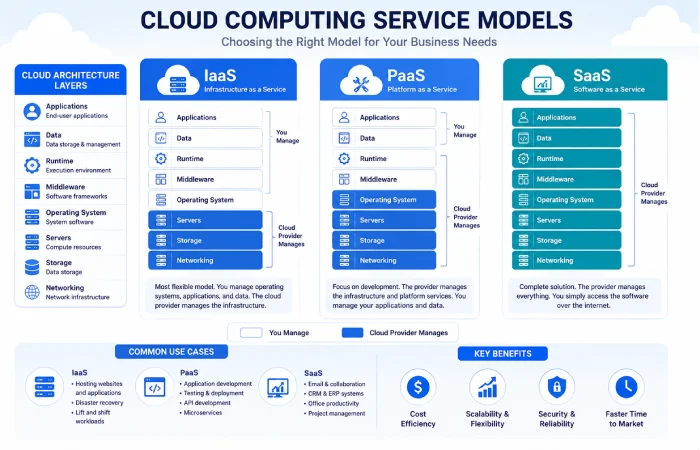
Contemporary cloud computing relies on three fundamental service models.
Infrastructure as a Service (IaaS)
IaaS delivers virtualized computing resources over the internet.
Instead of purchasing physical servers, businesses rent:
- Virtual machines
- Storage
- Networking
- Firewalls
- Load balancers
- Operating systems
It is the customer who manages the operating system, applications, and data; the cloud provider is responsible for the physical infrastructure.
PaaS (Platform as a Service)
PaaS offers a fulldevelopment and deployment platform.
Instead of configuring servers manually, developers receive a ready-to-use platform that includes:
- Development tools
- Databases
- Middleware
- Runtime environments
- Operating systems
- Deployment services
This enables the development teams to develop the application rather than having to provide the infrastructure.
Software as a Service (SaaS).
SaaS offers entirely maintained applications to be used on the web browser or a mobile app.
Users simply log in and begin using the software without worrying about:
- Installation
- Updates
- Servers
- Maintenance
- Security patches
All of it is controlled by the service provider.
Examples are collaborative tools and applications like mail systems, CRM, online applications, online office applications, and others
Cloud Service Models at a Glance
| Service Model | Managed By Provider | Managed By Customer | Best For |
| IaaS | Hardware, networking, virtualization | Operating systems, applications, data | IT teams and enterprises |
| PaaS | Infrastructure, operating system, runtime | Applications and data | Developers and software teams |
| SaaS | Entire application stack | User settings and data | End users and businesses |
And compared to the customer, the provider takes more and more responsibility when shifting from IaaS toward SaaS.
Evolution of Cloud Computing Services
The cloud computing has been developed much during 20 years.
Traditional IT Infrastructure
Organizations previously had to:
- Purchase servers
- Build data centers
- Install networking equipment
- Manage backups
- Handle hardware failures
- Perform software updates
This required a lot of up-front cost and maintenance.
The Rise of Cloud Computing
Cloud providers offered a more flexible approach which permitted companies to hire computing resources as needed.
Benefits included:
- Lower capital expenses
- Faster deployment
- Global accessibility
- Automatic scaling
- Improved reliability
Consequently, several organizations of different scales started migrating their workloads into the cloud.
Modern Cloud Services in 2026
Today‘s cloud platforms provides far more than virtual servers.
Modern services include:
- Artificial intelligence
- Machine learning
- Data analytics
- Internet of Things (IoT)
- Serverless computing
- Edge computing
- Container orchestration
- Advanced cybersecurity
- Cloud-native application development
Their innovations still go on to make the cloud computing increasingly broad than more than just hosting the traditional infrastructures.
Benefits of Cloud Computing Services
No matter which service model is adopted, some advantages remain the same.
Scalability
Cloud resources are scalable. They can be scaled up or down according to demand.
Companies are billed strictly on the resources that are actually utilized.
Cost Savings
The hardware investment is significantly reduced by the cloud services.
Business pays instead of high infrastructure subscription/usage based.
Global Accessibility
Employees are able to reliably connect to cloud services from any remote location with an internet connection.
This supports:
- Remote work
- Hybrid workplaces
- International collaboration
Reliability
Major cloud suppliers own numerous, geographically spread data centers.
This redundancy helps improve:
- Availability
- Business continuity
- Disaster recovery
Automatic Updates
Many cloud services automatically receive:
- Security patches
- Feature updates
- Performance improvements
It‘s easier from the perspective of the IT teams less admin.
Common Examples of Cloud Computing Services
Many of the digital services we use on a daily basis are driven by cloud computing.
Examples include:
Infrastructure Services
- Virtual servers
- Cloud storage
- Virtual networking
- Load balancing
Development Services
- Application hosting
- Database management
- API management
- Continuous integration and deployment (CI/CD)
Business Software
- Email platforms
- Video conferencing
- Project management tools
- Customer relationship management systems
- Online document collaboration
For these reason, these examples show how cloud computing supports both technical users but also everyday business users.
Understanding the Shared Responsibility Model
A key concept in cloud computing is the shared responsibility model.
Under this model:
- Managing the underlying infrastructure is done by the cloud provider.
- The customer is accountable for the chunks of the service that they maintain.
The amount of customer data responsibility changes for each of them, depending on what of the products they end up choosing IaaS, PaaS or SaaS.
Generally:
- IaaS is the most flexible for the customer allowing them to have the most control and be responsible for the most aspects of the virtual infrastructure.
- PaaS reduces the burden of managing the underlying infrastructure.
- SaaS would transfer nearly every bit of equipment and application needed for the hosting environment into the hands of the service provider.
This model allows organizations to better understanding of the model security, maintenance and operational issues.
What You’ll Learn Next
Having explained the basic concepts of cloud computing services and the variations of the three main service models, the following section will focus more on IaaS and PaaS.
You’ll learn:
- How each model works
- Real-world business use cases
- Advantages and limitations
- Leading cloud providers
- Cost considerations
- The appropriate usage of each model.
This knowledge will also help you determine which cloud service model will be most suitable to your organization‘s technical and business needs.
Infrastructure as a Service (IaaS)
IaaS (Infrastructure as a Service). This is the most flexible category of cloud services. Rather than buying hardware and hosting it on the company‘s own land, a third party host backs up (or rents) a lot of cloud hardware.
For IaaS, the cloud provider configures and manages the virtualized hardware and resources including data centers, networking hardware and storage. The customer has control of their software stacks including; OS, applications, database and data.
This model provides companies the most control over their computing environment at a fraction of the cost and complexity of maintaining a physical infrastructure.
How Infrastructure as a Service Works
Upon subscribing for an IaaS platform, you will be able to access virtualized computing resources that will be provisioned for use within minutes.
Typical resources include:
- Virtual machines (VMs)
- Cloud storage
- Virtual networks
- Firewalls
- Load balancers
- Backup services
- IP addresses
- Security groups
No hardware purchased, customer just consumes what they need, and pay for usage.
Key Features of IaaS
Infrastructure as a Service typically includes:
- On-demand virtual servers
- Elastic storage
- High-speed networking
- Disaster recovery options
- Automatic infrastructure scaling
- Pay-as-you-go pricing
- High availability
- Monitoring and logging services
These features enable organizations to release applications rapidly and with flexibility.
Advantages of IaaS
High Flexibility
Organizations have complete control over:
- Operating systems
- Software installations
- Security configurations
- Applications
- Databases
This, therefore, makes IaaS a perfect fit for companies having custom infrastructure needs.
Lower Capital Costs
Standard infrastructure involves costly hardware.
IaaS removes the need for huge operations investment by converting it into running costs on a pay-for-use basis.
Rapid Scalability
The infrastructure can be scaled up or down within minutes.
Examples include:
- Incorporating virtual servers at the time of maximum traffic.
- Increasing storage capacity.
- Expanding networking resources.
This kind of flexibility allows businesses react rapidly to changing workloads.
Better Disaster Recovery
All the leading cloud providers provide data centers across the world.
Organizations can:
- Replicate workloads.
- Create automated backups.
- Recover systems rapidly from disruptions.
Limitations of IaaS
IaaS is very flexible but involves extra task.
Potential challenges include:
- Greater infrastructure management
- Security configuration requirements
- Operating system maintenance
- Patch management
- Technical expertise required
Without IT teams of their own, companies may find these tasks difficult.
Common IaaS Use Cases
Infrastructure as a Service is commonly used for:
- Website hosting
- Enterprise applications
- Development and testing environments
- Disaster recovery
- Data backup
- High-performance computing
- Big data processing
- Virtual desktop infrastructure
An added reason organizations seeking a tailored infrastructure might opt for IaaS is its flexibility.
Leading IaaS Providers
A handful of companies dominate the world market of Infrastructure as a Service.
| Provider | Popular Services |
| Amazon Web Services (AWS) | EC2, EBS, VPC, S3 |
| Microsoft Azure | Azure Virtual Machines, Storage, Networking |
| Google Cloud | Compute Engine, Persistent Disk |
| IBM Cloud | Virtual Servers, Cloud Storage |
| Oracle Cloud Infrastructure | Compute, Networking, Block Storage |
Each provider has a suite of infrastructure services to meet the different requirements of business.
Platform as a Service (PaaS)
Platform as a Service (PaaS) – provides developers everything they need for application development.
Instead of overseeing servers, networking, operating systems, developers can spend their time exclusively writing, testing, and deploying applications.
The cloud provider takes care of the underlying infrastructure and developers focus on developing the software.
How PaaS Works
The Paa S platform provides anything needed for application development.
This typically includes:
- Runtime environments
- Databases
- Development frameworks
- Middleware
- Deployment tools
- API management
- Monitoring services
- Integrated development support
Developers can just paste the code of the application. And all provision will be handled by platform for them.
Key Features of PaaS
Typical Platform as a Service offerings include:
- Managed operating systems
- Automatic scaling
- Integrated databases
- Continuous deployment
- Built-in development tools
- Application monitoring
- Version control integration
- Team collaboration tools
All of these advantages reduce much of the difficulty of development.
Advantages of PaaS
Faster Application Development
Enables developers to focus their time on developing software instead of configuring infrastructure.
Shorter development cycles, faster product introduction.
Lower Operational Overhead
Since the cloud provider manages infrastructure, organizations spend less time on:
- Server administration
- Software updates
- Hardware maintenance
- Operating system management
Built-In Development Tools
Many platforms include:
- Code repositories
- Deployment pipelines
- Database services
- Monitoring dashboards
- Testing environments
They make life so much easier for the tools.
Easy Collaboration
Development teams may collaborate in shared cloud environments.
This supports:
- Remote teams
- Continuous integration
- Continuous delivery
- Agile development
Limitations of PaaS
Despite the convenience, PaaS has its caveats.
Challenges may include:
- Less infrastructure control
- Vendor lock-in risks
- Platform compatibility limitations
- Restricted operating system customization
Organizations with requirements for Niche/Architecture specific infrastructure may opt for IaaS.
Common PaaS Use Cases
Platform as a Service is widely used for:
- Web application development
- Mobile application development
- API development
- Database-driven applications
- Software testing
- DevOps workflows
- Enterprise application development
It‘s especially useful for any software team that needs to speed up development without the hassle of managing hardware.
Leading PaaS Providers
Popular Platform as a Service providers include:
| Provider | Popular Services |
| Google Cloud | App Engine |
| Microsoft Azure | Azure App Service |
| Amazon Web Services | Elastic Beanstalk |
| Red Hat | OpenShift |
| Heroku | Managed application platform |
This set of services is available to various development languages and frameworks.
IaaS vs PaaS: Quick Comparison
By Understanding the variations between Infrastructure as a Service and Platform as a Service, organizations are in a better situation of choosing the right solution for them.
| Feature | IaaS | PaaS |
| Infrastructure Control | High | Limited |
| Operating System Management | Customer | Provider |
| Application Development | Customer | Customer |
| Hardware Management | Provider | Provider |
| Scalability | Excellent | Excellent |
| Ease of Use | Moderate | High |
| Best For | IT teams, enterprises | Developers, software companies |
In general:
- Select IaaS where you are comfortable maintaining the hardware, OS and that you want to retain full control over everything.
- Select PaaS if your primary concern is your ability to develop and deliver applications rapidly.
Choosing Between IaaS and PaaS
The correct variation depends on what is the goals in your organization.
Choose Infrastructure as a Service (IaaS) if you need:
- Custom server configurations
- Full operating system control
- Advanced networking
- Enterprise infrastructure
- Complex workloads
Choose Platform as a Service (PaaS) if you want:
- Faster software development
- Simplified deployments
- Managed infrastructure
- Integrated development tools
- Reduced operational complexity
It is common for many organizations to utilize both models side by side e.g. running core infrastructure on IaaS while developing applications on the PaaS platform.
What’s Coming Next
Infrastructure as a Service and Platform as a Service reached the high end of the cloud spectrum; most companies wanted an even easier one and wanted the application to be managed 100%.
The subsequent section discusses SaaS software as services, a comparison of IaaS vs PaaS vs SaaS, looks at the cost, security and scalability (performance), and guides you through selecting the most suitable cloud service model for your organization in 2026.
(2) Software as a Service (SaaS)
The most popular cloud service model is SaaS, where all the application software resides on remote servers and is only available via web browsers and mobile apps, rather than individual computers or data centers.
Everything—including the infrastructure, operating system, application updates, security patches, and maintenance—is managed by the cloud service provider.
For end users, SaaS offers the simplest way to use software without worrying about technical administration.
How SaaS Works
Companies offering SaaS, operate both the hardware and the software providing ‘the software as a service’. The vendor hosts the application in the cloud and delivers it over the internet.
Users simply:
- Create an account.
- Sign in.
- Start using the application.
There is no requirement to install software locally or tenant hardware.
Most SaaS offerings are based on subscriptions. This enables organizations to subscribe on a monthly or annual basis, based on their actual use.
Key Features of SaaS
Software as a Service platforms typically include:
- Browser-based access
- Automatic updates
- Cloud storage
- Multi-device synchronization
- Subscription pricing
- Automatic backups
- Built-in security updates
- Collaboration features
These features are among the most compelling reasons for the demand of SaaS among its users.
Advantages of SaaS
Easy to Use
There is no technical knowledge needed for SaaS applications.
Users can typically start working within minutes of signing up.
Lower IT Costs
Organizations are not required to invest in servers or even install intricate software infrastructure.
This reduces:
- Hardware expenses
- Maintenance costs
- IT staffing requirements
Automatic Updates
The service provider handles:
- Security patches
- Feature enhancements
- Performance improvements
- Bug fixes
Users are always running the most recent version, since no installations are required.
Access from Anywhere
Since SaaS applications are internet-based, users can work from:
- Office computers
- Home laptops
- Smartphones
- Tablets
This flexibility is appropriate for a remote environment.
Limitations of SaaS
While providing conveniency, SAS may derive many limitations.
Potential disadvantages include:
- Limited customization
- Less control over infrastructure
- Dependence on internet connectivity
- Vendor-controlled updates
- Data residency considerations
Customizable Cloud Model (in which, Business have more flexible and tailor made requirements that can be supported) is more suitable for Business that have highly customized needs for their software.
Common SaaS Use Cases
The use of Software as a Service is widespread across many different industries.
Examples include:
- Customer relationship management (CRM)
- Video conferencing
- Project management
- Team collaboration
- Email services
- Human resources software
- Accounting platforms
- AI productivity tools
However, many organizations use several SaaS applications in their daily work.
Popular SaaS Providers
Some of the biggest IT companies in the world offer SaaS products.
| Provider | Popular Services |
| Microsoft | Microsoft 365 |
| Google Workspace | |
| Salesforce | CRM Platform |
| Adobe | Creative Cloud |
| Zoom | Video Meetings |
| Dropbox | Cloud Storage |
| Slack | Team Collaboration |
Such tools show that SaaS allows companies to use enterprise type of software without having to invest in their own hardware.
IaaS vs PaaS vs SaaS
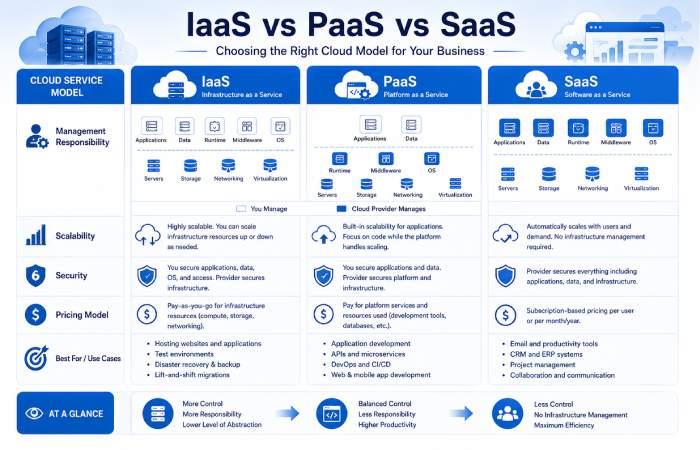
The three service models essentially vary in how much responsibility the provider and customer are willing to share.
| Feature | IaaS | PaaS | SaaS |
| Infrastructure Managed by Provider | ✅ | ✅ | ✅ |
| Operating System Managed by Provider | ❌ | ✅ | ✅ |
| Application Managed by Provider | ❌ | ❌ | ✅ |
| Customer Control | High | Medium | Low |
| Technical Expertise Required | High | Medium | Low |
| Deployment Speed | Moderate | Fast | Immediate |
| Best For | IT teams | Developers | End users |
As you slowly transition from IaaS to SaaS, infrastructure management for the customer lessens.
Which cloud service model should you opt for?
The choice of cloud service model will depend on what you want to achieve in your business, your technical level and the nature of the operations you want to perform.
Choose IaaS If You Need
- Complete infrastructure control
- Custom networking
- Virtual servers
- Flexible operating systems
- Enterprise-scale workloads
Ideal for:
- Large organizations
- IT departments
- Infrastructure engineers
Choose PaaS If You Need
- Faster software development
- Managed infrastructure
- Simplified deployments
- Integrated development tools
Ideal for:
- Software companies
- Development teams
- Startups building applications
Choose SaaS If You Need
- Ready-to-use software
- Fast deployment
- Minimal technical management
- Predictable subscription costs
Ideal for:
- Small businesses
- Remote teams
- Educational institutions
- Individual professionals
Cloud Service Cost Comparison
Cost is one of the main motivations for organizations using cloud computing.
Different service models have various pricing characteristics.
| Cost Factor | IaaS | PaaS | SaaS |
| Upfront Investment | Low | Low | Very Low |
| Infrastructure Costs | Usage-based | Included | Included |
| Maintenance Costs | Customer | Provider | Provider |
| Software Licensing | Customer | Partial | Included |
| Scalability Costs | Usage-based | Usage-based | Subscription-based |
Before a cloud service choice is made, the organization should consider the past and future costs.
Security Considerations
Security duties are different across IaaS, PaaS and SaaS.
Infrastructure as a Service
Customers manage:
- Operating system security
- Firewall configuration
- Application security
- User access
- Data protection
Platform as a Service
The provider secures:
- Infrastructure
- Runtime environment
- Operating system
Customers remain responsible for:
- Application code
- User permissions
- Sensitive data
Software as a Service
The provider manages:
- Infrastructure
- Software updates
- Security patches
- System availability
Customers primarily manage:
- User accounts
- Passwords
- Data access policies
- Compliance with organizational requirements
Comprehension of the shared responsibility model is essential, so that, organizations can configure the security controls accordingly.
AI and Modern Cloud Computing Services
Cloud computing is not just a hosting service.
Modern cloud platforms now offer advanced capabilities such as:
- Artificial intelligence
- Machine learning
- Natural language processing
- Image recognition
- Predictive analytics
- Generative AI services
- Serverless computing
- Edge computing
By using them, customers can develop intelligent applications without having to acquire capabilities of their own.
Future Trends in Cloud Computing
The rapid growth of cloud computing still has not stopped.
There are many trends to look forward to in the world of cloud services.
Multi-Cloud Strategies
Many organizations today use several cloud providers to enhance agility and decrease vendor lock-in.
Hybrid Cloud Adoption
A lot of companies combine on-premises solutions and a public cloud in order to keep their data secure and meet their compliance issues, but also grow in terms of far processing and scalability.
Serverless Computing
Developers run and execute code without having to look over the shoulders of hardware or has to manage servers.
AI-Powered Cloud Platforms
“All of the major cloud providers continue to build AI into their developer tools, analytics, security and automation offerings…”
Sustainability
Cloud providers are moving towards more energy efficient data centres and renewable power to reduce impact.
Choosing the Right Cloud Strategy
Organizations should be asking which model best fits their objectives and not which cloud model is best.
Most companies combine several service models.
For example:
- Use IaaS for enterprise infrastructure.
- Deploy applications through PaaS.
- Operate a business using SaaS solution.
This multi-layered layering structure balances flexibility with cost and efficiency.
Before the Final Section
You now understand:
- How Software as a Service operates.
- The distinctions among IaaS, PaaS, and SaaS.
- Cost and security considerations.
- Contribution of AIs to current cloud services.
- Emerging cloud computing trends.
Last part: FAQs, conclusion, faq schema markup, image proposal, internal linking guideline and the complete SEO checklist for the article to be published.
Frequently Asked Questions
What are the three types of cloud computing services?
The three primary types of cloud computing services are:
- Infrastructure as a Service (IaaS) – delivers virtualized hardware and networking resources.
- Platform as a Service (PaaS) – Offers a development environment for building, testing, deploying and managing applications.
- Software as a Service (SaaS) – Depicts managed applications and complete suites on the websites.
Each model provides varying degrees of management and control.
What is the difference among IaaS, PaaS and SaaS?
The primary distinction is how much of the stack is managed by the cloud provider.
- IaaS provides more control of the applications and operating systems to the customer than any of the other services.
- PaaS provides to developers, the infrastructure to develop and run applications.
- SaaS is deployed entirely by the provider, and is provided on demand in the form of software.
What is the ideal cloud service model for small business?
Most small businesses, for whom most of the benefits of SaaS would be realized, would take the SaaS route because it has minimal technical requirements, predictable subscription costs and enables teams to begin taking advantage of business applications straight away.
However, custom software developers might not be at the wrong side of Platform as a Service (PaaS).
Is cloud computing secure?
Yes, cloud computing can be very secure if correctly implemented.
Major cloud providers invest heavily in:
- Data encryption
- Identity and access management
- Network security
- Compliance certifications
- Threat detection
- Disaster recovery
And it is the customers’ turn to take responsibility for the application, such as usage protection, user account security, permission management and protection of sensitive data based on the model of shared responsibility.
More FAQ
What are the typical examples of SaaS.
Common SaaS applications include:
- Microsoft 365
- Google Workspace
- Salesforce
- Zoom
- Dropbox
- Slack
- Adobe Creative Cloud
All these applications are in web browser or mobile application that does not need to be installed locally or on the servers.
Is it possible for a company to use multiple cloud service models?
Yes.
There are also a number of companies that present several different models of the cloud.
For example:
- IaaS: were used for hosting the enterprise infrastructure.
- PaaS for software development.
- SaaS for email, collaboration, and CRM.
Best outcomes can be achieved with multiple models, selecting the right balance of cost/flexibility/performance.
What are the shared responsibility model?
Cloud security and management definitions located in the shared responsibility model.
Generally:
- Cloud providers secure the underlying infrastructure.
- Customers obtain the security of their applications, user accounts, data and access rights according to the specific cloud service model.
If we try to Answer this question it is surely using the model of IaaS.
The Infrastructure as a Service (IaaS) will often require the greatest degree of technical expertise since the customers themselves will configure the operating system, applications and some networking and security options.
Are cloud services scalable?
Yes.
One of the major benefits of cloud computing is scalability.
Companies are able to add or remove resources computing power, disk space, “applications,” etc. to meet their needs. Using add or remove may help to fine-tune the application as well as saving money.
Is the cloud a baby for what Startups?
Absolutely.
By the services in cloud computing, it offers the speed provided to start businesses without the corresponding costs of of investing in hardware and server centers.
Startups have the ability to pay as you go. With this option they can grow and scale without the burden of an overload of technology.
Conclusion
What kinds of services are available in cloud computing and how will they help your organization. The different types of services such as IaaS, PaaS and SaaS, Expose various levels of flexibility and control over the infrastructure and flexibility over the application development respectively.
Instead of competing, a number of firms mix and match across the three service models to achieve a cloud environment that serves different business needs. For instance, a firm builds its infrastructure upon IaaS, support application development upon PaaS, and uses SaaS to support communication, collaboration, customer relationship management.
Cloud technology is constantly changing with artificial intelligence (AI), automation, serverless computing and enhanced security features and features. Any organization and any size can take advantage of the appropriate combination of cloud services. Depending on your skillset, business objectives, security needs and financial limitations you should assess the optimal combination of cloud service model(s).
It doesn’t matter if you are an IT professional designing enterprise infrastructure, or a developer supporting cloud native applications, or, say, a business owner experimenting with digital transformation getting to grips with IaaS, PaaS, and SaaS is the first step in savvy cloud computing.
Cloud Computing Services Hub
Discover cloud computing services, deployment models, cloud providers, storage solutions, security services, migration strategies, and managed cloud solutions for businesses and individuals.