



Introduction – Best Gaming Monitors for Xbox Series X
The Xbox Series X is one of the most powerful video game consoles available on the market, capable of Native 4 K, refresh rates of 120 Hz, variable refresh rate (VRR), Auto Low Latency Mode (ALLM), and HDR all in a single device. But you‘ll need a monitor with the console‘s features in mind.
Selecting the most suitable gaming monitor for Xbox Series X involves more than simply screen dimensions or resolution. Quality game image through HDMI 2.1, FPS, Response time and VRR setting, HDR effect, 4K, high contrast, color calibration, is critical for enjoyable experiences.
Whether you are trying to dominate the battlefield in games such as Call of Duty or fallout, pick new soil in games like starfield, or race around 1, Forza horizon 5, having the right monitor can really make the responsiveness and image quality come to life.
Will guide you through the main characteristics to examine, he compares 4K and 1440p pixels, and assists you in selecting the top Microsoft Xbox gaming monitor for your budget and gaming requirements.
Table of Contents
Why Your Monitor Matters for Xbox Series X
Numerous gamers purchase the newest console but play through an antiquated monitor that it is unable to fully support.
A high-quality monitor allows you to experience:
- Sharper 4K visuals
- Smoother 120Hz gameplay
- Reduced screen tearing
- Lower input lag
- Better HDR performance
- Faster response times
- Improved color accuracy
Without the right screen, you could be losing out on features that make playing Xbox Series X games feel faster and more immersive.
Key Features to Look For: HDMI 2.1 vs HDMI 2.0
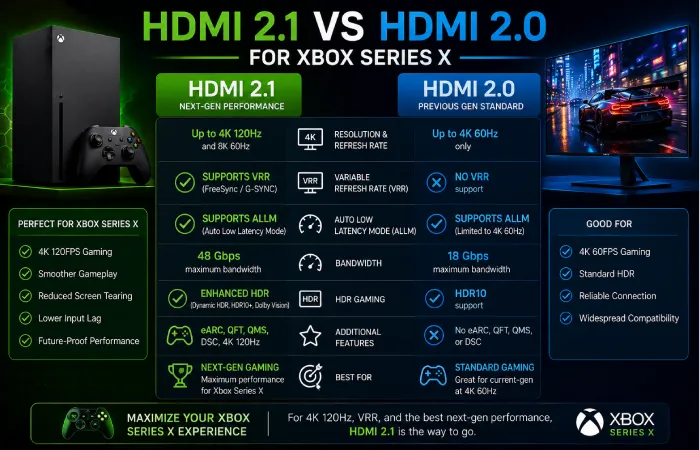
Before you buy a monitor, here are some specifications to keep in mind.
HDMI 2.1
HDMI 2.1 is quite possibly the most important feature for an Xbox Series X.
It supports:
- 4K resolution at 120Hz
- Variable Refresh Rate (VRR)
- Auto Low Latency Mode (ALLM)
- Higher bandwidth for smoother gameplay
If you are aiming for the highest possible console performance then I would say that monitor with HDMI 2.1 support is a must.
Refresh Rate
The refresh rate is the number of times the screen updates per second.
Common options include:
- 60Hz
- 120Hz
- 144Hz
- 165Hz
Even the Series X maxes out at 120Hz, it is still justified to get a 144Hz or 165Hz monitor if you also game on your PC.
For console-only players, 120Hz support is sufficient.
Response Time
Response time is defined as the speed of the pixel color changes.
A lower response time helps reduce:
- Motion blur
- Ghosting
- Smearing
In competitive gaming, you want a monitor with a 1ms GtG (Gray-to-Gray) response time or comparable speed.
Variable Refresh Rate (VRR)
VRR (Variable Refresh Rate) reads the console‘s frame rate, and adjusts the monitor‘s refresh rate to match this value.
Benefits include:
- Reduced screen tearing
- Smoother gameplay
- More consistent frame pacing
VRR is also available on the Series X. It is an important feature of any current gaming monitor.
HDR Performance
Enhancement of image quality by expanding luminance, contrasts and color depth is achieved using High Dynamic Range (HDR).
A good HDR monitor provides:
- Brighter highlights
- Deeper blacks
- More vibrant colors
- Greater visual realism
Although many monitor claim to have HDR support, peak brightness and good local dimming usually give a better HDR experience.
Input Lag
Input lag is the time delay from pressing a button on a controller to when it displays on the screen.
Lower input lag improves responsiveness, especially in:
- First-person shooters
- Racing games
- Sports games
- Fighting games
Competitive playing should consider using monitors with high refresh rates and low input delay.
4K vs 1440p: Which Is Better for Xbox Series X?
Which often arises as the most common questions of them all, which 4K or 1440p gaming monitor should I be buying.
Both options have advantages.
4K Gaming Monitors
Advantages include:
- Maximum image sharpness
- Better detail
- Improved HDR presentation
- Best visual experience for story-driven games
Ideal for:
- RPGs
- Adventure games
- Racing simulators
- Open-world titles
A 4K monitor will give you the best visuals; it is the ultimate choice for visual quality.
1440p Gaming Monitors
Advantages include:
- Lower cost
- Excellent image quality
- High refresh rates
- Better value for many gamers
Ideal for:
- Competitive multiplayer
- First-person shooters
- Battle royale games
- Players with smaller budgets
While a good 1440p monitor still works well on the Xbox Series X and saves you a lot of money.
Recommended Screen Size
The optimum size monitor will vary on your desk arrangement and viewing distance.
| Screen Size | Recommended Resolution | Best For |
| 24 inches | 1080p | Competitive gaming |
| 27 inches | 1440p | Balanced gaming setup |
| 32 inches | 4K | Immersive console gaming |
| 34 inches+ | Ultrawide (PC only) | Productivity and PC gaming |
For a majority of players on the Xbox Series X, a 27-inch 1440p or a 32-inch 4 K display will give an optimal compromise between picture quality and game play.
IPS vs VA vs OLED Panels
The display panel influences the picture quality, viewing angles and response times.
IPS Panels
Advantages:
- Excellent color accuracy
- Wide viewing angles
- Fast response times
Best for:
- Mixed gaming
- HDR content
- General entertainment
VA Panels
Advantages:
- Higher contrast ratios
- Deeper blacks
- Good movie performance
Best for:
- Single-player games
- Dark environments
- Story-driven titles
OLED Panels
Advantages:
- Perfect black levels
- Instant response times
- Outstanding HDR
- Incredible contrast
Best for:
- Premium gaming setups
- Cinematic experiences
- Gamers seeking the highest image quality
The OLED monitors are typically more expensive but they can actually rival some of the best visual display qualities.
Features Worth Paying For
If your budget allows, prioritize these features:
- HDMI 2.1
- 4K resolution
- 120Hz or higher refresh rate
- VRR support
- Low input lag
- Fast response time
- HDR capability
- Wide color gamut
These features enable the full potential of the Xbox Series X.
Best Gaming Monitors for Xbox Series X in 2026
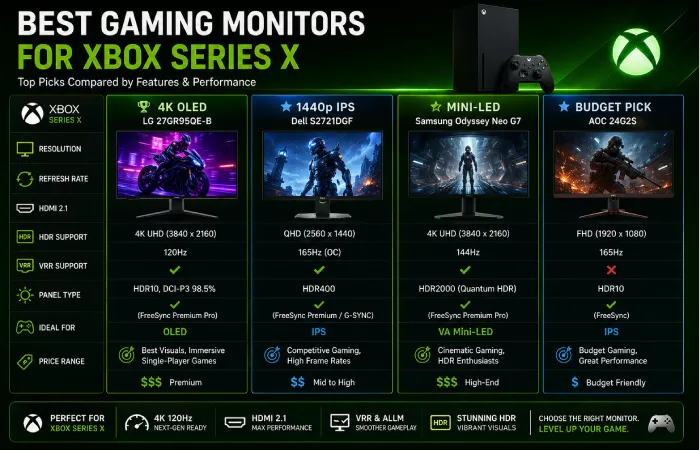
Based on looking at these different factors of display quality, gaming, HDMI 2.1, HDR, input lag, and value for money, the best monitors for Xbox Series X are:
No matter what your budget is, there’s a gaming monitor out there that suits you– from the best value 1440p gaming monitor to the top-end 4K display.
Best Overall: LG UltraGear 32GS95UE-B
The LG UltraGear 32GS95UE-B is among the best gaming monitors for Xbox Series X.
Key Specifications
- 32-inch OLED display
- 4K UHD (3840 × 2160)
- Up to 240Hz refresh rate (PC)
- HDMI 2.1
- Variable Refresh Rate (VRR)
- AMD FreeSync Premium Pro
- HDR support
- Ultra-fast response time
Why Buy It?
Consummate HDR performance, excellent contrast, smoothest gaming experience this monitors continues to impress. Xbox Series X owners will get native 4 k resolution and 120Hz support with the benefit of OLED image quality.
Best For
- Premium gaming setups
- Story-driven games
- Competitive gaming
- Long-term investment
Best Premium 4K Gaming Monitor: ASUS ROG Swift PG32UCDM
For the gamer who is into state of the art screen technology the ASUS ROG Swift PG32UCDM is a good option.
Highlights
- 32-inch QD-OLED panel
- 4K resolution
- HDMI 2.1
- 240Hz refresh rate (PC)
- Outstanding HDR performance
- Extremely low input lag
- Wide color gamut
Pros
- Incredible image quality
- Excellent color accuracy
- Future-ready specifications
- Superb gaming performance
Best For
- Enthusiast gamers
- HDR gaming
- Content creators who also game
Best 1440p Gaming Monitor: Dell G2724D
If you want a budget monitor that delivers good quality the Dell G2724D might be what you‘re looking for.
Specifications
- 27-inch IPS panel
- 2560 × 1440 (QHD)
- High refresh rate
- AMD FreeSync Premium
- Excellent color accuracy
- Low response time
Why It’s Recommended
If you don‘t need 4K resolution, this monitor offers crisp images, smooth play, and good value for gamers.
Best For
- Competitive gaming
- Multiplayer titles
- Budget-conscious buyers
Best Budget Xbox Gaming Monitor: Gigabyte M27Q X
The Gigabyte M27Q X brings high-end gaming technology at a more affordable price.
Features
- 27-inch IPS display
- QHD resolution
- HDMI connectivity
- Fast refresh rate
- Low input lag
- Wide color coverage
Advantages
- Excellent price-to-performance ratio
- Great motion handling
- Strong gaming performance
- Suitable for both PC and Xbox gaming
Best For
- Students
- First-time gaming monitor buyers
- Mid-range gaming setups
Best Curved Gaming Monitor: Samsung Odyssey Neo G7
The Samsung Odyssey Neo G7 is excellent for gaming.
Features
- 32-inch curved display
- 4K UHD
- Mini-LED technology
- HDMI 2.1
- High refresh rate
- HDR support
- Deep contrast
Why Gamers Love It
The curved display enhances immersion, and the Mini-LED technology provides good brightness and contrast.
Best For
- Racing games
- Flight simulators
- Open-world adventures
- Cinematic gaming
Best Competitive Gaming Monitor: ASUS ROG Strix XG27ACS
In general, competitive players tend to be more concerned with quick response time than with higher resolution.
The ASUS ROG Strix XG27ACS focuses on:
- Low input lag
- Fast response time
- High refresh rate
- Smooth motion
- Accurate colors
It‘s a great choice for a lot of competitive titles where having a quick response time take priority over having that crazy high resolution.
Best For
- Call of Duty
- Apex Legends
- Fortnite
- Halo Infinite
- Valorant (PC)
Xbox Gaming Monitor Comparison
| Monitor | Resolution | HDMI 2.1 | Panel Type | Best For |
| LG UltraGear 32GS95UE-B | 4K | ✅ | OLED | Overall Best |
| ASUS ROG Swift PG32UCDM | 4K | ✅ | QD-OLED | Premium Gaming |
| Dell G2724D | 1440p | No | IPS | Best QHD Value |
| Gigabyte M27Q X | 1440p | No | IPS | Budget Choice |
| Samsung Odyssey Neo G7 | 4K | ✅ | Mini-LED VA | Immersive Gaming |
| ASUS ROG Strix XG27ACS | 1440p | No | IPS | Competitive Gaming |
Each of the monitors has its relative strengths based on your gaming preferences.
Which Monitor Should You Buy?
Choose the LG UltraGear 32GS95UE-B if you want:
- The best overall Xbox experience
- Premium OLED visuals
- 4K gaming
- Future-proof specifications
Choose the ASUS ROG Swift PG32UCDM if you want:
- Exceptional HDR
- Professional-grade display quality
- Premium gaming performance
Choose the Dell G2724D if you want:
- Excellent value
- Smooth 1440p gaming
- Great everyday performance
Choose the Gigabyte M27Q X if you want:
- Budget-friendly performance
- Fast gameplay
- Reliable IPS panel
Choose the Samsung Odyssey Neo G7 if you want:
- Large immersive display
- Outstanding HDR
- Curved gaming experience
Choose the ASUS ROG Strix XG27ACS if you want:
- Competitive gaming performance
- Low input lag
- Fast response times
Important Buying Considerations
What to think about before buying an Xbox Series X gaming monitor:
Budget
More expensive monitors afford higher quality HDR, OLED panels and HDMI 2.1 support, but there were an excellent set of mid-range screens available for gaming.
Game Library
If you primarily enjoy cinematic single-player games, prioritize:
- 4K resolution
- HDR
- OLED or Mini-LED panels
If you mostly play competitive multiplayer games, focus on:
- High refresh rates
- Low response times
- Minimal input lag
Future Compatibility
If you also own a gaming PC or plan to build one, choosing a monitor with:
- HDMI 2.1
- DisplayPort
- Higher refresh rates
- Adaptive Sync technologies
can provide greater long-term value.
Xbox Series X Gaming Monitor Buying Guide
Picking the best Xbox Series X gaming monitor is not as simple as purchasing the most costly screen. The right monitor needs to be suitable to your gaming habits, budget, desk arrangement and the features you require.
This buying guide recommends the most significant factors to look at before making a purchase.
Choose the Right Resolution
Resolution is how clear and detailed your games seem.
4K (3840 × 2160)
Choose 4K if you:
- Enjoy cinematic single-player games
- Want maximum image quality
- Play on a 32-inch or larger monitor
- Plan to keep your monitor for several years
Of course, Forza Horizon 5, Microsoft Flight Simulator and Starfield all look great on a quality 4K screen.
1440p (2560 × 1440)
Choose 1440p if you:
- Want excellent image quality at a lower price
- Play competitive multiplayer games
- Prefer a 27-inch monitor
- Need the best value for money
Available for most games as 1440p at high refresh rates, 1440p is the viable choice for almost every gamer.
Don’t Ignore HDMI 2.1
If you‘re getting a really high quality monitor, then HDMI 2.1 better be somewhere near the top of your list.
Benefits include:
- Native 4K at 120Hz
- Variable Refresh Rate (VRR)
- Auto Low Latency Mode (ALLM)
- Higher bandwidth for next-generation gaming
While HDMI 2.0 still works great for many games, physically HDMI 2.1 will be better future proof for newer consoles.
Pick the Right Panel Technology
Different panel types provide different gaming experiences.
| Panel Type | Advantages | Best For |
| IPS | Excellent colors, wide viewing angles | Most gamers |
| VA | High contrast, deeper blacks | Story-driven games |
| OLED | Perfect blacks, incredible HDR, instant response | Premium gaming setups |
So, this means that IPS is still the most versatile, but OLED is technically the most capable in terms of picture quality for gamers who want to pay more.
Common Mistakes to Avoid
A significant number of buyers only consider the amount payable or the size of the screen.
Avoid these common mistakes:
Buying a 60Hz Monitor
The Xbox Series X can play at 120Hz when a game has support.
A higher refresh rate offers a much more smooth game experience.
Ignoring Input Lag
Low input lag is especially important for:
- First-person shooters
- Racing games
- Sports titles
- Competitive multiplayer
A beautiful display will still feel sluggish if there‘s a lot of input lag.
Choosing HDR Based Only on Marketing
Many monitors advertise HDR support, but true HDR performance depends on:
- Peak brightness
- Contrast ratio
- Local dimming
- Wide color gamut
A bit more than just the HDR tag. Play back the actual footage.
Buying the Wrong Screen Size
A larger monitor isn’t always better.
General recommendations:
- 27-inch for 1440p
- 32-inch for 4K
The correct size ensures the image stays sharp and that you stay comfortable during those long hours of game playing.
Frequently Asked Question
What is the top gaming monitor for Xbox Series X?
Most gamers will find this to be one of the best all around choices due to its one of the best OLED panels, HDMI 2.1 support, great HDR performance, and low input lag.
Even if you don‘t have a lot of money to spend, an otherwise great monitor like the Dell G2724D or Gigabyte M27Q X can still be enjoyed.
Do I need HDMI 2.1 for my Xbox Series X?
HDMI 2.1 should be chosen if you want to play 4K games at 120Hz, and have support for VRR and ALLM.
Is 1440p monitor good for Xbox Series X?
Yes. Though, if you‘re comfortable playing at 1440p, 60Hz, a monitor with HDMI 2.0 might still be enjoyable to use.
Does investing in an OLED make sense when it comes to Xbox games?
OLED delivers:
- Black levels of the utmost blackwere.
- Outstanding HDR
- Great contrast
- Instant pixel response,
Although more costly, OLED monitors offer one of the best visuals currently available for the Xbox Series X.
Which monitor size is preferable?
For most players:
- 27 inches is compatible with 1440p resolution.
- 32 inches is considered the optimum size for 4KGaming.
Both one and two size provide a good compromise of immersion and image resolution.
Conclusion
The top gaming monitor for Xbox Series X varies according to your style of play, game preferences, and what you can afford. Even though the console one of the most powerful on the market, is capable of 4 K resolution, 120 Hz refresh rate, VRR, ALLM and HDR. So, you‘ll only get the full use of these technologies with a monitor that provides them.
Premium displays such as the LG UltraGear 32GS95UE-B and ASUS ROG Swift PG32UCDM provide fantastic image quality combined with next generation gaming performance. If you want fantastic value and don’t mind 1440p gaming then the Dell G2724D and Gigabyte M27Q X are hard to beat.
Compare resolution, panel type, HDMI 2.1 support, refresh rate, response time, HDR capability and input lag before you buy. Choose wisely when buying your monitor; a bit more expense could ensure that it is suitable now with your new Xbox Series X and for future gaming hardware.
Best Gaming Monitors 2025 Hub
Discover the best gaming monitors of 2025, including 4K gaming monitors, 1440p displays, PS5-compatible monitors, Xbox Series X monitors, and budget-friendly gaming screens under $200 and $500.
