



Best Gaming Monitors for PS5 in 2025: Top HDMI 2.1 Displays for PlayStation 5
Table of Contents
Introduction
Selecting the perfect gaming monitors for PS5 requires looking beyond simply having a high resolution. PS5 has enhanced features such as 4K resolution, 120Hz refresh rates, High Dynamic Range (HDR), Variable Refresh Rate (VRR), and Auto Low Latency Mode (ALLM). You’ll require a monitor capable of unlocking the potential of the console.
No matter if you think fast multiplayer gameplay, like Call of Duty, is the way to go, or if you’re a fan of hockey titles, like EA Sports FC, or even cinematic blockbuster games, such as God of War Ragnarök, the right monitor can make a big difference.
Gaming monitors today range from cheap 1440p screens to luxurious 4 K OLED monitors; however, having so many options can make buying a gaming monitor quite difficult.
Here’s a comprehensive list of the best gaming monitors for PS5 in 2025. We explain which features matter most and recommend the best displays for your budget and gaming style.
The advantages of a special gaming monitor for PS5, I think, you will agree, are impressive.
While the PlayStation 5 is compatible with nearly any HDMI monitor, not all monitors can realize the system’s true power.
If you are a gamer, you will benefit from a dedicated gaming monitor, as it provides a much smoother gaming experience and lower input lag. It will also have better HDR performance and support for upcoming-generation games.
GADGETS HUB
This Article Is Part of the Gaming Gadgets Hub
Explore gaming laptops, gaming monitors, keyboards, mice, headsets, controllers, handheld consoles, accessories, buying guides, reviews, and performance tips inside our
Gaming Gadgets Hub.
Better Gaming Performance
Gaming monitors are built with responsiveness in mind.
Compared to standard office monitors or older televisions, they generally offer:
- Lower input lag
- Faster response times
- Higher refresh rates
- Better motion clarity
These benefits are even more evident in competitive games that require quick responses.
Support for 120Hz Gaming
A good number of PlayStation 5 titles support 120 frames per second.
Examples include:
- Call of Duty: Warzone
- Fortnite
- Destiny 2
- Rainbow Six Siege
- F1 25
You’ll need a monitor with HDMI support and 120Hz or higher to get a better experience in these games.
HDMI 2.1 Compatibility
One of the major features of HDMI 2.1 is a gift for PS5 game lovers.
It enables:
- Native 4K resolution at 120Hz
- Variable Refresh Rate (VRR)
- Auto Low Latency Mode (ALLM)
- Increased bandwidth for the next gaming generation
Without HDMI 2.1, you’ll be stuck with a lower refresh rate and/or mode of operation on your monitor.
Better HDR Experience
Another technique, known as High Dynamic Range, enhances realism by increasing contrast, brightness, and color range.
A good HDR monitor provides:
- Brighter highlights
- Richer colors
- Improved shadow detail
- More realistic supported games
Cinematic environments are best seen when films are loaded into the game and are most affected by well-implemented HDR.
Excellent for More Than Gaming
Many PS5 gaming monitors also work well for:
- Streaming
- Watching movies
- Content creation
- Remote work
- General productivity
Allow this to be a flexible upgrade to your gaming build.
Essential Features to Look for in a PS5 Gaming Monitor
You should be aware of which specifications most influence your game before selecting a monitor.
Resolution
Multiple output resolutions are available for the PlayStation 5.
1440p (QHD)
Benefits include:
- Excellent image quality
- Lower cost
- Widely available
- Good balance of performance and value
4K UHD
Benefits include:
- Maximum image sharpness
- Better HDR presentation
- Ideal for cinematic games
- Future-ready display
If your budget allows, a 4K monitor will provide the optimal visual experience for most PS5 games.
Refresh Rate
The screen refresh rate will decide how smoothly the motion is displayed.
For PlayStation 5:
| Refresh Rate | Recommended Use |
| 60Hz | Casual gaming |
| 120Hz | Best for PS5 |
| 144Hz | Excellent choice |
| 165Hz+ | More freedom for PC gaming |
While the PS5 can output at a maximum of 120Hz, it is worth buying a higher-refresh-rate monitor if you also have a gaming PC.
Response Time
Lower response times reduce:
- Motion blur
- Ghosting
- Smearing
For gaming, try to find a monitor with a response time of 1ms or less.
MS> Pixels’ response times on OLED panels can be as low as 0.03ms, making for super smooth motion.
HDR Support
Every HDR display is not equal,
Higher-quality HDR monitors offer:
- Better brightness
- Improved local dimming
- Wider color gamut
- Greater visual impact
Join the ranks of the certified by looking for certifications like DisplayHDR 600, DisplayHDR 1000, or DisplayHDR True Black.
Quick Comparison of the Best Gaming Monitors for PS5
| Monitor | Resolution | Panel | Refresh Rate | HDMI 2.1 | Best For |
| ASUS ROG Swift OLED PG32UCDM | 4K | QD-OLED | 240Hz | Yes | Best Overall |
| LG UltraGear 32GS95UE | 4K | OLED | 240Hz | Yes | Premium Gaming |
| Gigabyte M32U | 4K | IPS | 144Hz | Yes | Best Value |
| Acer Predator XB323QK | 4K | IPS | 160Hz | Yes | Console Gaming |
| Samsung Odyssey Neo G8 | 4K | Mini-LED | 240Hz | Yes | HDR Performance |
| LG UltraGear 27GR95QE | 1440p | OLED | 240Hz | Yes | QHD Gaming |
Buying Tip: If you purchase a monitor exclusively for the PS5, make sure it supports HDMI 2.1, VRR, HDR, and 120Hz refresh rates that the PS5 can’t take full advantage of.
Best Overall Gaming Monitor for PS5
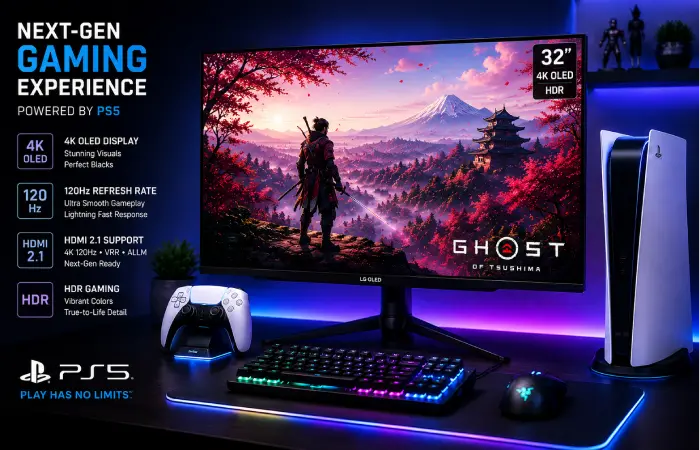
ASUS ROG Swift OLED PG32UCDM
ASUS ROG Swift OLED PG32UCDM is probably the most complete gaming monitor available to PlayStation 5 owners in 2025.
Combines high-end QD-OLED technology with innovative gaming capabilities to create stunning images and fluid gameplay across every genre.
Key Specifications
| Feature | Specification |
| Screen Size | 32 Inches |
| Resolution | 3840 × 2160 (4K UHD) |
| Panel | QD-OLED |
| Refresh Rate | 240Hz |
| Response Time | 0.03ms |
| HDR | DisplayHDR True Black 400 |
| HDMI | HDMI 2.1 |
| VRR | Supported |
Why It’s the Best Overall Choice
The PG32UCDM provides a superb performance/visual quality balance.
The OLED panel produces:
- Perfect black levels
- Exceptional contrast
- Rich, vibrant colors
- Excellent HDR performance
The games listed below, like Marvel’s Spider-Man 2, Horizon Forbidden West, Gran Turismo 7 and God of War Ragnarök, all look outstanding on this screen.
The monitor’s HDMI 2.1 ports all support the gaming features of the PlayStation 5, allowing for 4K gaming at up to 120Hz with VRS.
Gaming Experience
Action Games
Rapid response times allow for clear visibility during combat at high speed and rapid camera adjustments.
Racing Games
Help make tracks, reflections, and even weather even more lifelike with HDR lighting and Deep Contrast.
RPG and Open-World Games
The monitor’s brilliant colors, excellent 4K resolution, and OLED contrast make large environments a pleasure to work in.
Pros
- Outstanding OLED image quality
- Native 4K resolution
- HDMI 2.1 support
- Excellent HDR performance
- Near-instant response time
- Premium build quality
- Wide color gamut
Cons
- Premium price
- Needs to utilize the standard measures to prevent OLED burn-in, which includes the application of good software practices
- More expensive than IPS though in many contexts this could be seen as a positive:…
Best For
This monitor is ideal for:
- Possibilities for PlayStation 5 owners who are looking for the best overall experience
- Gamers who encompass both competitive and cinematic titles
- For those who intend to connect a PS5 and a gaming PC.
- Long-term premium display seekers.
Overall Rating
| Category | Rating |
| Gaming Performance | ⭐⭐⭐⭐⭐ |
| HDR Quality | ⭐⭐⭐⭐⭐ |
| Image Quality | ⭐⭐⭐⭐⭐ |
| Console Compatibility | ⭐⭐⭐⭐⭐ |
| Value for Money | ⭐⭐⭐⭐☆ |
Is It Worth Buying?
If you’re after a premium monitor that truly harnesses the power of your PlayStation 5, the ASUS ROG Swift OLED PG32UCDM is one of the best choices in 2025. The model’s OLED screen, HDMI 2.1, 4K resolution and first-class gaming performance make it a great investment for dedicated console players.
Best Budget Gaming Monitor for PS5
You don’t have to spend flagship money to get a great PS5 gaming experience. There are a few mid-range monitors which now have all the features you need, such as HDMI 2.1 support, 4K resolution, and low input lag for a much lower price.
The Gigabyte M32U is still one of the best affordable gaming monitors for PS5 in 2025.
Gigabyte M32U
Overall, the Gigabyte M32U provides a good balance of gaming performance, image quality, and productivity features, and is one of the best-value monitors available.
Unlike many budget monitors, it has HDMI 2.1 support, so PlayStation 5 owners can take advantage of 4K gaming at up to 120Hz without sacrificing image quality.
Key Specifications
| Feature | Specification |
| Screen Size | 31.5 Inches |
| Resolution | 3840 × 2160 (4K UHD) |
| Panel | IPS |
| Refresh Rate | 144Hz |
| Response Time | 1ms GTG |
| HDR | DisplayHDR 400 |
| HDMI | HDMI 2.1 |
| VRR | Supported |
Why It’s a Great Value
The M32U delivers nearly every feature most PS5 gamers need:
- Native 4K resolution
- HDMI 2.1 support
- 120Hz compatibility
- Low input lag
- Wide color gamut
- Ausb hub with KVM switch
For gamers who also use a laptop or desktop PC, the built-in KVM makes switching between them a breeze.
Pros
- Outstanding value for money
- HDMI 2.1 support
- Excellent color accuracy
- Low input lag
- Sharp 4K IPS display
- Great productivity monitor
Cons
- Basic HDR performance
- Contrast isn’t as good as OLED.
- Average black levels in a dark room
Best For
- Budget-conscious PS5 gamers
- Students
- Mixed gaming and productivity
- First-time 4K monitor buyers
Overall Rating
| Category | Rating |
| Gaming Performance | ⭐⭐⭐⭐☆ |
| Image Quality | ⭐⭐⭐⭐☆ |
| Console Compatibility | ⭐⭐⭐⭐⭐ |
| Value | ⭐⭐⭐⭐⭐ |
Best Premium OLED Monitor for PS5
If image quality is your top priority, then OLED is the best choice, still leading the way.
The LG UltraGear 32GS95UE is the best premium gaming monitor for your PS5 and a high-end gaming PC.
LG UltraGear 32GS95UE
LG offers top-notch OLED visuals paired with some of the best features in a console game, making it easily one of the most immersive experiences you can have with a console.
Key Specifications
| Feature | Specification |
| Screen Size | 32 Inches |
| Resolution | 3840 × 2160 |
| Panel | OLED |
| Refresh Rate | 240Hz |
| Response Time | 0.03ms |
| HDR | DisplayHDR True Black 400 |
| HDMI | HDMI 2.1 |
Why Gamers Love It
OLED technology provides:
- Perfect black levels
- Infinite contrast
- Rich HDR performance
- Exceptional motion clarity
- Extremely fast pixel response
Games that are story-oriented titles like God of War Ragnarök, The Last of Us Part I, Marvel’s Spider-Man 2, and Ghost of Tsushima Director’s Cut all gain a significant advantage from OLED’s image quality.
Pros
- Outstanding HDR
- Incredible contrast
- Near-instant response time
- Premium build quality
- Excellent HDMI 2.1 implementation
Cons
- Expensive
- Requires basic OLED care
Best For
- Cinematic gaming
- HDR enthusiasts
- Premium gaming setups
- Long-term investment
Best 1440p Gaming Monitor for PS5
Even though the PlayStation 5 provides 4K output, most gamers prefer 1440p displays, as they deliver a very good image and are much cheaper.
The best of these options is the LG UltraGear 27GR95QE.
LG UltraGear 27GR95QE
This 24-inch QHD OLED/4K monitor packs a punch with its high refresh rates and outstanding picture quality.
Key Specifications
| Feature | Specification |
| Screen Size | 27 Inches |
| Resolution | 2560 × 1440 |
| Panel | OLED |
| Refresh Rate | 240Hz |
| Response Time | 0.03ms |
| HDR | DisplayHDR True Black |
| HDMI | HDMI 2.1 |
Why It’s a Great PS5 Choice
Supports native 1440p output for gamers looking for responsiveness without sacrificing sharpness, this is a good choice.
Benefits include:
- – Affordability is less expensive than the best 4K monitors.
- Excellent OLED quality
- HDMI 2.1 support
- Superb gaming performance
Pros
- Excellent OLED image quality
- Sharp QHD resolution
- Fast response times
- Strong HDR performance
Cons
- A screen smaller than many other 4K options
- Premium for a 1440p monitor
Best For
- Competitive console gaming
- Smaller gaming setups
- Gamers upgrading from 1080p
Best Large-Screen Gaming Monitor for PS5
Some gamers favor a larger screen for immersion in games such as open-world, racing, or cinematic titles.
The Samsung Odyssey Neo G8 is another fantastic large-screen choice.
Samsung Odyssey Neo G8
The combination of outstanding brightness and easy-to-count benefits of Samsung’s Mini-LED.
Specifications
| Feature | Specification |
| Screen Size | 32 Inches |
| Resolution | 3840 × 2160 |
| Panel | Mini-LED |
| Refresh Rate | 240Hz |
| HDR | HDR2000 |
| HDMI | HDMI 2.1 |
Advantages
The Neo G8 excels in:
- HDR brightness
- Contrast
- Color reproduction
- Immersive gaming
The Mini-LED backlighting produces brighter highlights than many OLED panels and very good picture quality.
Pros
- Outstanding HDR
- Bright display
- Excellent gaming performance
- Premium build quality
Cons
- Premium pricing
- Aggressive screen curvature may not be suitable for everyone
Best For
- Racing games
- Open-world adventures
- HDR gaming
- Large gaming desks
Best Value HDMI 2.1 Gaming Monitor
If HDMI 2.1 support is by far your most important feature and you’re not heading down the flagship route, then the Acer Predator XB323QK is worth a good long look.
Acer Predator XB323QK
This monitor offers a great balance of gaming performance, picture quality, and value for money.
Key Specifications
| Feature | Specification |
| Screen Size | 32 Inches |
| Resolution | 3840 × 2160 |
| Panel | IPS |
| Refresh Rate | 160Hz |
| HDR | DisplayHDR 600 |
| HDMI | HDMI 2.1 |
Why It’s Worth Considering
The XB323QK encompasses all the key features of the PlayStation 5 cost-efficiently, compared to expensive flagship OLED monitors.
It offers:
- 4K gaming
- HDMI 2.1
- VRR compatibility
- Excellent color accuracy
- Strong HDR performance
Pros
- Good combination of price and features
- Excellent PS5 compatibility
- Sharp 4K display
- Reliable IPS panel
Cons
- HDR cannot match OLED
- Lower contrast than Mini-LED
Best For
- Most PlayStation 5 owners
- Gamers switching from older monitors
- Shoppers interested in high-end features at a more affordable price
Best PS5 Gaming Monitors by Category
Each gamer’s priorities are different.
| Category | Recommended Monitor |
| Best Overall | ASUS ROG Swift OLED PG32UCDM |
| Best Budget | Gigabyte M32U |
| Best Premium OLED | LG UltraGear 32GS95UE |
| Best 1440p | LG UltraGear 27GR95QE |
| Best Large Screen | Samsung Odyssey Neo G8 |
| Best HDMI 2.1 Value | Acer Predator XB323QK |
What PS5 Gaming Monitor Should You Buy?
Your perfect monitor ultimately depends on the money you have to spend and your gaming preferences.
Choose ASUS ROG Swift OLED PG32UCDM if:
- You are looking for the best overall PS5 monitor.
- You also own a gaming PC.
- Budget is not your biggest concern.
Gigabyte M32U if:
- You want excellent value.
- You need HDMI 2.1.
- I also use the monitor to do work/study.
Choose LG UltraGear 32GS95UE if:
- You want high-end OLED image quality.
- Your goal is HDR performance.
- The kinds of games you like best are single-player games.
LG UltraGear 27GR95QE if:
- You prefer an even larger screen of 27”.
- You’re after a premium 1440p gaming experience.
- It’s all about gaming competitively.
Choose Samsung Odyssey Neo G8 if:
- You enjoy immersive gaming.
- HDR brightness is important.
- You favor larger screens.
Choose Acer Predator XB323QK if:
- Begs for a good compromise between price and performance.
- You require the full HDMI 2.1.
- You’re going to have this monitor forever.
PS5 Monitor Recommendations: Final Thoughts Before Buying
Before purchasing, consider:
- Your available budget
- Whichever you prefer; 4K or 1440p
- What games do you play most, either the type or the specific games?
- Screen size
- HDR quality
- Long-term upgrade plans
A quality gaming monitor will (or should) stay in your setup across several generations of consoles, making it one of the best long-term investments a PlayStation gamer can make.
HDMI 2.1 Explained: Why It Matters for PS5 Gaming
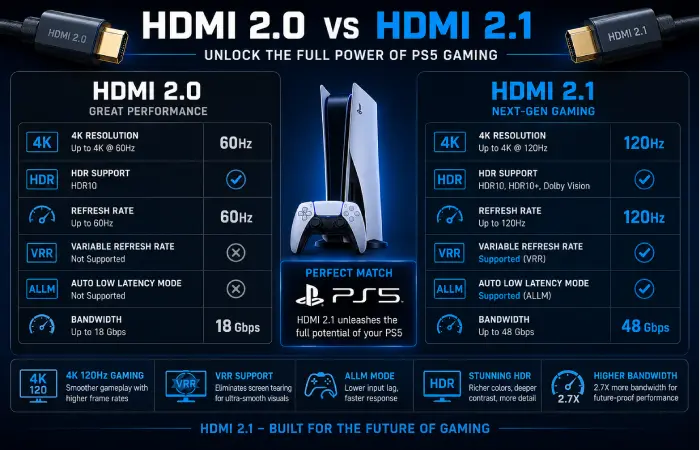
The first difference between a typical monitor and a PlayStation 5 monitor is HDMI 2.1 support. The PS5 is compatible with older HDMI standards, but you won’t be able to enjoy all the gaming features.
If you’re purchasing a monitor for PlayStation 5, make sure that HDMI 2.1 is one of the main considerations.
What Is HDMI 2.1?
Supported HDMI 2.1. The newest (or latest) HDMI standard supported in the PlayStation 5
The bandwidth is much greater than HDMI 2.0 can support, enabling the console to output higher resolutions and refresh rates, along with advanced gaming technology.
Key Benefits
- 4K gaming (at up to 120Hz)
- Variable Refresh Rate (VRR)
- Auto Low Latency Mode (ALLM)
- Increased Bandwidth for HDR content
- Improved overall gaming performance
Many of these features are not available, or are only limited, without HDMI 2.1.
Comparison of HDMI 2.0 and HDMI 2.1
| Feature | HDMI 2.0 | HDMI 2.1 |
| Maximum Resolution | 4K 60Hz | 4K 120Hz |
| Bandwidth | 18 Gbps | 48 Gbps |
| Variable Refresh Rate | Limited | Supported |
| Auto Low Latency Mode | No | Yes |
| HDR Support | Yes | Enhanced |
| Best for PS5 | Good | Excellent |
Verdict: If you’re buying a new monitor for your PlayStation 5, it is definitely worth the extra money to go with HDMI 2.1, as it lets you take advantage of everything the console has to offer.
PS5 4K vs 1440p
Another popular question is whether to go for a 4K or 1440p gaming monitor.
Both resolutions run fine on the PlayStation 5, though they each have their own benefits:
4K Gaming
It is a 4K monitor. Offers the best quality image the PS5 can produce.
Advantages
- Maximum visual detail
- Sharper textures
- Better HDR presentation
- More immersive gaming
- Ideal for large displays
Best For
- Story-driven games
- Open-world adventures
- Racing games
- Sports games
- Single-player experiences
1440p Gaming
The PlayStation 5 supported native 1440p output, which put QHD monitors on an equal footing with 4K.
Advantages
- Lower purchase price
- Excellent image quality
- Smaller desk setups
- Great value
Best For
- Competitive gaming
- Multiplayer games
- Budget-conscious buyers
- Smaller gaming rooms
4K vs 1440p Comparison
| Feature | 1440p | 4K |
| Image Sharpness | Excellent | Outstanding |
| Cost | Lower | Higher |
| HDR Experience | Good | Better |
| Competitive Gaming | Excellent | Excellent |
| Story Games | Very Good | Outstanding |
| Long-Term Value | Excellent | Excellent |
Which Should You Choose?
Select 4K if you want the ultimate visual experience and can afford a high-end monitor.
Select 1440p if you want the best gaming experience at a low price point and aren’t concerned about a few bits of image quality.
Understanding Variable Refresh Rate (VRR)
Variable Refresh Rate is one of the most exciting gaming features of the PlayStation 5.
Rather than commanding the monitor to update at a fixed rate, the VRR system adjusts the monitor’s refresh rate to match the console’s frame rate.
Benefits
- Eliminates screen tearing
- Reduces stuttering
- Produces smoother gameplay
- Improves motion clarity
- Is likely to provide a more consistent gaming experience.
Most current PC5 games that VR5 supports automatically make use of VR(R P.
Auto Low Latency Mode (ALLM)
ALLM automatically puts your monitor into its ultra-low-latency gaming mode when a PlayStation 5 is detected.
Benefits
- Lower input lag
- Faster controller response
- Reduced processing delay
- Better competitive gaming performance
In the absence of ALLM, picture modes have to be changed manually again and again.
HDR for PlayStation 5
High Dynamic Range greatly enhances the visual quality of supported games.
Instead of only raising the overall brightness, HDR also widens the tones of the darkest and brightest parts of an image and reproduces true-to-life colors.
Benefits
- Brighter highlights
- Richer colors
- Better shadow detail
- Improved realism
- Enhanced cinematic experience
The following games, including Marvel’s Spider-Man 2, Horizon Forbidden West, Gran Turismo 7, and Ratchet & Clank: Rift Apart, demonstrate HDR effectively.
HDR Certifications
Not all HDR-enhanced monitors will provide you with the same experience.
| Certification | Quality |
| DisplayHDR 400 | Entry-Level |
| DisplayHDR 600 | Good |
| DisplayHDR 1000 | Excellent |
| DisplayHDR True Black | Premium OLED |
If HDR matters to you, look for DisplayHDR 600 or more.
Response Time and Input Lag
These two claims are not interchangeable and are targeted at two quite different things:
Response Time
Response time is the number of seconds it takes for pixels to change color.
Lower response times reduce:
- Motion blur
- Ghosting
- Smearing
1ms or lower should be used for gaming.
Input Lag
Input lag is the delay between you pressing a button on your controller and seeing the result onscreen.
Lower input lag creates:
- Faster reactions
- More responsive gameplay
- Better competitive performance
Most current gaming monitors far surpass conventional televisions in this regard.
Choosing the Right Screen Size
The perfect-size monitor is very much a matter of personal preference; some people prefer a large screen, while others prefer a relatively small one. It actually depends on how much space you have on your desk and how far you will sit from the monitor.
| Screen Size | Best For |
| 27 Inches | Competitive gaming, small desks |
| 32 Inches | Best overall balance |
| 42 Inches | Maximum immersion |
Generally, the best compromise for most PlayStation 5 owners is a 32-inch monitor, which strikes a balance between immersion and resolution.
Common Mistakes When Buying a PS5 Gaming Monitor
Help yourself avoid making these common mistakes so you don’t end up picking the wrong monitor again.
Buying Without HDMI 2.1
The majority (80%) of buyers purchase older HDMI 2.0 monitors.
Though they do support PS5, they don’t support 4 K gaming at 120 Hz.
Paying for Refresh Rates You Can’t Use
The PlayStation 5 currently outputs a maximum of 120Hz.
Purchasing a 360Hz monitor for console gaming only doesn’t really yield any practical benefit unless you also own a high-end gaming computer.
Ignoring HDR Quality
Many low-cost monitors claim to support HDR but lack the brightness or local dimming needed to make a difference.
Always pick monitors that are officially DisplayHDR-certified whenever possible.
Choosing the Wrong Panel
The various panel technologies cater to different gamers.
- IPS: brilliant quality and accurate colors.
- OLED: The best image quality and response times.
- Mini-LED: Outstanding HDR brightness.
- VA: good contrast. It’s great for cinematic gaming.
Forgetting Future Upgrades
Often, a quality monitor outlives one console generation.
Going for HDMI 2.1, VRR support, and a high-end panel today will ensure it can handle new hardware in the years to come.
Expert Buying Recommendations
For Competitive Multiplayer Gamers
Prioritize:
- HDMI 2.1
- Low input lag
- Fast response times
- VRR support
For Story-Driven Games
Choose:
- 4K resolution
- OLED or Mini-LED panel
- Strong HDR performance
For Budget Buyers
Look for:
- IPS panel
- HDMI 2.1
- 120Hz support
- Reliable color accuracy
For Mixed Console and PC Gaming
Select a monitor with:
- DisplayPort
- HDMI 2.1
- High refresh rate
- Adaptive Sync support
Gives you the option to customize it should you later choose to assemble or upgrade a gaming PC.
Building the Perfect PS5 Gaming Setup
A good monitor is only one element of a fun gaming experience.
Consider pairing your monitor with:
- A height-adjustable monitor arm
- A quality gaming headset
- Comfortable gaming chair
- Surge protector or UPS
- Ambient lighting is appropriate to minimize eye strain
- Examples of cable management equipment for a cleaner arrangement
Having an organized gaming room not only adds to your comfort when gaming for hours at a stretch but also helps you make the best use of your PlayStation 5 and new gaming display.
Frequently Asked Questions
What PS5 gaming monitor is the best in 2025?
The ASUS ROG Swift OLED PG32UCDM is one of the top gaming displays for the PS5 in 2025, offering a great combination of a 4 K QD-OLED screen, HDMI 2.1, 120Hz PlayStation 5 compatibility, excellent HDR, and extremely quick response times, ideal for eSports and cinematic gaming.
Do I require HDMI 2.1 for PS5?
Yes, if you want to enjoy the full extent of the PlayStation 5.
HDMI 2.1 enables:
- 4K gaming, supported up to 120Hz
- Variable Refresh Rate (VRR)
- Auto Low Latency Mode (ALLM)
- Improved HDR performance
- Higher bandwidth
If you don’t go for HDMI 2.1, you’ll miss out on some of the console’s most advanced gaming features.
Is a 1440p monitor good for PS5?
Yes. Native 1440p is supported by the PlayStation 5.
A quality QHD gaming monitor offers:
- Sharp image quality
- Cheaper than most 4K displays. Original: The cost is lower than most 4K displays
- Excellent performance
- High refresh rates
1440p offers a great mix between cost and look for many gamers.
Is a 4K monitor more suitable than a TV for PS5?
Really, your play style.
Gaming monitors generally provide:
- Lower input lag
- Faster response times
- Better motion clarity
- Higher refresh rates
A bigger TV provides a more cinematic experience. Monitors are generally better for competitions and for sitting at a desk.
Are OLED‘s recommended for PlayStation 5?
If the budget allows, then OLED is one of the top display for PS5 gaming.
Benefits include:
- Perfect black levels
- Outstanding HDR
- Extremely fast response times
- Incredible image quality
Otherwise, OLED is most suitable for cinematic type games with elaborate lighting and dark backgrounds.
Conclusion
Opting for one of the best gaming monitors for PS5 is an inarguably effective way to enhance your console gaming experience. The PlayStation 5 can deliver great graphics and smooth gameplay on many screens, but a dedicated gaming monitor enables you to take advantage of 4 K 120Hz, Variable Refresh Rate, HDR, and Auto Low Latency Mode.
If you’re a gamer after the best possible image quality, then don’t look past the high-end OLED monitors, which have great contrast, vivid colors, and a very fast, almost instant response time. For those on a budget, then the latest IPS panels still offer great performance, accurate colours, and complete HDMI 2.1 support. If HDR brightness is key though, Mini-LED displays are a great choice.
Think about your budget, the size of screen you want, how much you play and how much room you have on your desk before buying. As long as you buy a monitor that guarantees you access to the features of the current PlayStation 5 and will work with the next gaming console, you will always have a excellent product.
If you‘re keen on multiplayer competitions, simply want to enjoy a vast openworld, or continue creating a dream PS5 gaming setup, finding an ideal monitor will make a difference.
Best Gaming Monitors 2025 Hub
Discover the best gaming monitors of 2025, including 4K gaming monitors, 1440p displays, PS5-compatible monitors, Xbox Series X monitors, and budget-friendly gaming screens under $200 and $500.
