


Best 1440p Gaming Monitors 2025: Top QHD Displays for Every Gamer
Table of Contents
Introduction
Deciding on the top 1440p gaming monitors in 2025 represents one of the most worthwhile enhancements one can install in their gaming system. Covering the 1440p resolution (known as QHD), a 1440p monitor will provide considerably better image clarity than a 1080p display while being far easier to run than a 4K display, making it the standard resolution of choice for the modern PC gamer.
We are approaching the days where 1440p is the golden mean between graphical fidelity and gamer performance. Various competitive multiplayer games including Counter-Strike 2 and Valorant, or open-world wonders like Cyberpunk 2077, or even simulators for the racing enthusiasts, you will find a good QHD gaming monitor smooths things out quite nicely.
Today‘s gaming market also offers numerous gaming monitors with various panel types (IPS, VA, OLED), refresh rates up to 360Hz, HDR support, adaptive sync technologies or HDMI 2.1 support. Having so many options available, selecting the best gaming monitor becomes even more difficult.
The ultimate selection of 1440p gaming monitors of 2025. Here our guide to the most popular gaming monitors of 2025, listing what makes each a great choice so you can get the right monitor for your graphics card, budget and gameplay style.
GADGETS HUB
This Article Is Part of the Gaming Gadgets Hub
Explore gaming laptops, gaming monitors, keyboards, mice, headsets, controllers, handheld consoles, accessories, buying guides, reviews, and performance tips inside our
Gaming Gadgets Hub.
Why Purchase a 1440p Gaming Monitor for 2025?
1440p has become the preferred resolution for a great many gamers. It is much sharper than 1080p, but eats significantly less GPU power than 4K this makes it an option for a much wider range of gaming PCs.
Sharper Image Quality
1440 p monitor has native resolution of 2560 × 1440 meaning it has 78% more pixels than a standard 1080 p monitor.
This results in:
- Sharper textures
- More detailed environments
- Cleaner corners with less aliasing
- Increase in users’ information literacy; Enhanced readability of the text and user interfaces;
- Better overall visual clarity
Anywho, be it the gigantic RPGs or the quick-playing shooters, you just can‘t help but notice the jump in detail.
Higher Frame Rates Than 4K
Although 4K renders the image brilliantly and has excellent image quality, the graphics processing power needed is also far higher.
A 1440p display allows many gaming PCs to achieve:
- Higher average frame rates
- Smoother gameplay
- Lower input latency
- Better competitive performance
For gamers with mid-range and upper mid-range graphics cards QHD is usually ideal due to its combination of speed and image quality.
Better Value for Money
A lot of 1440p gaming monitors have features you would expect on a flagship model, like for example:
- Refresh rates from 165Hz to 240Hz
- HDR support
- HDMI 2.1
- USB hubs
- Adaptive Sync
- Wide color gamut panels
The categories become more comparable for 1440p as there is a much broader range of prices, so it is one of the best values among gaming monitors for 1440p.
Excellent for Productivity
Beyond gaming, a QHD monitor offers additional workspace for:
- Video editing
- Programming
- Graphic design
- Streaming
- Office productivity
- Content creation
The expanded screen area makes multitasking easier without the graphics processing power of 4 K.
Quick Comparison of the Best 1440p Gaming Monitors 2025
| Monitor | Panel Type | Refresh Rate | HDR | Best For |
| ASUS ROG Swift PG27AQDM | OLED | 240Hz | DisplayHDR True Black | Best Overall |
| LG UltraGear 27GS95QE | OLED | 240Hz | DisplayHDR True Black | Competitive Gaming |
| Dell Alienware AW2725DF | QD-OLED | 360Hz | DisplayHDR True Black | Esports |
| Gigabyte M27Q X | IPS | 240Hz | DisplayHDR 400 | Best Value |
| MSI MAG 274QRF QD E2 | IPS | 180Hz | DisplayHDR 400 | Everyday Gaming |
| Samsung Odyssey G6 | VA | 240Hz | HDR600 | Curved Gaming |
Buying Tip: Gamers that mostly play competitive multiplayer games should begin by looking at refresh rate and response time. if spectator cinematic, you should pay attention to panel quality, HDR performance and colors.
Best Overall 1440p Gaming Monitor
ASUS ROG Swift PG27AQDM
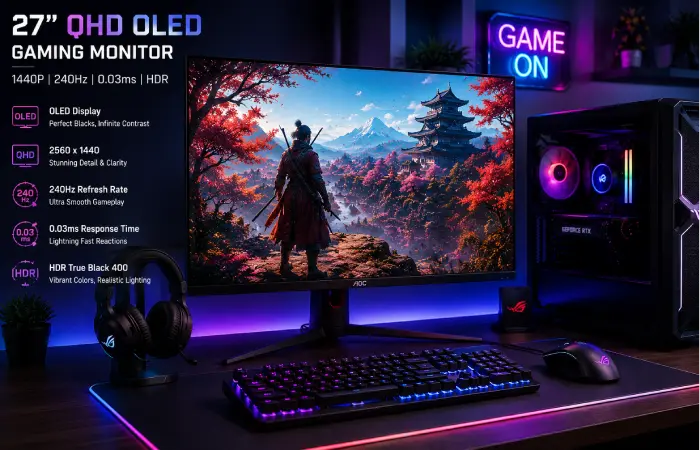
Top 1440p Gaming Monitor in 2025 – ASUS ROG Swift PG27AQDM. The ASUS ROG Swift PG27AQDM is another of the best 1440p gaming monitors, which blends the qualities of an OLED display and a 240Hz refresh rate for a great gaming experience.
Whether you’re an elite esports competitor or simply an enthusiast of AAA titles with loads of eye candy, this is one of the most well-rounded gaming monitors on the market right now.
Key Specifications
| Feature | Specification |
| Screen Size | 27 Inches |
| Resolution | 2560 × 1440 (QHD) |
| Panel | OLED |
| Refresh Rate | 240Hz |
| Response Time | 0.03ms |
| HDR | DisplayHDR True Black 400 |
| Adaptive Sync | AMD FreeSync Premium & G-SYNC Compatible |
| Connectivity | HDMI 2.0, DisplayPort 1.4, USB Hub |
Why It Stands Out
The OLED screen is the best I have ever seen though with pitch black blacks, great contrast and great looking colours making everything I have played and watched look fantastic.
The refresh rate of 240Hz is unbelievably smooth and the response time of 0.03ms (effectively instant) is what prevents ghosting and motion blur. On a monitor of this power, it is amazing to be able to play high-octane multiplayer competitive shooters like Valorant, Counter-Strike 2 and Overwatch 2 and visually demanding games like Red Dead Redemptio 2 and Alan Wake 2.
Furthermore, it also features AMD FreeSync Premium and NVIDIA G-SYNC Compatible, to ensure the best possible picture quality as well as smooth gaming experience without tears at any frame rates.
Gaming Performance
In real-world gaming, the PG27AQDM excels in several areas:
Competitive Gaming
A 240Hz refresh rate and OLED response times give extremely smooth motion and make fast paced shooters feel incredibly snappy.
Story-Driven Games
Game environments are visually heightened by the added depth and immersive effects higher-quality OLED screens can provide.
Open-World Adventures
Since the monitor has an excellent color accuracy and contrast, large areas with lots of textures, good light effects and beauty in general will be more realistic.
Pros
- Outstanding OLED image quality
- Instant refresh rate of 240Hz!
- Near-instant 0.03ms response time
- Excellent HDR performance
- Large color gamut with factory calibration
- Adaptive Sync support for AMD and NVIDIA GPUs
- Premium build quality: Ergonomic stand
Cons
- Prices were higher than IPS competitors
- OLED panel ( basic measures to prevent burn-in is also needed to ).
- Peak brightness is lower than some mini-LED monitors
Best For
The ASUS ROG Swift PG27AQDM is an excellent choice for:
- Competitive gamers
- AAA game enthusiasts
- Content creators
- Streamers
- High-end gaming PC owners
With its OLED technology, quick refresh rate, and superb motion resolution, this is one of the best all-around QHD gaming displays you can get today.
Overall Rating
| Category | Rating |
| Gaming Performance | ⭐⭐⭐⭐⭐ |
| Image Quality | ⭐⭐⭐⭐⭐ |
| HDR Performance | ⭐⭐⭐⭐⭐ |
| Motion Clarity | ⭐⭐⭐⭐⭐ |
| Value for Money | ⭐⭐⭐⭐☆ |
Is It Worth Buying?
If your pockets are deep enough, the ASUS ROG Swift PG27AQDM is the best long-term investment you can make for the salt and vinegar of PC gaming enthusiasts. It offers the latest OLED technology mixed with high-end gaming features, providing fantastic results in both competitive esports and aesthetically challenging AAA titles.
When it is not only one monitor that is highly recommended in almost all facets, then it is hard to beat this 1440p gaming monitor for 2025.
Best Budget 1440p Gaming Monitor
You don‘t need to splurge on a high-end gaming monitor to get the benefits of an exceptional QHD gaming experience. Many budget-oriented displays have recently added premium gaming attributes like high refresh rates, faithful colors, adaptive sync, and other gaming-centric features.
For most gamers, however, the Gigabyte M27Q X is still one of the best value-for-money 1440p gaming monitors in 2025.
Gigabyte M27Q X
The Gigabyte M27Q X is a combination of a sharp QHD IPS panel with a 240Hz refresh rate and is an appropriate choice for competitive gamers and everyday users.
Many budget monitors just make a bunch of cut backs to put the price down; the M27Q X manages to pack some top end specifications in for an affordable price point.
Key Specifications
| Feature | Specification |
| Screen Size | 27 Inches |
| Resolution | 2560 × 1440 |
| Panel Type | IPS |
| Refresh Rate | 240Hz |
| Response Time | 1ms GTG |
| HDR | DisplayHDR 400 |
| Adaptive Sync | AMD FreeSync Premium |
| Connectivity | HDMI 2.1, DisplayPort 1.4, USB Hub |
Why It‘s an Excellent Value
The M27Q X offers an unbeatable combination within the class it is in.
Gamers benefit from:
- Crisp QHD resolution
- Excellent color reproduction
- Smooth 240Hz gameplay
- Wide viewing angles
- Low input lag
- KVM enabled USB hub
The integrated KVM switch helps the user utilize to command various other devices on the computer using a common keyboard and a mouse and is more often than not useful in a workstation as well as for the while gaming(communicating with a computer).
Pros
- Outstanding value for money
- 240Hz refresh rate
- HDMI 2.1 support
- Accurate IPS colors
- Excellent gaming performance
- Built-in KVM switch
Cons
- HDR performance is basic
- Contrast is not as high as OLED or VA panels
- Average black uniformity
Best For
- Budget-conscious gamers
- Students
- First gaming PC builds
- Mixed productivity and gaming
Overall Rating
| Category | Rating |
| Gaming Performance | ⭐⭐⭐⭐⭐ |
| Image Quality | ⭐⭐⭐⭐☆ |
| HDR | ⭐⭐⭐☆☆ |
| Value | ⭐⭐⭐⭐⭐ |
Best Premium OLED QHD Gaming Monitor
If picture quality is a top priority then agamers should opt for an OLED screen.
The LG UltraGear 27GS95QE is one of the best quality premium QHD gaming monitors you can buy in 2025.
LG UltraGear 27GS95QE
LG‘s new OLED gaming monitor is an incredible product that delivers incredible contrast, speed, and high end gaming features all in one package.
Specifications
| Feature | Specification |
| Screen Size | 27 Inches |
| Resolution | 2560 × 1440 |
| Panel | OLED |
| Refresh Rate | 240Hz |
| Response Time | 0.03ms |
| HDR | DisplayHDR True Black 400 |
| HDMI | HDMI 2.1 |
Why Gamers Love It
OLED technology delivers:
- Perfect black levels
- Infinite contrast
- Rich HDR visuals
- Instant pixel response
- Incredible motion clarity
The best picture quality is provided by games in dark environments with cinematic lighting and HDR effects, which are best viewed using OLED.
Pros
- Outstanding image quality
- Incredible response times
- Exceptional HDR
- Premium design
- Excellent motion handling
Cons
- Premium price
- Sustained brightness lower than Mini-LED
- Requires basic OLED care
Best For
- AAA gaming
- Story-driven games
- HDR enthusiasts
- Premium gaming setups
Best Esports 1440p Gaming Monitor
When it comes to competitive gamers then nothing beats refresh rate and responsiveness.
The Dell Alienware AW2725DF is now regarded as one of the most popular displays on the market for professional gaming.
Dell Alienware AW2725DF
This QD-OLED monitor offers top-notch image quality backed up by one of the fastest refresh rates available today.
Specifications
| Feature | Specification |
| Resolution | 2560 × 1440 |
| Panel | QD-OLED |
| Refresh Rate | 360Hz |
| Response Time | 0.03ms |
| HDR | DisplayHDR True Black 400 |
Why It Excels
A 360Hz refresh rate provides exceptional motion clarity for fast-paced competitive titles such as:
- Counter-Strike 2
- Valorant
- Rainbow Six Siege
- Overwatch 2
- Apex Legends
Given the fast response times of the OLED screen gameplay seems very snappy.
Pros
- 360Hz refresh rate
- Near-instant response
- Outstanding OLED quality
- Excellent HDR
- Premium build quality
Cons
- Very expensive
- Benefits are most noticeable for competitive players
Best For
- Esports professionals
- Competitive FPS gamers
- High-end gaming PCs
Best Curved 1440p Gaming Monitor
Gaming on curved screens is more immersive, especially in racing simulators, flight simulators or open world games.
The Samsung Odyssey G6 is still the best curved QHD gaming screen in 2025.
Samsung Odyssey G6
Samsung has also not failed with its Odyssey line, maintaining good gaming performance with a more aggressive curve and refresh rates.
Specifications
| Feature | Specification |
| Screen Size | 32 Inches |
| Resolution | 2560 × 1440 |
| Panel | VA |
| Refresh Rate | 240Hz |
| HDR | HDR600 |
| Curvature | 1000R |
Advantages
The 1000R curve closely matches the natural field of view of the human eye, increasing immersion during gameplay.
Benefits include:
- Wider perceived field of view
- Better immersion
- Excellent contrast
- Smooth motion
- Strong HDR performance
Pros
- Immersive curved design
- Deep contrast
- Excellent HDR
- Fast refresh rate
- Strong gaming performance
Cons
- Viewing angles aren’t as wide as IPS
- Curved screen isn’t ideal for all productivity tasks
Best For
- Racing games
- Flight simulators
- Open-world adventures
- Immersive single-player experiences
Best 1440p Monitor for Content Creators
Some gamers do not solely use their monitors for playing games. Quite a few also edit videos, design graphics, run a streaming channel, or are working from home.
For mixed-use applications, the MSI MAG 274QRF Q D E2 is a great choice.
MSI MAG 274QRF QD E2
This monitor combines gaming performance with professional-grade color accuracy.
Specifications
| Feature | Specification |
| Screen Size | 27 Inches |
| Resolution | 2560 × 1440 |
| Panel | Rapid IPS |
| Refresh Rate | 180Hz |
| Color Coverage | Wide Color Gamut |
| HDR | DisplayHDR 400 |
Why It’s Ideal
The Rapid IPS panel provides:
- Excellent factory calibration
- Wide color coverage
- Smooth gaming performance
- Sharp text rendering
This makes it suitable for:
- Photo editing
- Video editing
- Graphic design
- Streaming
- Gaming
Pros
- Excellent color accuracy
- Fast refresh rate
- Comfortable for long work sessions
- Great productivity monitor
Cons
- HDR is average
- Not as fast as OLED displays
Best For
- Content creators
- Designers
- Streamers
- Gamers who also work from home
Best QHD Gaming Monitors by Category
Different gamers have different priorities.
| Category | Recommended Monitor |
| Best Overall | ASUS ROG Swift PG27AQDM |
| Best Budget | Gigabyte M27Q X |
| Best Premium OLED | LG UltraGear 27GS95QE |
| Best Esports | Dell Alienware AW2725DF |
| Best Curved | Samsung Odyssey G6 |
| Best for Productivity | MSI MAG 274QRF QD E2 |
Which 1440p Gaming Monitor Should You Buy?
The right monitor certainly is a matter of your gaming habits, your setup and your wallet.
Choose ASUS ROG Swift PG27AQDM if:
- Who doesn‘t wantthe best all-round gaming experience?
- How many hours a week do you play games? You tend to play a mixture of competitive and AAA titles.
- Your main concern should not be money; it is more important to choose the right one.
Gigabyte M27Q X if:
- You want maximum value.
- You need a monitor for both gaming and work.
- You prefer IPS technology.
Choose LG UltraGear 27GS95QE if:
- You want premium OLED visuals.
- HDR performance is important.
- You enjoy cinematic gaming.
Dell Alienware AW2725DF if:
- You play competitive esports titles.
- You have a powerful gaming PC.
- You want the highest refresh rate available.
Choose Samsung Odyssey G6 if:
- You enjoy immersive single-player games.
- You prefer curved displays.
- You play racing and simulation games.
Choose MSI MAG 274QRF QD E2 if:
- You split your time between gaming and creative work.
- Color accuracy matters as much as gaming performance.
- You need a balanced everyday monitor.
1440p Monitor Reviews: Final Thoughts Before Buying
When comparing QHD gaming monitors, don’t focus solely on specifications.
Think about:
- Your graphics card’s performance
- The types of games you play most
- Whether you also use the monitor for work or content creation
- Your available desk space
- Long-term upgrade plans
A 1440p gaming display of this caliber will average well over three years of use while still working as a solid investment. For gamers that try to aim for the best compromise of price, image quality, and performance it is quite possibly a best buy.
IPS vs VA vs OLED Which Panel Is Best 1440p Gaming?
So you choose the perfect resolution, refresh rate and now you need to choose the right panel technology. While all three technologies (IPS, VA and OLED) can be used to make a great gaming monitor, each is better suited for certain types of gamers.
Knowing these distinctions will allow you to buy a monitor that fits your gaming practice and long-term plans.
IPS Gaming Monitors
The reasons that IPS (In-Plane Switching) panels are the favorite of gamers is that they strike the right compromise on cost, performance and image quality.
Advantages
- Excellent color accuracy
- Wide viewing angles
- Fast response times
- Good brightness
- Great for both gaming and working!
Disadvantages
- Lower contrast than oled and va
- Blacks seem gray in dark rooms.
- The HDR performance is influenced by the quality of the backlight.
Best For
- Everyday gaming
- Competitive gaming
- Photo editing
- Video editing
- Productivity
VA Gaming Monitors
VA (Vertical Alignment) panels focus on delivering better contrast than IPS displays.
This makes them popular among gamers who enjoy darker environments and cinematic games.
Advantages
- Excellent contrast ratio
- Deep black levels
- Good HDR experience
- Affordable pricing
Disadvantages
- Slower pixel response than IPS and OLED
- Minor ghosting in some fast-moving games
- Narrower viewing angles
Best For
- RPG games
- Open-world adventures
- Racing simulators
- Movie watching
OLED Gaming Monitors
OLED has become the premium choice for gaming monitors.
Unlike passively illuminated LCD panels OLED can illuminate each pixel independently resulting in blacker-than-black imagery and far greater contrast.
Advantages
- Perfect blacks
- Infinite contrast
- Outstanding HDR
- Extremely fast response time
- Exceptional motion clarity
- Vibrant colors
Disadvantages
- Premium price
- Lower sustained brightness than Mini-LED
- Requires basic burn-in prevention
Best For
- AAA gaming
- HDR gaming
- High-end gaming PCs
- Premium gaming setups
Panel Comparison Table
| Feature | IPS | VA | OLED |
| Color Accuracy | Excellent | Very Good | Excellent |
| Contrast | Good | Excellent | Outstanding |
| Black Levels | Good | Excellent | Perfect |
| HDR | Good | Very Good | Excellent |
| Response Time | Excellent | Good | Outstanding |
| Viewing Angles | Excellent | Good | Excellent |
| Burn-in Risk | None | None | Low |
| Price | Moderate | Moderate | Premium |
Which Panel Should You Choose?
Choose IPS if:
- You want the best overall value.
- You use your monitor for both gaming and work.
- Color accuracy is important.
If Choose VA:
- You enjoy immersive single-player games.
- You watch movies on your monitor.
- Deep contrast matters more than response time.
Choose OLED if:
- You want the best gaming experience available.
- HDR quality is a priority.
- You have a premium budget.
1440p vs 4K Gaming: Which Resolution Should You Choose?
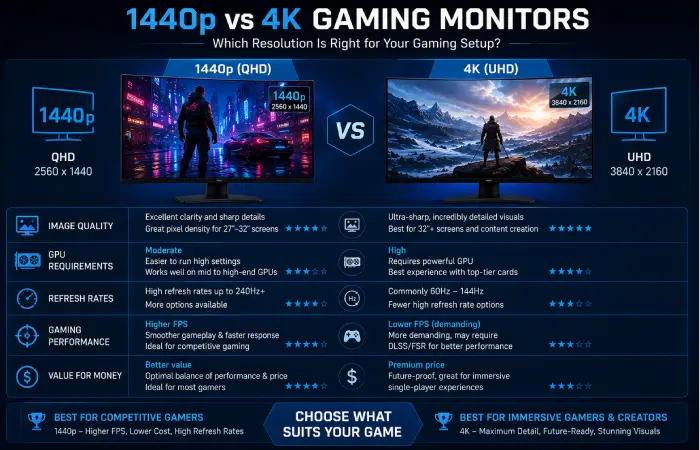
One of the most common questions gamers ask is whether to buy a 1440p or a 4K gaming monitor.
The answer depends on your hardware, budget, and gaming preferences.
Image Quality
4K monitors offer approximately four times the pixel count of Full HD and significantly more detail than 1440p.
However, QHD still provides a sharp image while requiring far less graphics processing power.
Performance
Because 1440p contains fewer pixels, your graphics card can render games much faster.
Benefits include:
- Higher frame rates
- Lower GPU load
- Better competitive performance
Hardware Requirements
| Resolution | Recommended GPU |
| 1080p | RTX 4060 / RX 7600 |
| 1440p | RTX 4070 Super / RX 7800 XT |
| 4K | RTX 4080 Super / RTX 4090 / RX 7900 XTX |
Competitive Gaming
Most esports players prefer:
- 1440p
- 240Hz+
- Lower latency
- Higher frame rates
Competitive games benefit more from smooth gameplay than maximum resolution.
Story-Driven Games
Games such as:
- Cyberpunk 2077
- Alan Wake 2
- Red Dead Redemption 2
Looks stunning at 4K.
If the visual quality is the most critical thing to you and your PC has enough muscle, then 4K might be worth it.
Comparison Table
| Feature | 1440p | 4K |
| Image Sharpness | Excellent | Outstanding |
| GPU Requirement | Moderate | High |
| Frame Rates | Higher | Lower |
| Competitive Gaming | Excellent | Good |
| AAA Gaming | Excellent | Outstanding |
| Price | Lower | Higher |
| Value | Excellent | Very Good |
Verdict
For the majority of PC gamers in 2025, 1440p will be the sweet spot of performance and image quality, while still being affordable. It gives new graphics cards extra frames per second compared to a Full HD resolution, without having a blurry image.
Understanding Refresh Rates
Refresh rate how many times a second can your monitor update the image.
A higher refresh rate will smooth out gameplay; be more responsive.
144Hz
Ideal for:
- Most gamers
- AAA titles
- Entry-level competitive gaming
165Hz
A little bit smoother motion than the 144Hz, is which is regularly seen now in higher end gaming displays.
240Hz
Recommended for:
- Competitive FPS players
- High-end gaming PCs
- Fast-paced multiplayer games
360Hz
Made for the best professional Esports players.
The advantages are most apparent when combined with very high frame rates.
Refresh Rate Comparison
| Refresh Rate | Best For |
| 144Hz | General gaming |
| 165Hz | Enthusiast gaming |
| 240Hz | Competitive gaming |
| 360Hz | Professional esports |
Important Features to Consider
HDMI 2.1
While more prevalent on 4K displays, HDMI 2.1 is starting to be found on high-end QHD screens.
Benefits include:
- Higher bandwidth
- Better console compatibility
- VRR support
- Future-ready connectivity
DisplayPort
One of the main reasons PC gaming still uses the DisplayPort connection is because it allows for higher refresh rates as well as newer features such as gaming.
Adaptive Sync
Adaptive Sync helps eliminate:
- Screen tearing
- Stuttering
- Input lag
Most premium gaming monitors support:
- AMD FreeSync Premium
- NVIDIA G-SYNC Compatible
HDR
A monitor with good HDR support offers:
- Brighter highlights
- Better contrast
- Improved color depth
Search for DisplayHDR certified instead of just “HDR Compatible.”
Common Mistakes When Buying a 1440p Gaming Monitor
Buying Based Only on Refresh Rate
A 360Hz monitor isn‘t right for you if your PC can‘t run enough frames.
Don‘t overshoot; try to find a balance between refresh rate and your graphics card.
Ignoring Panel Technology
The panel influences image quality equally to refresh rate.
Do not concentrate solely on specs.
Choosing the Wrong Size
Most QHD gaming systems have a 27-inch display as their perfect size.
A larger screen may require more desk space and viewing distance.
Paying for Features You Won‘t Use
Some expensive gaming monitors have features which hardcore gamers will likely never use but casual gamers may pay for.
Make your purchase on the basis of the gaming that you really do. Don‘t buy on publicity.
Ignoring Ergonomics
Look for a monitor stand that supports:
- Height adjustment
- Tilt
- Swivel
- Pivot
Comfort becomes more and more important in long-lasting gaming sessions.
Expert Buying Recommendations
For Competitive Gamers
Prioritize:
- 240Hz or higher
- Fast response times
- Adaptive Sync
- IPS or OLED panels
For AAA Gaming
Choose:
- OLED or VA
- Strong HDR performance
- Larger display sizes
For Mixed Gaming and Productivity
Select:
- IPS panel
- Excellent color accuracy
- Ergonomic stand
- USB hub
For Budget Builds
Look for:
- IPS panel
- 165Hz refresh rate
- FreeSync support
- Reliable build quality
These features give a great gaming experience with fairly low budget.
Ultimately, the best QHD gaming monitor is one that fits your system, your gaming style and the way you use your monitor on a daily basis. By selecting the right monitor for your needs, you will be happy with your buy for years to come.
Frequently Asked Questions
Is 1440p superior to 1080p for gaming?
Yes. A 1440p screen will look way sharper than a 1080p one, because it has around 78% more pixels. Games look better, things are sharper and text is easy to read. If your graphics card can comfortably play at QHD then it‘s definitely worth seriously upgrading your screen.
Will 1440p provide a superior gaming experience to 4K?
For a lot of gamers, yes. The thing is, 4 K is definitely better looking, but 1440p is a much more balanced experience with clear upside performance wise. Today‘s mid-range and high-midrange graphics cards can push much higher framerates than 60fps at 1440p.
What is the best 1440p gaming monitor of 2025?
The ASUS ROG Swift PG27AQDM is easily one of the best all-round options due to the OLED panel, 240Hz refresh rate, close-to-zero response time, superb HDR capabilities and adaptive sync compatibility.
What size of a 1440p gaming monitor should I get?
For most gamers:
| Screen Size | Recommended Use |
| 24 Inches | Played in a LAN setting, limited desk space to work with. |
| 27 Inches | Best overall balance |
| 32 Inches | Immersive gaming and productivity |
| 34 Inches Ultrawide | Simulation, racing, and multitasking |
A 27” QHD screen is still the choice for many because it‘s got a perfect pixel density and it will most likely fit on your desk.
Gaming Monitor How long does a monitor last?
Gaming monitors of a good quality should last around 7-10 years. Purchasing a monitor with new-age connections, adaptive sync, high quality panel will allow you to use it for quite a few PC or console upgrades.
Conclusion
The best 1440p gaming monitors in 2025 continue to provide one of the most powerful balance of performance, picture quality and cost for gamers. While 4K gaming is now very much in reach, QHD is still the resolution of choice for many gamers as it provides the level of detail we require, without demanding as much from our graphics hardware.
Whether you are a competitive esports player wanting ultra-high refresh rates, a high-end enthusiast demanding OLED image quality, or simply someone in need of a versatile monitor for gaming and work, a QHD display exists to meet your requirements.
Consider your graphics card, how many games you want to play, the size of the room on your desk, and whether you are upgrading in the next couple of years. Features such as the refresh rate, panel technology, adaptive sync, HDR, and ergonomic adjustments will be much more important than models/manufacturer specs.
The screen itself is the most durable component on a gaming PC. Buying a quality 1440p monitor now provides not only years of seamless gaming but also increased work efficiency and premium display quality which is why it is one of the most worthy modifications any PC gamer can make in 2025.
Best Gaming Monitors 2025 Hub
Discover the best gaming monitors of 2025, including 4K gaming monitors, 1440p displays, PS5-compatible monitors, Xbox Series X monitors, and budget-friendly gaming screens under $200 and $500.
>>>>>>>>>>>>>>>>>>>>>>>>Best Gaming Monitors 2025
Complete Guide →<br />