





Search Engine Optimization Tutorials
SEO is the practice of enhancing a web page so that search engines can find it and present it to users.
Search engine optimization is a skill that bloggers, website owners, small businesses, marketers, and anyone new to website development will need to learn quickly if they wish to develop a site that is not solely dependent on paid advertisements.
You don’t need to be a developer or an SEO expert to begin. Through a step-by-step learning of SEO methods, you will be able to familiarize yourself with what search engines are looking for, identify good keywords, write more relevant website content, optimize your pages, enhance your site’s technical performance, develop appropriate link building strategies and calculate the ROI.
This tutorial introduces the key topics about SEO and also gives the roadmap for the beginners who want to learn search engine optimization step by step.
Table of Contents
What does Search Engine Optimization mean?
Search engine optimization (SEO) is the process of enhancing the content, design and various technical aspects of a website so that search engines comprehend it and users discover relevant material via search.
There is much more to an SEO strategy than simply cramming a few keywords in.
Important areas include:
- Search intent
- Keyword research
- Content quality
- On-page optimization
- Technical SEO
- Internal linking
- Backlinks
- Website performance
- Mobile usability
- SEO measurement
The ultimate aim is to actually benefit visitors coming to the site (make sure to be a useful resource), but at the same time keep the content clean and straightforward so that search engines can understand it easily.
For instance, if I built a page about SEO tutorials for those just starting out, spamming the phrase everywhere isn’t great. An improved page would define SEO, answer questions, structure the content to educate easily, inter-link to other tutorials, and offer a valuable resource.
There is the backbone of a lot of modern SEOS.
What Are the Benefits of SEO?
When people need answers, products, services, or information, they turn to search engines.
A strong SEO strategy can help a website:
- Provide organic traffic to the site
- Attract a significant number of targeted visitors
- Increase brand awareness
- Generate leads
- Supporting the online sales
- Develop topical authority
- Develop long-standing traffic opportunities
Search engine optimization is not an immediate source of traffic in most cases. It may require some time to see the results and depending on the competition, the quality of the website, the search trends, content and other aspects the time to get results may be different.
The aim should be to build a useful site, not to be chasing for quick ranking tricks.
How Search Engines Work
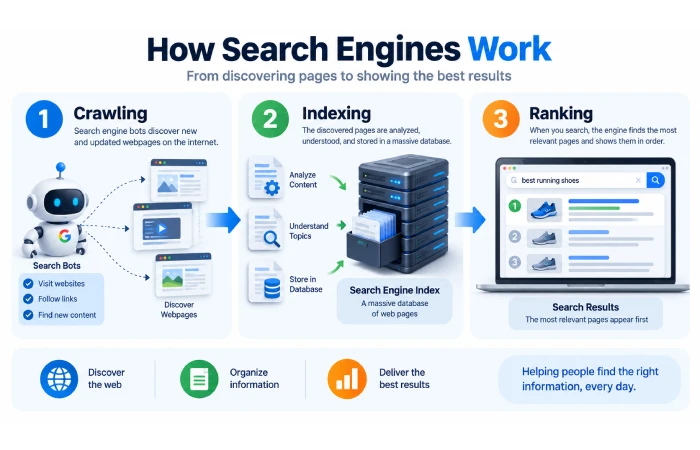
The search process can be understood prior to learning the SEO methods.
There are three important concepts:
Crawling
Search engines utilize automatic mechanisms, also known as spiders or crawlers to find the pages.
The pages that will be found are the ones linked, listed in the sitemaps or already known URLs.
Clear site structure and appropriate internal link structure contribute to easy discovery of important pages;
Indexing
Once a page has been found, the search engine can examine and record the page details in its index.
Being crawled doesn’t necessarily mean that a page will be returned in the search results.
Indexing of a page is also affected by the quality of the content, technical issues, duplicated content or potential other problems.
Ranking
When a person searches, the search engine evaluates the query and deems which results are most important and useful for that search.
Ordering can be based on multiple things content relevance, content quality, website experience, website authority, search context, etc.
This explains why there is no one “trick” that will assure a precise ranking.
Understanding Search Intent
Search intent is arguably one of the most crucial SEO concepts a beginner should understand.
Search intent, the intention of a search.
For example:
The question “What is SEO?” can be answered simply, at least for those who are not technically minded. It is the search engines such as “Google”, “Bing”, “Ask”, etc. that decide how the websites are listed for any given search. In other words, the search engine ranks the list of pages that correspond to what the web visitor is trying to search. The more relevant they are to the visitors, the higher they are positioned.
I think that what you actually wanted was to have an explanation.
The best SEO tools
The user could be comparing between alternatives.
“Google Search Console”
May be attempting to locate the appropriate service.
SEO agency Hyderabad
The user may need a service at this location.
Common search intents include:
Informational
User desires to learn.
Navigational
The user wishes to search for a website or page.
Commercial Investigation
The user is exploring various options to compare before choosing.
Transactional
The user is prepared to take some action. Such as, buy, sign-up, hire etc.
What is written here should be based on the purpose behind the search not on the keyword alone.
The Main Types of SEO
On-Page SEO
On-page SEO focuses on elements within individual webpages, including:
- Titles
- Headings
- Content
- URLs
- Meta descriptions
- Images
- Internal links
Next: On-Page SEO Tutorial
Technical SEO
The technical SEO is concerned with a site that is easier to crawl, index and use.
Important areas include:
- Crawling and indexing
- XML sitemaps
- Robots.txt
- Mobile usability
- Core Web Vitals
- HTTPS
- Canonical URLs
- Redirects
- Site architecture
Next: Technical SEO Tutorial
Off-Page SEO
Off-page SEO comprises of actions and signals outside of your own website – particularly links and mentions from external sites.
Focus on earning relevant, quality backlinks instead of having hundreds of low-quality links.
Next: Link-Building Tutorial
Local SEO
Local SEO optimizes your organization to be found in search results when people are searching for your industry in the region.
This may include; business profiles, reviews, local content, local pages and other local signals.
SEO Basics for Beginners
After you have familiarized yourself with the search engines, concentrate on a couple of simple concepts.
Create Content for People
Make sure your content is answering questions, solving problems, explaining something or helping to make a decision.
Avoid having a page just because a keyword has search volume.
Ask:
Actually, will this page really benefit someone who searches for this?
This question should also influence your content.
Use Keywords Naturally
Keywords enable the search engines to determine what the page is about.
Use your main topic naturally in places such as:
- Page title
- H1
- Introduction
- Relevant headings
- Main content
- The URL is written as when the page itself should not be mentioned or the specific page is unimportant in favor of the site itself.
You don’t have to repeat a keyword excessively.
Next: SEO Basics for Beginners
Organize Your Website Clearly
An orderly structure will aid both visitors in navigation and search engines in exploring your website.
For example:
SEO
- SEO Basics
- Keyword Research
- On-Page SEO
- Technical SEO
- Link Building
- Search Console
Use internal links to relate pages to each other and give the learner a line of learning.
Keyword Research
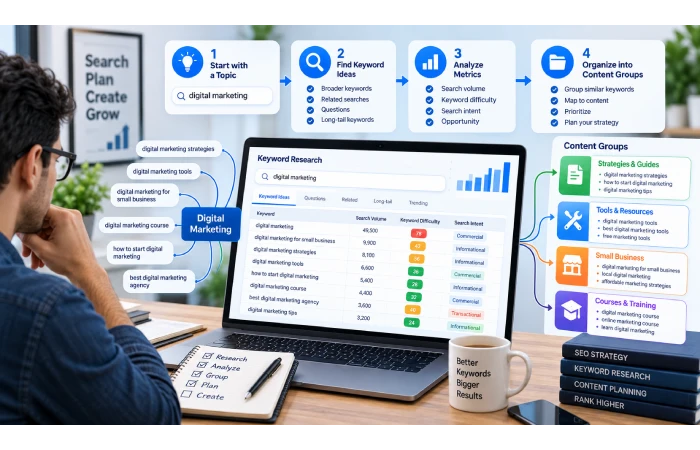
Keyword research lets you see what your audience actually looks for.
Begin by stating a topic that is general and then specify further.
For example:
SEO
≻ keyword research→ Make a list of keywords to target on your website, those with high traffic. Use Google Adwords to find them. Analyze your keywords and choose the most relevant ones, then construct a default page to promote for each keyword.
and it influences it on-page SEO.
→ technical SEO
→ link building.
→SEO tools
You can find keyword ideas from search suggestions and related searches, by research of competitors, or with keyword tools, going through forums, customer questions and just through your own experience in the industry.
Focus on Search Intent
Be cautious not to consider a keyword just based on search volume.
A keyword should also be:
- Pertinent to the audience you are targeting
- Another point strongly related to your site
- Proprietary properties suitable for your content.
- A practical level for competition at your present stage
It may be beneficial to use long-tail keywords as they generally indicate a more defined requirement.
For example:
SEO covers a lot.
SEO for small business: It’s more defined.
How to do SEO for a small business website can be even more specific.
Create a Keyword Map
A keyword map is a listing of the significant subjects to be covered and is associated with the pages which should focus on them.
For example:
| Page | Main Topic |
| SEO Guide | This is also why there’s a lot of free learning information out there (tutorials). |
| SEO Basics | Basics of SEO for novices |
| Keyword Research | Tutorial in keyword research |
| On-Page SEO | However, otherwise the means for each door package4 of on page SEO tutorial |
| Technical SEO | Here is a tutorial about technical SEO. |
| Link Building | link-building tutorial |
| Search Console | Google Search Console tutorial |
This ensures that several pages do not all compete for the same main topic.
Next: Keyword Research Tutorial
On-Page SEO
Once you have your topic, refine your webpage.
Write a Clear Title
Good titles set the topic of the page.
For example:
SEO for Beginners: A Step-by-Step Guide
is more useful than:
SEO Tips
Write a title that means something for a user and not full of keywords.
Use Logical Headings
A clear structure might look like:
H1: On-Page SEO Tutorial
H2: What Do We Know about On-Page Optimization?
H2: Important On-Page SEO Elements
- H3: Title Tags
- H3: Meta Descriptions
- H3: Internal Links
Effective headings contribute to better scanning and intelligibility of long passages of text.
Optimize the Content
This means that your content must meet the user’s needs or questions.
Before publishing, ask:
- Is this a response to the question above?
- Are the details correct?
- It is simple to comprehend?
- Are there any important sub topics covered?
- Can the reader do something useful after reading it?
Don’t bloat the article by taking the easy option of repetitive text. A piece of 1500 words is (or can be) more powerful than 4000 words which are so repetitive that they add little or no value.
Improve URLs and Images
Use short, descriptive URLs such as:
/keyword-research-tutorial/
Pictures should have informative filenames, appropriate compression and alt tags where relevant.
Add Internal Links
Link related pages by using natural internal links.
For instance, you could have your SEO guide linking to your Keyword Research Tutorial, and that tutorial could be linking to your On-Page SEO Tutorial.
This provides the users with links to other relevant information, and provides the search engines with greater understanding of the relationship between different pages.
Technical SEO
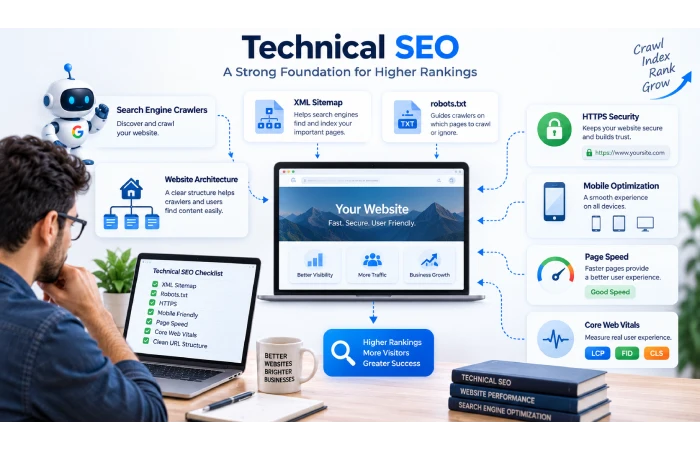
Technical SEO’s main job is to make sure that important content is actually accessible and understandable by both users and bots.
XML Sitemaps
An XML sitemap allows you to list the most important URLs of your site to make them available and known to search engines.
Especially useful for large web pages, a sitemap could be utilized.
The submitting of a sitemap to the search engines will not ensure indexation and ranking of the website or the pages within it.
Robots.txt
Robots.txt tells the crawlers which parts can and cannot be accessed.
Use great caution if altering it, as the wrong rule may by chance eliminate important content.
Do not use the robot.txt file to protect private data.
Mobile Usability
The website must be functional on mobile phones and tablets.
Check:
- Readable text
- Easy-to-use navigation
- Tap-friendly buttons
- Images should be sized accurately. This not only affects file size but also has a negative impact on image quality. By resizing images carefully with correctly formatted images, as shown to the right, a good balance can be achieved. With image B, too much has been removed to the extent that it looks distorted and the quality has suffered as a result.
- Avoid running your eyes back and forth on the text.
Core Web Vitals
Core Web Vitals are a set of user-centered metrics that measure loading performance, interactivity and visual stability.
The current metrics include:
- Largest Contentful Paint (LCP)
- Interaction to Next Paint (INP)
- Cumulative Layout Shift (CLS)
Utilise feedback to narrow down what the real user-practical problems are and leave the scoreboard-mission unreal problems alone.
HTTPS, Canonicals, and Redirects
Ensure that your website supports and enforces HTTPS correctly.
Know how to determine canonical URLs when different URLs have very similar content.
Use a 301 redirect for pages which are moving to a new location permanently.
Link Building and Backlinks
A backlink is simply a link to your website from another web page.
When links are related to the content here, they can be valuable in helping people to find your information and they can also give helpful signals regarding your site’s popularity.
You also have to be careful; there is a difference between quantity and quality. Too many backlinks do not necessarily improve your SEO.
Focus on earning relevant links through:
- Original content of value This article provides some fresh insight that is a more sophisticated and nuanced view of the changing politics of the period.
- Research and research statistics
- Digital PR
- Expert resources
- Legitimate outreach
- Valuable guest contributions
Avoid services which offer hundreds of backlinks for a very cheap price or unrealistically assured rankings.
A useful question is:
Would you still find this link if there were no engines to find?
If your answer was yes, then this link is more likely to give real value.
Measuring SEO Performance
One thing to consider is that the measurement of SEO should take place after the content is published.
The two broad categories are search performance and website results.
Google Search Console
Google Search Console can help you understand:
- Search queries
- Clicks
- Impressions
- Click-through rate
- Average position
- Indexing information
- Sitemap status
- Some issues that are known when searching.
For instance, if a page gets a high number of impressions but a small percentage of clicks from those impressions, it’s an opportunity to make the page more relevant, to enhance how it appears in search results.
Next: Google Search Console Tutorial
Analytics
Web analytics can provide insights into what your visitors do once they reach your site.
Depending on the website, useful outcomes may include:
- Leads
- Sales
- Sign-ups
- Contact requests
- Product purchases
- Returning visitors
Traffic helps, but the most successful SEO strategy translates visibility into a business or audience impact.
A Simple SEO Process for Beginners
You can turn everything you’ve learned into a repeatable workflow:
Understand Your Audience
Determine your target audience as well as what issues they need addressed.
Research Topics and Keywords
– Find relevant searches and organize by purpose.
Analyze Search Results
Observe the nature and format of the information that is showing up for your target phrase.
Create Helpful Content
Create the page the most effectively fulfills the user.
Optimize the Page
Focusing on: Optimize titles, headings, content, URLs, images, metadata and internal links.
Check Technical SEO
Enable the page to be easily viewed and navigated on any mobile device; provide online security; and ensure all technical aspects of the page function correctly.
Publish and Connect
Batch code and link to related content throughout your site.
Measure Results
Track organic visibility, types of searches, organic search traffic, and conversions.
Improve Existing Content
Update any out-of-date content, bolster weak areas, enhance internal connectivity, and take care of issues exposed by your data.
The process is continuous:
Research, Design, Develop, Optimize, Measure, Improve or R Research, Design, Develop and Optimize the new product or service. Test the results and analyze the efficiency of the new strategies and approaches used, then continuously improve.
Common SEO Mistakes Beginners Should Avoid
Keyword Stuffing
Repeating the same keywords repeatedly, makes the content sound unnatural and will not provide a better experience to the user.
Writing Only for Search Engines
Your first priority should be content that is good for real people.
Chasing Search Volume Alone
Just because a keyword is high-volume, does not necessarily mean it’s going to be worth anything – too competitive and not targeted to your audience.
Creating Thin Content
Avoid having separate pages for every small keyword variation, an approaching these variations with a broader and more powerful resource for your users.
Ignoring Search Intent
The page should give the kind of information the searcher is expecting.
Neglecting Internal Links
Employ connected information so that the user can find the next item desired.
Ignoring Technical Problems
Broken links, restrictions on indexing, bad mobile usability and other technical problems can affect the website’s performance.
Buying Cheap Backlinks
Stay away from automated or manipulative link packages claiming to give your site overnight authority.
Expecting Immediate Results
SEO is not an overnight process. Results differ between each website and industry.
Following Every SEO Trend
Value each and every MBA speculation shortcut in favor of its often believed-like reliability fundamentals.
SEO Tools Beginners Should Know
You really don’t need loads of tools to learn SEO.
Start with:
Google Search Console – search performance, indexing, queries, and technical details.
Google Analytics or some other analytics tool traffic and user behavior.
Tools for researching keywords: suggestions for keywords, competition, similar themes, and statistics.
Tools for assessing the effectiveness of the pages:
Diagnostics include the time taken and the quality of the users’ experience.
Tools are useful when they improve your decision-making. It is less important how many tools you use than how well you use the information they provide.
Frequently Asked Questions
What it is seo in an easy word?
SEO (Search Engine Optimization) is about optimizing your website so that the search engines understand it and that it is findable via organic search.
My first question is how do i begin my internet SEO learning process?
Begin with the fundamentals of SEO, then get into keyword research, on page SEO, technical SEO, link building and SEO measurement.
Is SEO hard when starting out?
Getting the basics down is fairly easy, but mastering SEO requires a lot of practice. SEO involves both content and marketing (creativity), technical expertise, research, and analysis of all the data.
Is coding required for learning SEO?
No. It is possible to pick up many basics of SEO without the need of writing any code. Technical development comes in handy when it comes to more advanced technical SEO and more complex sites.
How long does it take to SEO to work?
Nothing is set in stone. It depends on competitiveness, content, website quality, search volume, authority etc.
How many keywords should one use on a page?
There are no ‘perfect’ word-density level use keywords naturally and sparingly in the appropriate context, keeping the target about the user’s needs.
Do backlinks still count?
If you can find relevant backlinks then of course that can add to the new site as well, but quality of the incoming links and the context from where those links appear are always more important than a large number.
Is it possible for me to get into the detailed process of SEO?
Yes. Fundamentally, website/ business owners and small businesses can cope with a number of different kinds of SEO ‘by themselves, keyword research, content, pen ‘ink and basic technical review.
Your SEO Learning Path
The most effective approach for acquiring SEO knowledge is to start with the basics and then explore how to apply it.
Begin with SEO Basics for Beginners to gain insights on search engines, crawling, indexing, ranking and the core of SEO.
Next, follow the Keyword Research Tutorial to discover keywords, determine search intent, and Categorize topics.
Next, explore the On-Page SEO tutorial in order to understand how to optimize each webpage.
Return to the Technical SEO Tutorial. Learn about crawling, indexing, sitemaps, robots.txt, site structure and performance.
Next, learn how to obtain relevant and legitimate backlinks by using the Link-Building Tutorial.
Finally, learn how to track search performance and diagnose indexation or visibility problems by studying the Google Search Console Tutorial.
SEO Checklist for Beginners
Before considering your basic SEO setup complete, check the following:
Strategy
- Target audience is defined the target audience were the readers of IT Training magazine and readers of IT Training Magazine are mainly Managers, Training Managers and Department Heads or anyone else that has an investment in training. The magazine encompasses a wide audience as it covers all aspects of IT.
- Main topics are marked
- Search intention is perceived as,
- Keywords are linked to corresponding pages
Content
- All pages have a clear purpose.
- Content is a match for user search
- The information is accurate and helpful
- Content is readable and organized in a user-friendly manner.
On-Page SEO
- Clear page title.
- Clear H1
- Logical headings
- Descriptive URL
- Usefull meta description.
- Natural use of keywords. It makes sense to the visitors who visit the website beacuause they can easily find what they are searching for. If keywords are used frequently in the content, these can help the visitors to jump to the required page easily rather than wasting their time searching for each page.
- Related internal links:
- Optimized images
Technical SEO
- Significant pages can be crawled
- Indexing: It is possible to have pages indexed which are also relevant pages.
- First of all, it is possible to generate an XML sitemap.
- The robots.txt file is set up properly We have a 404 error on the file which means that the file is there but it is misconfigured. This file is set up to block all search engines by default which is most likely the case.
- Likewise, the formshandle3.htm file doesn’t appear to be functioning correctly.
- Mobile experience is good.
- Key pages take a long time to load
- Properly managing directs and canonicals
Measurement
- Set up in Search Console is most effective.
- Analytics is set up as follow.
- Check the organic traffic.
- Search queries are checked
- Existing content is optimized on-going.
Conclusion
Once you realize that a lot of SEO consists of a set of complex tricks and see it as a clear process, it makes the job so much simpler.
Know who you are writing for and what they are looking for.
Next, research the keywords and search intent.
Create valuable content for those searches.
Optimize the page: use meaningful titles, headings, URLs, images, and internal links.
Use the following to ensure the search engines can arrive at, crawl and interpret your website:
Build positive backlinks by providing valuable content and genuine promotion.
And last, assess how you perform and keep on improving.
The basic SEO process is simple:
Know→ Explore→ Develop→ Enhance→ Quantify→ Improve
You do not have to learn all the SEO tricks right away. Master the basic concepts, apply them on a live site and then take it from there.
Now the six supporting tutorials which are available within this SEO hub provide a great next step for anyone that wishes to learn SEO in a structured step by step approach and to develop some hands-on search engine optimization skills.
