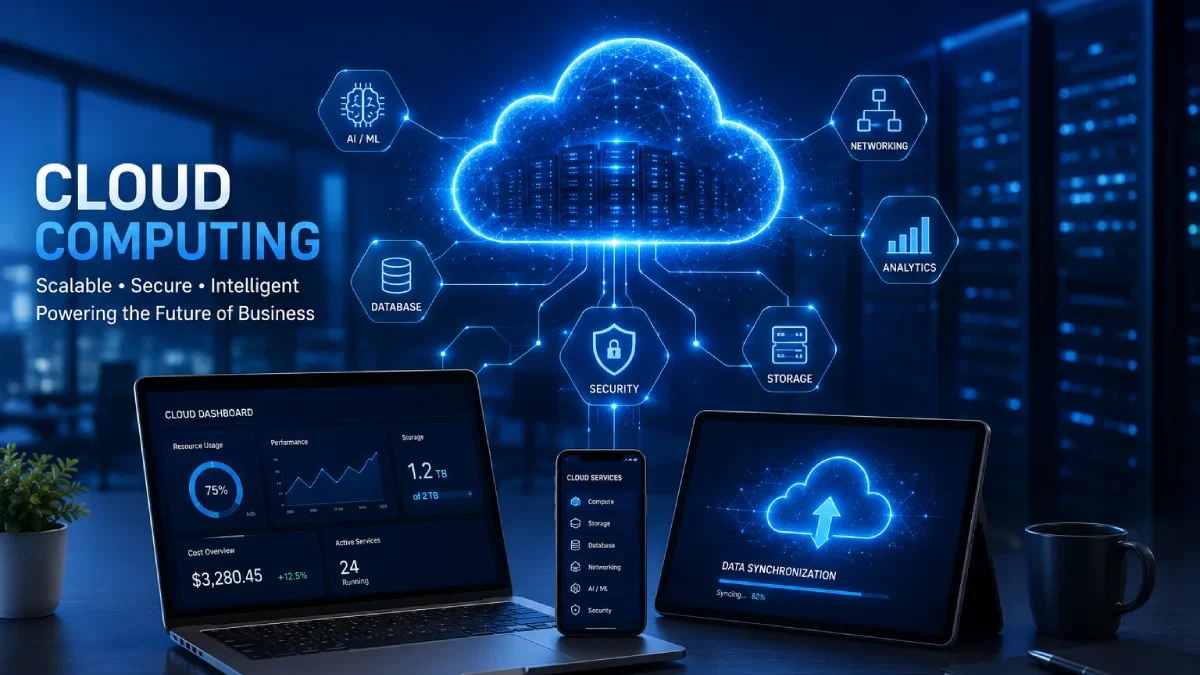

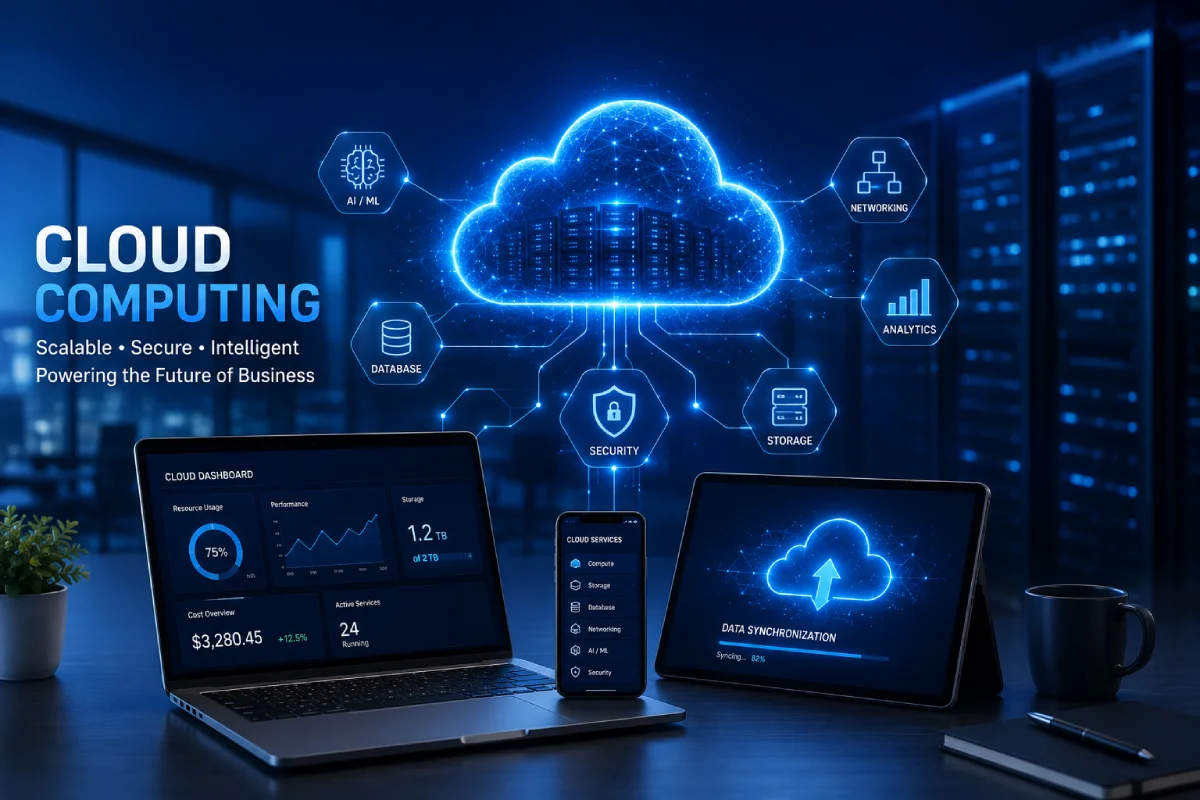


Cloud Computing Services: Complete Guide to Cloud Solutions, Providers, and Benefits
Table of Contents
Introduction
Cloud computing services have changed the way people store data, use applications, manage infrastructure, and deliver digital services.
Instead of investing in and managing their own hardware, organizations have access to all the computing power, storage, databases, networks, software, and security available on the internet, which is far more flexible, scalable, and affordable.
The range of users utilizing cloud computing is very wide and covers small businesses, start-ups, and corporate organizations; scales right to educational, medical, and government institutions, and to end-users. There is a range of applications, including internet hosting, data storage, authoring business intelligence reports, enabling mobility, recovery from catastrophe, presentation, and productivity, to name but a few.
Cloud computing remains one of the most important building blocks, even amid future trends such as AI, Edge Computing, Automation, and the Internet of Things.
In this ebook,k you will soon learn what Cloud services are, how Cloud Computing works, the types of Cloud services, deployment models, benefits and risks, some of the main service providers, security issues, how to migrate to the cloud,d and the future of Cloud Computing.
TECH HUB
This Article Is Part of the Future Tech Trends Hub
Explore AI trends, future innovations, next-generation computing, smart technologies, digital transformation, automation, robotics, emerging devices, and technology predictions shaping tomorrow inside our
Future Tech Trends Hub.
What Are Cloud Computing Services?
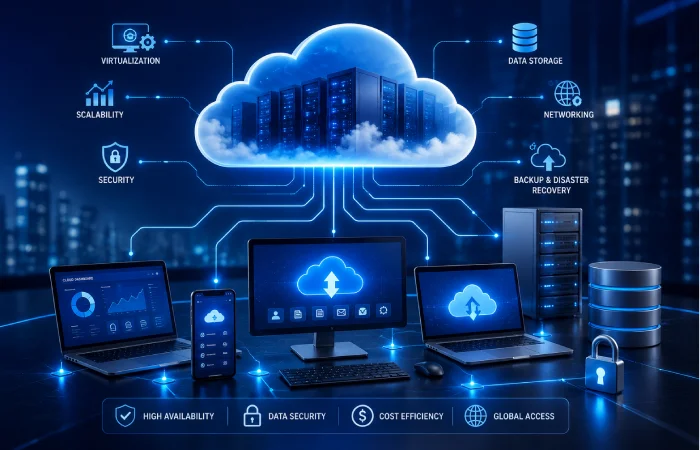
Cloud computing services are offerings from service providers. These services make available compute resources on the web.
These resources may include:
- Computing power
- Virtual servers
- Data storage
- Networking
- Databases
- Software applications
- Artificial intelligence tools
- Security services
- Backup and recovery solutions
Rather than buying costly hardware, companies can lease cloud resources from a provider and scale them up or down according to their requirements.
For instance, a company running a website on a physical office server would suffer if traffic increased too suddenly. With cloud computing, it is very easy to scale server capacity.
This is one of the reasons that cloud computing has become so popular.
How Does Cloud Computing Work?
A major technological paradigm underlying cloud computing is large data centers containing many thousands of servers. These data centers are managed by cloud service providers and store, process, and deliver digital resources.
For instance, a user opens a web-based application, delivers a document, or operates a web-based program. The user’s request is sent over the network to the cloud provider’s server, which responds.
A simple cloud process looks like this:
- A user interacts with a cloud service.
- The request is then sent on to the provider’s data center.
- TheCloudd has found the necessary resources, but they are provided on its own.
- Data is utilized, processed, stored, and/or retrieved.
- Has been reprocessed on the user side.
As Resources are virtualized here, resources enable the offering of computational time, storage, or network access to a wide number of users.
Key Components of Cloud Computing
Multiple infrastructure technologies and standards are combined to provide the cloud delivery model.
Data Centers
Cloud providers have secure data centers all over the world. These facilities have been built to ensure security, confidentiality, performance, redundancy, and scalability, providing high-availability solutions.
Included are often backup power, higher-end cooling, physical security, and disaster recovery for the system.
Virtualization
Virtualization enables a physical server to support several virtual machines.
This allows cloud providers to operate hardware more efficiently and enables customers to provision servers quickly without physical equipment.
Benefits of virtualization include:
- Better hardware usage
- Lower infrastructure costs
- Faster resource allocation
- Easier scaling
- Improved flexibility
Networking
Cloud networking securely connects users, applications, databases, and cloud resources.
Common cloud networking features include:
- Load balancing
- Firewalls
- Virtual private networks
- Content delivery networks
- Private cloud connections
- Traffic monitoring
Storage Systems
Cloud Storage enables businesses to store files, databases, backups, and application data on decentralized systems.
Benefits include:
- High availability
- Automatic data replication
- Disaster recovery support
- Easy scalability
- Remote access
Why Businesses Use Cloud Computing Services
Businesses use cloud computing to reduce costs, improve flexibility, and operate more efficiently.
Common business use cases include:
- Website hosting
- Application development
- Data backup
- Disaster recovery
- Big data analytics
- Artificial intelligence
- Machine learning
- Remote collaboration
- Business continuity
- Software delivery
With cloud computing, organizations can scale resources up or down as needed, rather than investing heavily in physical infrastructure.
Main Characteristics of Cloud Computing
Cloud computing has several key features that distinguish it from a conventional IT setup.
On-Demand Self-Service
Computing resources are available whenever needed.
Broad Network Access
All cloud services can be accessed via a simple internet connection on a laptop, desktop, tablet, or mobile. device
Resource Pooling
Cloud providers use common infrastructure shared across several customers, but eachcustomer’ss data and applications are isolated.
This model enables cutting costs without compromising security.
Rapid Elasticity
Cloud resources can scale rapidly in response to load.
For instance, an online shop may increase server capacity during a holiday sale and then return it to normal after the sale.
Measured Service
Cloud providers usually have pay-per-use pricing, where the customer is billed for the resources they actually consume
This will be a more cost-effective solution than having physical servers that are not used all the time.
Types of Cloud Computing Services
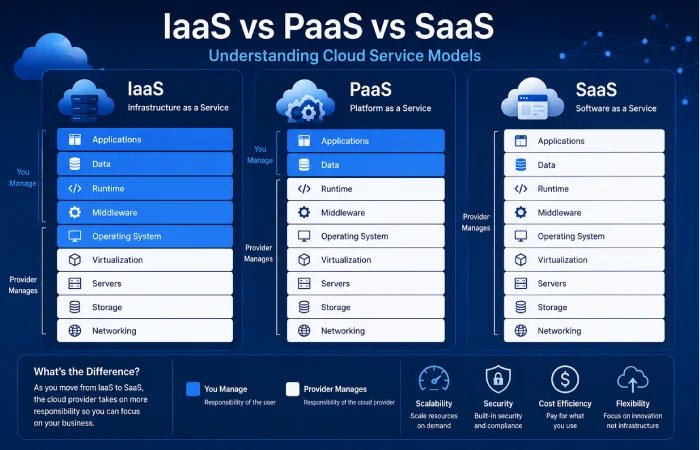
Cloud computing services are usually divided into three main models:
- Infrastructure as a Service
- Platform as a Service
- Software as a Service
Each model provides a different degree of control, accountability, and ease.
Infrastructure as a Service
Infrastructure as a Service, or IaaS, is the provision of virtualized computing resources over the internet.
It usually includes:
- Virtual machines
- Storage
- Networking
- Firewalls
- Load balancers
- Operating systems
In addition, IaaS offers organizations greater flexibility and access to their infrastructure without having to acquire or manage their own electronic equipment.
Best for:
- IT administrators
- Developers
- Start-ups
- Enterprises
- Businesses needing flexible infrastructure
Advantages of IaaS:
- High scalability
- Lower hardware investment
- Greater infrastructure control
- Faster deployment
- Flexible pricing
Platform as a Service
Platform as a Service (PaaS) provides a ready-to-use environment for implementing, testing, and deploying applications.
PaaS does not require developers to manage the servers, storage, or networking below the application.
Common PaaS features include:
- Development frameworks
- Databases
- Runtime environments
- Deployment tools
- Testing tools
- Application hosting
Best for:
- Software developers
- App development teams
- DevOps teams
- Businesses building custom applications
Advantages of PaaS:
- Faster development
- Easier deployment
- Lower maintenance
- Built-in development tools
- Better team collaboration
Software as a Service
SaaS–Software as a Service is software that provides applications over a network.
SaaS applications are available to users simply via a web browser or an app. Users do not need to install or maintain the software.
Examples of SaaS include:
- Email platforms
- CRM software
- Collaboration tools
- Accounting software
- Project management tools
- Office productivity apps
Best for:
- End users
- Small businesses
- Teams
- Companies that are looking for ready-made software
Advantages of SaaS:
- Easy access
- Automatic updates
- Subscription pricing
- Low maintenance
- Quick setup
IaaS vs PaaS vs SaaS
Here is a simple way to compare the three main cloud service models:
| Feature | IaaS | PaaS | SaaS |
|---|---|---|---|
| Infrastructure management | Customer | Provider | Provider |
| Application management | Customer | Customer | Provider |
| Technical skill needed | High | Medium | Low |
| Scalability | High | High | High |
| Best for | Infrastructure control | App development | Ready-to-use software |
Choosing the Right Cloud Service Model
Your objectives, technical experience, and business requirements will determine the cloud service model you choose.
IaaS is for you if you would prefer the most control over servers, storage, network, and OS.
Choose PaaS if speed is your top priority.
Use SaaS if you want ready-to-use software without infrastructure management.
Many organizations deploy a mixture of IaaS, PaaS, a nd SaaS for various functions.
Cloud Deployment Models
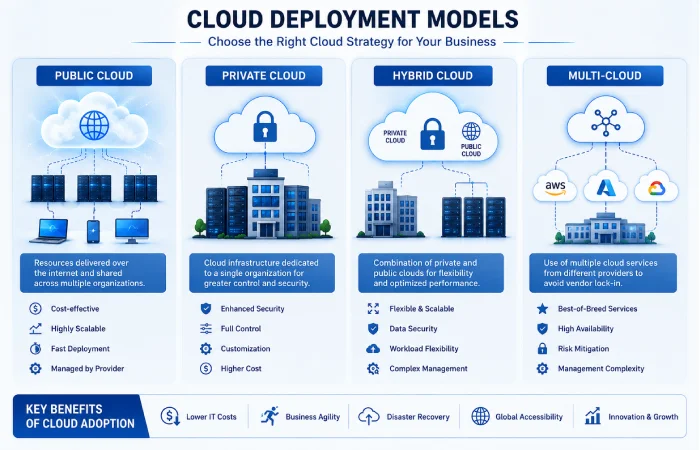
A cloud deployment model outlines where in the cloud resources are hosted, who administers them, and how users access them.
The four main cloud deployment models are:
- Public Cloud
- Private Cloud
- Hybrid cCloud
- Multi-cloud
Public Cloud
In a public cloud, the cloud provider controls the entire system, which several customers share.
Cloud platforms are preferred by many because of their flexibility, scalability, and cost-effectiveness.
Advantages of public cCloud
- Lower upfront costs
- Easy scalability
- Fast deployment
- Global availability
- Provider-managed maintenance
Limitations of the public cloud
- Less control over hardware
- Shared infrastructure
- Data residency concerns
- Maybe a plan of compliance.
Best for:
- Start-ups
- Small businesses
- Web applications
- Development environments
- Testing projects
Private Cloud
Private Cloud. This is for one organization only. It is either hosted on-premises or by a cloud provider.
Many cloud providers offer private clouds, which allow for greater control over security, compliance, and customization.
Advantages of a private Cloud
- Greater security control
- Better customization
- Stronger compliance support
- Dedicated resources
- More infrastructure control
Limitations of the private cloud
- Higher cost
- More maintenance
- Complex setup
- Requires skilled IT teams
Best for:
- Government agencies
- Healthcare organizations
- Financial institutions
- Large enterprises
- Businesses handling sensitive data
Hybrid Cloud
A Hybrid Cloud is a seamless and compelling combination of public and private clouds.
Companies could run sensitive workloads in a private cloud, while delegating less sensitive tasks to a public cloud.
For instance, a business could maintain a customer database in a private cloud and operate its public web server from a public cloud.
Advantages of hybrid Cloud:
- Better flexibility
- Improved disaster recovery
- Cost optimization
- Better workload distribution
- Greater control over sensitive data
Limitations of hybrid Cloud:
- More complex management
- Integration challenges
- Security planning requirements
- Requires strong cloud governance
Best for:
- Large businesses
- Enterprises with mixed workloads
- Companies that are migrating to the cloud in a piecemeal fashion.
- Organizations with compliance needs
Multi-Cloud
A multi-cloud strategy involves using services from multiple providers.
For example, a company may have multiple providers: one for storage, another for analytics, and another for backup.
Advantages of multi-cloud:
- Reduced vendor lock-in
- Better redundancy
- Access to specialized services
- Improved performance options
- Greater flexibility
Limitations of multi-cloud:
- More complex management
- Harder cost tracking
- Multiple dashboards
- Policies should be compatible.
Best for:
- Global organizations
- Large enterprises
- Businesses needing high availability
- How do companies protect themselves from dependence on a sole provider?
Benefits of Cloud Computing Services
We learn that there are many advantages to a networked, service-based approach to IT that extend well beyond storage. Cloud computing enables organizations to operate more quickly and more cost-effectively, creating a solid base for digital expansion.
Cost Savings
Conventional IT infrastructure consumes the existing server farm, hardware, and software licenses; consumes electricity and cooling; consumespeoples’’ time and headcount.
Cloud computing alleviates many of these costs through flexible pricing.
Financial benefits include:
- Lower upfront spending
- Reduced hardware costs
- Lower maintenance expenses
- Flexible subscriptions
- Better resource usage
Users only pay for what they use, so they don’t waste cash on unused infrastructure.
Scalability
Fog computing allows us to scale resources.
For example:
- An online shop can even buy a larger server during a high-sales period.
- If the start-up becomes popular, a further increase in storage size is possible.
- A business can cut back on resources in lean seasons.
This flexibility enables companies to react rapidly to demand.
High Availability
Major cloud providers have data centers in several geographical regions.
This improves uptime and eliminates end-service disruption.
Benefits include:
- Reduced downtime
- Automatic failover
- Better business continuity
- Improved reliability
- Regional redundancy
Remote Accessibility
You can get to cloud services from virtually anywhere you have an internet connection.
This supports:
- Remote work
- Hybrid teams
- Global collaboration
- Mobile productivity
- Access to business tools.
Faster Deployment
Cloud infrastructure can be configured in a matter of minutes rather than weeks.
This helps businesses:
- Launch applications faster
- Test ideas quickly
- Reduce development time
- Improve business agility
- More quickly react to developments in the market
Disaster Recovery
Backup and Recovery: The Cloud also offers tools for backup and recovery that help businesses recover from failures, cyberattacks, or other mishaps.
Common disaster recovery features include:
- Automated backups
- Geographic redundancy
- Data replication
- Snapshot recovery
- Fast restoration
These features help minimize downtime and data loss.
Improved Collaboration
Cloud-based tools help teams work together.
Employees can:
- Share files
- Edit documents instantly
- Access centralized data
- Communicate across locations
- Work from different devices
Leads to increased productivity and project coordination.
Automatic Updates
Provide for many updates, patches, and software improvements.4
This gives organizations:
- Better security
- Less maintenance
- Improved reliability
- Access to new features
- Reduced IT workload
Top Cloud Service Providers
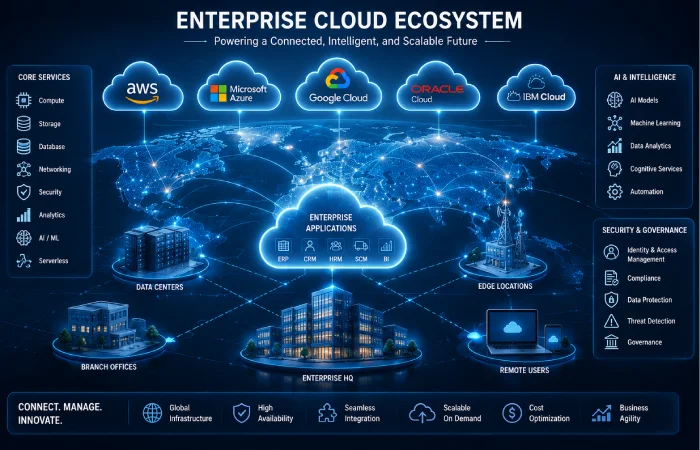
Selecting the appropriate cloud provider is a critical element of defining cloud strategy.
The services, pricing models, industries, and strengths of each provider are unique to
Amazon Web Services
Amazon Web Services (AWS) is one of theworld’ss largest cloud platforms.
Strengths of AWS:
- Large global infrastructure
- Diverse cloud services
- Strong developer tools
- State-of-the-art artificial intelligence (AI) and machine learning offerings
- Flexible infrastructure options
Best for:
- Enterprises
- Start-ups
- Developers
- Global applications
- Excellent cloud services for your business enterprise.
Microsoft Azure
Most companies that previously used Microsoft products are now using Microsoft Azure.
Strengths of Azure:
- Strong Windows integration
- Enterprise security features
- Hybrid cloud support
- Business productivity tools
- Microsoft 365 integration
Best for:
- Large enterprises
- Government organizations
- Microsoft-based environments
- Hybrid cloud strategies
Google Cloud
Google Cloud – analytics, artificial intelligence, data processing, new applications?
Strengths of Google Cloud:
- Data analytics
- AI and machine learning
- Kubernetes support
- Global networking
- Developer-friendly tools
Best for:
- AI workloads
- Data-driven businesses
- Modern application development
- Analytics-heavy projects
Oracle Cloud Infrastructure
Enterprise workloads and database-intensive applications are the target use cases for Oracle Cloud.
Strengths of Oracle Cloud:
- Enterprise databases
- High-performance computing
- Business applications
- Strong security
- Oracle software support
Best for:
- Large enterprises
- Database-intensive workloads
- Oracle software users
- Business-critical applications
IBM Cloud
IBM Cloud is all about Enterprise Cloud, Hybrid Cloud, AI, and Regulated Industries.
Strengths of IBM Cloud:
- Hybrid cloud solutions
- AI integration
- Industry compliance
- Enterprise consulting
- Security-focused services
Best for:
- Financial services
- Healthcare
- Government
- Regulated industries
- Large enterprises
Factors to Consider Before Choosing a Cloud Provider
Before selecting a cloud provider, consider:
- Business requirements
- Security features
- Compliance certifications
- Global data center availability
- Pricing model
- Technical support
- Reliability
- Integration with existing systems
- Scalability
- Backup and recovery options
The biggest provider isn’t always the best provider; what’s right for you may depend on your business objectives, budget, technical requirements, and long-term strategy.
Cloud Storage Services
Overview of Cloud storage services: Cloud storage is a network-based service that uses data centers as off-site data storage for users and enterprises.
Instead of Local Hard Drives or office network servers, companies can also safely store their files, backups, databases, media, and application data in the cloud.
Cloud storage is used for:
- Personal file backups
- Business documents
- Application data
- Enterprise databases
- Media files
- Disaster recovery
- Collaboration
How Cloud Storage Works
When a user uploads a file to cloud storage, the file is transmitted securely to the provider’s infrastructure.
The provider stores the data on multiple servers and may replicate it in other locations for reliability.
This can help maintain access to data even if one of the locations or servers is experiencing trouble.
Types of Cloud Storage
Object Storage
Object storage is applied to unstructured data, such as images, videos, backups, documents, and large datasets.
Best for:
- Media files
- Backups
- AI datasets
- Large-scale storage
- Archives
File Storage
File storage uses a familiar directory structure.
Best for:
- Shared business files
- Team collaboration
- Office documents
- Department folders
Block Storage
Block storage: Data is stored in fixed-size blocks. Use for high performance.
Best for:
- Databases
- Virtual machines
- Enterprise applications
- High-performance workloads
Benefits of Cloud Storage
Cloud storage offers several advantages:
- Easy scalability
- Remote access
- Cost efficiency
- Automatic backup
- Disaster recovery support
- Data replication
- Better collaboration
Storage capacity can also be increased or decreased by the companies themselves without the need to purchase and install new hardware.
Cloud Security Services
Security is the most important part of cloud computing.
Cloud security services defend infrastructure, applications, data, and users from cyber attacks.
Why Cloud Security Matters
Businesses store valuable information in the cloud, Cloudding:
- Customer records
- Financial data
- Employee information
- Business applications
- Intellectual property
- Confidential documents
Protecting this data will help reduce risk, so you will maintain customer trust and meet compliance requirements.
Common Cloud Security Risks
Cloud environments may face risks such as:
- Data breaches
- Misconfigured resources
- Weak identity management
- Insider threats
- Malware
- Ransomware
- Poor access controls
Essential Cloud Security Services
Important cloud security services include:
- Identity and access management
- Data encryption
- Firewall protection
- Security monitoring
- Backup and recovery
- Threat detection
- Compliance tools
Cloud Security Best Practices
Organizations should follow these best practices:
- Use complex passwords and multi-factor authentication.
- Follow the principle of least privilege.
- Encrypt sensitive data.
- Monitor cloud activity regularly.
- Review user permissions.
- Keep systems updated.
- Train employees on cybersecurity.
- Perform regular security audits.
Cloud security is an ongoing process, not a one-time configuration.
Cloud Migration Services
The migration to the cloud includes deploying applications, data, databases, and workloads from on-premises infrastructure.
Or onto another cloud provider.
Why Businesses Migrate to the Cloud
Businesses migrate to the cloud for several reasons:
- Lower infrastructure costs
- Better scalability
- Improved disaster recovery
- Faster innovation
- Remote workforce support
- Better performance
- Easier software deployment
Cloud Migration Process
Most cloud migration projects follow these steps:
- Assessment: Review current applications, systems, data, and business objectives.
- Planning: Develop migration strategy, timeline, budget, and risk management plan.
- Cloud migration: Relocating workloads, applications, data, and services to the cloud.
- Cloudng: Check that performance, functionality, security, and user access are functioning correctly after migration.
- OptimizationMonitor: optimizes cloud resources across performance, security, and cost.
Common Migration Challenges
Cloud migration may involve challenges such as:
- Application compatibility issues
- Downtime concerns
- Data transfer complexity
- Security planning
- Cost estimation
- Staff training
- Compliance requirements
These risks can also be mitigated through careful planning.
Cloud Migration Best Practices
Helpful migration practices include:
- Begin with less critical workloads.
- Have a backup of the data before migration.
- Test applications carefully.
- Monitor performance after migration.
- Document each step.
- Educate IT staff on implementing new cloud infrastructure.
Managed Cloud Services
With Managed cloud services, companies can outsource cloud management to a competent vendor.
Rather than relying on in-house teams, companies can rely on the dedicated expertise of specialists for activities such as monitoring, maintenance, security, optimization, and support.
What Managed Cloud Providers Do
Managed cloud providers may handle:
- Infrastructure monitoring
- Security management
- Backup operations
- Software updates
- Performance optimization
- Cost management
- Incident response
- Technical support
Benefits of Managed Cloud Services
Managed cloud services can help businesses by offering:
- Lower operational complexity
- Improved security
- Better cost control
- 24/7 monitoring
- Faster issue resolution
- Access to cloud experts
- Decreased burden (administrative) for internal IT departments
Managed vs Self-Managed Cloud
| Feature | Managed Cloud | Self-Managed Cloud |
|---|---|---|
| Infrastructure management | Provider | Customer |
| Security monitoring | Provider | Customer |
| Technical skill required | Lower | Higher |
| Operational workload | Lower | Higher |
| Cost optimization | Provider-assisted | Internally managed |
Real-World Cloud Computing Use Cases
Cloud computing is being adopted in a wide range of organizations.
| Industry Common | n Use Cases |
|---|---|
| Healthcare | Electronic health records, telemedicine |
| Education | Online learning, virtual classrooms |
| Retail | E-commerce, inventory management |
| Banking | Digital banking, fraud detection |
| Manufacturing | IoT monitoring, predictive maintenance |
| Media | Video streaming, content delivery |
| Technology | App development, cloud hosting |
| Government | Secure data systems, public services |
Cloud Computing Challenges
While there are many advantages to cloud computing, it is also important for companies to be aware of the potential difficulties.
Vendor Lock-In
Lock-in may also occur when the enterprise relies on a provider’s tools or services so heavily that its business becomes dependent on them.
This could pose a challenge or lead to increased costs if the subscriber wishes to switch to another provider.
Ways to reduce vendor lock-in:
- Use open standards.
- Design applications for portability.
- Consider multi-cloud when appropriate.
- Review provider contracts regularly.
Data Security and Privacy
Cloud providers offer robust security capabilities, but businesses are still responsible for safeguarding their data and controlling access accurately.
Best practices include:
- Encrypt sensitive information.
- Use multi-factor authentication.
- Audit permissions regularly.
- Monitor security logs.
- Limit unnecessary access.
Compliance Requirements
A few industries must comply with strict regulations on data storage, privacy, and security.
These may apply to:
- Healthcare
- Finance
- Government
- Education
- Regional privacy laws
Businesses must check that the cloud provider supports the level of compliance they need.
Downtime and Availability
While cloud providers offer high availability, outages are possible.
To reduce downtime:
- Use multiple regions.
- Set up redundancy.
- Create backup systems.
- Create a disaster recovery plan.
- Monitor service health.
Cost Management
Pricing in the Cloud can always be flexible; it may increase if resource usage is not well managed.
Common causes of unnecessary spending include:
- Unused virtual machines
- Overprovisioned storage
- Idle resources
- Poor monitoring
- Unoptimized workloads
Cost optimization tips:
- Review billing reports.
- Remove unused resources.
- Use automatic scaling.
- Monitor usage regularly.
- Pick an appropriate pricing plan.
Skills Gap
Cloud platforms evolve rapidly, and teams require continual upskilling.
Businesses should invest in:
- Staff training
- Cloud certifications
- Governance policies
- Security education
- Continuous learning
Future of Cloud Computing
Cloud computing is rapidly evolving as new technologies are conceived.
Key future trends include AI, edge computing, serverless architecture, multi-cloud computing, and green cloud infrastructure.
Artificial Intelligence and Cloud Computing
AI is highly reliant on cloud infrastructure because it requires substantial computing and data processing.
Cloud-based AI services help businesses:
- Build intelligent applications
- Analyze large datasets
- Automate repetitive tasks
- Improve customer experiences
- Support faster decision-making
Edge Computing
Edge computing is the idea that data should be processed closer to its source rather than sent to a centralized cloud data center.
Benefits include:
- Lower latency
- Faster response times
- Reduced bandwidth usage
- Improved execution of IoT devices
Edge computing is adopted in Healthcare, manufacturing, transportation, and smart city applications.
Serverless Computing
With serverless computing, you can build and run applications without having to maintain the server infrastructure.
Benefits include:
- Automatic scaling
- Lower operational work
- Faster deployment
- Pay-per-use pricing
- More focus on code
Multi-Cloud Growth
There is a growing tendency for businesses to work with multiple cloud providers to increase flexibility and mitigate vendor lock-in. This is also said to increase reliability.
Multi-cloud approaches enable selecting the most suitable service for a workload.
Sustainable Cloud Computing
Cloud providers are developing energy-efficient infrastructure and renewable energy.
Sustainability efforts may include:
- Renewable-powered data centers
- Efficient cooling systems
- Carbon reduction programs
- Hardware optimization
- Lower energy usage
If sustainability becomes a major business concern, some companies will choose between various cloud providers based on their environmental impact.
Frequently Asked Questions
Define cloud computing services:
Offering different kinds of computing services over the internet. Such as: servers, storage, databases, networking, software, analytics, and intelligence.
What are the 3 main cloud service models?
The three main types of cloud services are: IaaS (Infrastructure as a Service), PaaS (Platform as a Service) and SaaS (Software as a Service).
In what way does a public cloud compare to a private cloud?
Public Cloud- infrastructure shared, owned, and operated by a third party. Private Cloud- infrastructure dedicated to a single organization, allowing more control over cloud resources.
What is the “best” cloud deployment model?
Whether that’s good or bad depends on your needs. Public Cloud is cheap and scalable; Private Cloud gives you control; Hybrid Cloud is something in between; Multi-Cloud makes use of several Providers.
Is cloud computing secure?
Cloud computing can be very secure if the business performs proper authentication, encryption, monitoring, access control, and security audits.
What is a managed cloud service?
Cloud managed services: The management of the cloud is handled by a third-party specialist who monitors and maintains it, administers security, and upgrades and optimizes services.
Reasons for companies moving to the cloud:
Cloudnies are migrating their applications to the cloud to lower costs, increase scalability, enable telecommuting, strengthen disaster recovery, and speed up innovation.
Can small organizations take advantage of the benefits of cloud computing?
Yes. Cloud computing is an alternative for a small business to obtain enterprise-class powerful technology without expensive capital investments in equipment and infrastructure.
What are the business usages of cloud computing?
Cloud computing can be used by healthcare, finance, education, retail, manufacturing, media, government, logistics and technology.
What does the future have in store for cloud computing?
Its future encompasses artificial intelligence, edge computing, serverless applications, multi-cloud solutions, automation, and green cloud infrastructure.
Conclusion
Cloud computing services have become an ingrained part of how businesses use technology today, not because of widespread adoption, but because of the benefits these services offer. They enable organizations to utilize flexible, scalable capacities, reduce CapEx and OpEx, improve collaboration within teams, and promote digital transitions. Whether it’s IaaS, PaaS, SaaS, cloud storage, security, migration, or managed cloud services, organizations have a plethora of options for creating agile and scalable technology architectures.
Pick whichever cloud strategy is suitable to you – depending on your goal, money, security and compliance issues, plans.
By the nature of emerging tech like AI, edge, automation, and serverless, the cloud will continue to be the foundation for innovation, productivity, and connectivity.No matter whether you are starting a new business, upgrading your company’s old digital enterprise system, or just building a new set of digital services, cloud computing can give you more agile, more secure, and more future-proof enterprise.
Cloud Computing Services Hub
Discover cloud computing services, deployment models, cloud providers, storage solutions, security services, migration strategies, and managed cloud solutions for businesses and individuals.