


Keeping devices safe, fast, and current in 2026 via timely software updates is necessary. Don‘t forget that customers may need to know how to check for software updates on their Windows PC/MacBook, Android, and iPhone.
Many people ignore updates until something breaks. But outdated software can lead to:
- security vulnerabilities,
- app crashes,
- slow performance,
- compatibility issues,
- and even data loss.
The official software update guide describes the methods for updating software on each of the major platforms: Windows, Android, iOS, and Firefox. This update guide is also evident in the inclusion of the process of updating the essential applications available for Mac OS. It covers updating apps and programs, troubleshooting common issues, and the best software updater tools in 2026.
Table of Contents
What Are Software Updates?
Software updates are patches or improvements released by developers to:
- fix bugs,
- improve security,
- optimize performance,
- and add new features.
Updates can apply to:
- operating systems,
- apps,
- drivers,
- firmware,
- browsers,
- and security tools.
Why Software Updates Matter in 2026
Each year, computers threats getting more intelligent, then hackers choose widely spread and years-late OS.
Keeping software updated helps:
- block malware attacks,
- improve system stability,
- reduce crashes,
- extend device lifespan,
- and improve battery efficiency.
Benefits of Regular Updates
| Benefit | Description |
| Better Security | Protects against viruses and ransomware; |
| Faster Performance | Optimizes system resources |
| New Features | Unleashes an AI and productivity tools. |
| App Compatibility | Prevents software conflicts |
| Bug Fixes | Resolves crashes and glitches |
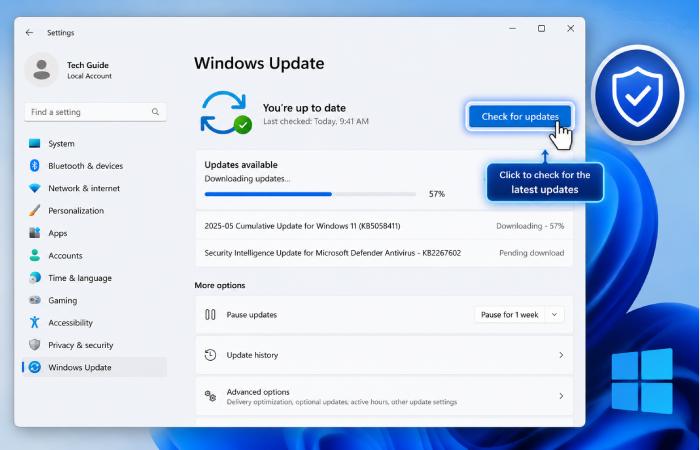
Guidelines for Verifying Software Updates on Windows 11
Windows PCs receive:
- security updates,
- feature updates,
- driver updates,
- and app updates.
Updating software on Windows 11
The newest version (version 11) of Microsoft‘s update system is available in Windows 11.
Step 1: Open Settings
Press:
Windows + I
Step 2: Open Windows Update
From the left menu:
- Click Windows Update
Step 3: Check for Updates
Click:
Check for updates
Windows will:
- search for updates,
- download patches,
- Will Download and Install updates for you.
Step 4: Restart Your PC
Requires restart after every update. All updates must be restarted in order to finish installing.
How do I check if I have a Windows 10 software update?
There are still several hundred million people using Windows 10.
Steps
- Open Settings
- Go to:
- Update & Security
- Select:
- Windows Update
- Click:
- Check for updates
How to Update Apps and Programs on Windows
Many programs update automatically, but it is worth checking them manually.
Update Microsoft Store Apps
Steps
- Open:
- Microsoft Store
- Click your profile icon
- Select:
- Downloads and Updates
- Press:
- Get Updates
How to Update Third-Party Programs
Apps like:
- Google Chrome,
- Zoom,
- VLC,
- Discord,
- Steam
They usually have a built-in update system.
You can manually check updates from:
- Settings,
- Help menu,
- or About section.
Best Windows Software Updater Tools
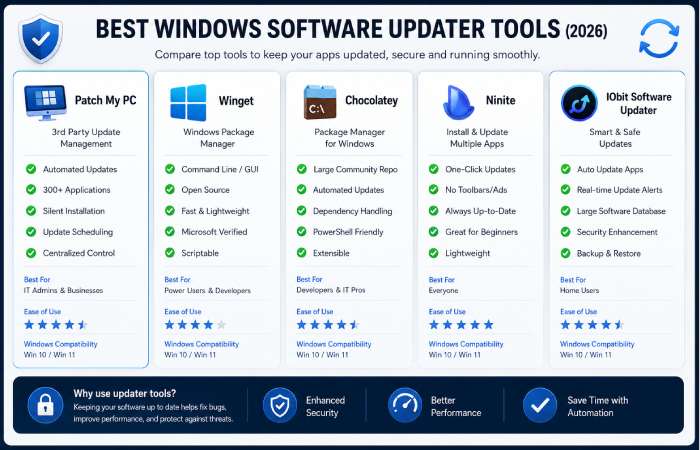
Using a Windows software updater can automate updating many programs.
Best Software Updater Tools in 2026
| Tool | Free Version | Automatic Updates | Best For |
| Patch My PC | Yes | Yes | Beginners |
| Ninite | Yes | Partial | Fast installs |
| Winget | Yes | Yes | Advanced users |
| Chocolatey | Yes | Yes | Developers |
| IObit Software Updater | Yes | Yes | Casual users |
Patch My PC
Patch My PC is one of the safest and easiest updater tools.
Advantages
- Lightweight
- Fast scanning
- Beginner-friendly
- Supports many popular apps
Winget
Winget is a command-line updateWinget is a command-line updater for Windows.rade
Update all apps
winget upgrade –all
How to Check Software Updates in macOS
Apple makes upgrading to the latest version of macOS easy.
Steps to Update macOS
Step 1
Click the Apple logo.
Step 2
Open:
System Settings
Step 3
Go to:
General > Software Update
Step 4
Install available updates.
How to Update Apps on Mac
Mac apps update through:
- App Store,
- or developer launchers.
Update App Store Apps
- Open App Store
- Click:
- Updates
- Install updates.
How to Check for Software Updates on Android
Android updates vary by manufacturer.
Steps for Android Updates
Step 1
Open:
Settings
Step 2
Go to:
Software Update
or:
System > System Update
Step 3
Tap:
Check for Updates
How to Update Android Apps
Using the Google Play Store
- Open:
- Google Play Store
- Tap the profile icon
- Select:
- Manage apps and devices
- Press:
- Update All
Steps to check for software updates on iPhone and iPad
Apple regularly releases:
- iOS updates,
- security patches,
- performance improvements.
Steps to Update iPhone
Step 1
Open:
Settings
Step 2
Go to:
General > Software Update
Step 3
Tap:
Download and Install
How to Upgrade Apps on iPhone
Steps
- Open App Store
- Tap the profile icon
- Scroll to available updates
- Tap:
- Update All
How to Enable Automatic Software Updates
Most users should enable automatic updates.
Benefits
- Better security
- Less maintenance
- Faster patch installation
- Reduced risk of malware
Recommended Update Settings
| Device | Recommended Setting |
| Windows | Automatic updates enabled |
| macOS | Automatic updates enabled |
| Android | Auto-update on Wi-Fi |
| iPhone | Automatic downloads enabled |
How to Update Drivers on Windows
Drivers enable hardware to talk to Windows.
Outdated drivers can cause:
- crashes,
- poor gaming performance,
- audio problems,
- Wi-Fi issues.
Update Drivers Using Device Manager
Steps
- Right-click Start
- Open:
- Device Manager
- Right-click device
- Select:
- Update Driver
Update Drivers Through Windows Update
Go to:
Settings > Windows Update > Advanced Options > Optional Updates
Common Software Update Problems and Fixes
Even up-to-date systems sometimes lag.
Problem: Update Stuck
Fixes
- Restart device
- Check the internet connection
- Free storage space
Problem: Not Enough Storage
Delete:
- temporary files,
- downloads,
- old backups.
Problem: Slow Updates
Solutions
- Use stable Wi-Fi
- Disable VPN
- Restart router
Problem: Apps Not Updating
Fixes
- Clear app cache
- Sign out and sign in again
- Reinstall the app store
How to Fix Windows Update Errors
Open Command Prompt as Administrator and run:
sfc /scannow
Then:
DISM /Online /Cleanup-Image /RestoreHealth
These commands repair damaged Windows files.
Advanced Methods to Check Software Updates
PowerShell and command-line tools are typically only used by power users.
PowerShell Update History
Get-HotFix
CMD Update List
wmic qfe list
Why You Should Avoid Fake Updater Tools
Some fake updater tools install:
- malware,
- spyware,
- browser hijackers,
- adware.
Never download updater software from unofficial sites.
Best Practices for Safe Software Updates
Recommended Practices
- Enable automatic updates
- Use official app stores
- Backup important data
- Restart after updates
- Update security software regularly
No new software features are anticipated beyond standard updates.
Software updates are becoming:
- AI-assisted,
- faster,
- more automatic,
- and less disruptive.
Modern systems now use:
- background patching,
- smart restarts,
- predictive downloads,
- unified update ecosystems.
Widows 11, Android 15, IOS 19, and macOS are gliding toward a hovering OS with auto-updates more simply.
Frequently Asked Questions
PC software update checker?
Open:
Settings > Windows Update
Then click:
Check for Updates
What is the frequency of software updates?
Check updates weekly for best security and performance.
Should I turn automatic updates on?
Yes. Automatic updates offer protection from many security vulnerabilities.
Can outdated software cause sluggish devices?
Yes. Old software may cause:
- crashes,
- lag,
- compatibility problems,
- and higher resource usage.
What is the matter with software updates?
Updates improve:
- security,
- speed,
- compatibility,
- and reliability.
What if I never update the software?
Your device becomes more vulnerable to:
- malware,
- hacking,
- app failures,
- and performance issues.
Software Updates Resource Hub
Explore our complete software update guides covering Windows, Mac, Android, iPhone, update tools, troubleshooting methods, and software update best practices.
Final Thoughts
For whatever platform I choose, checking for updates in 2026 should be standard practice whether it‘s on Windows, Mac, Android or iPhone updates will help keep data safe, optimize my device and maintain up-to-date software.
By following this complete software update guide, you can:
- Securely update apps and programs,
- improve device stability,
- fix software problems,
- And prolong your devices.
A seemingly modest amount of work at the level of regular software maintenance has such profound implications on security, quality and the health of the device.