



Mobile App Design Process for Beginners
Creating a mobile app involves much more than just selecting colours and laying out buttons. A well-designed application begins with a thorough knowledge of the users, their needs and the problem to be solved.
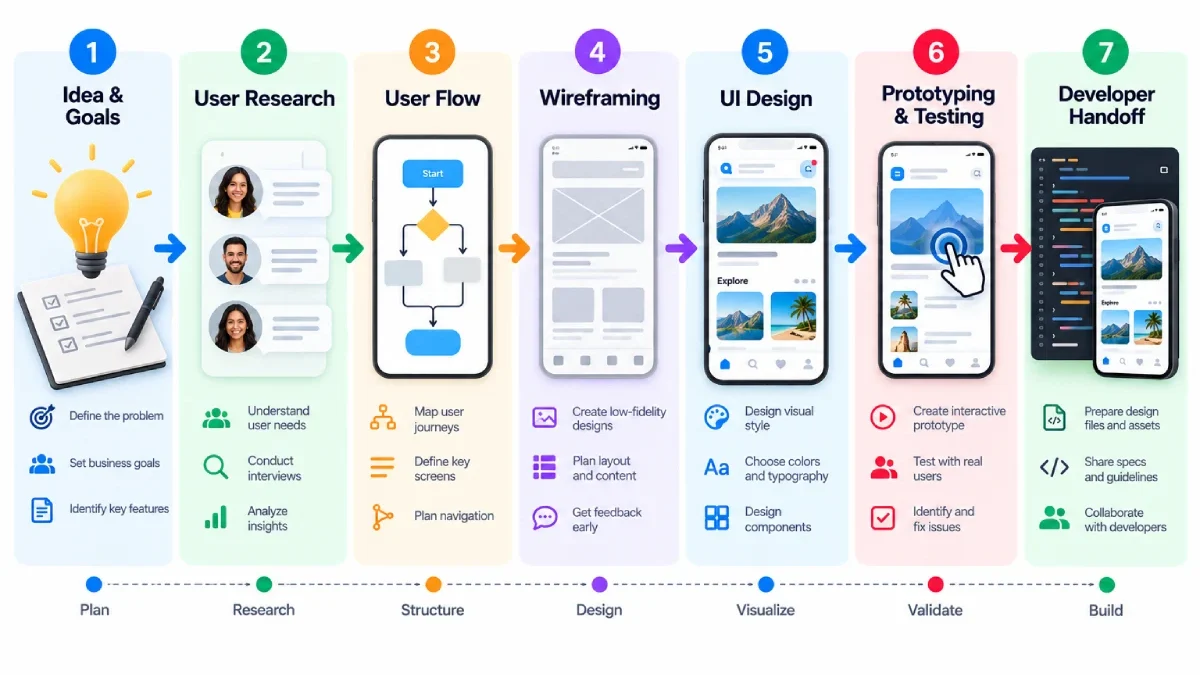
This can be especially confusing for a beginner because there are a lot of steps. The positive aspect is that you don‘t really have to plan everything in advance. Having a defined process will enable you to progress from an idea to a functional app design with no crucial step missed.
Table of Contents
Understand the App Idea
Begin by being clear on what it is that the app is supposed to do.
Ask a few basic questions:
- What issues does the application address?
- By whom?
- What is the most important user task?
- Which features must be implemented?
For example, an app that delivers food might require browsing, search, a cart, payment, and order tracking features. Functionality not integral to the core experience can be added subsequently.
A simple function makes the design of the itself easier to manage.
Research the Users
The third step is the in-depth study of the targeted users of the application.
Observe their goals, typical problems they face, routines and experience. Use surveys, interviews, competitive testing, testimonials or researchs to existing product data.
You don‘t need a giant research project to build a basic app. Even a little of useful user information can prevent design decisions based only on personal assumptions.
Plan the User Flow
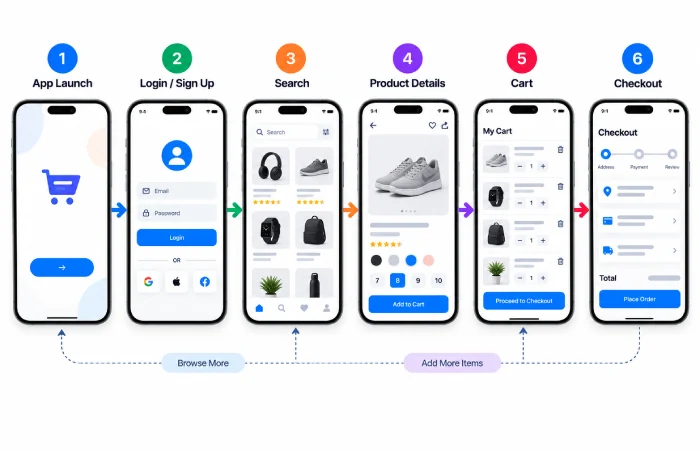
A user flow represents how a user navigates through an application.
For example:
Open app Sign in Search product View product Add to cart Checkout
Sorting out this journey also enables you to clarify which screens you really need.
Another principle of current app-design guidance in Figma suggests that you should identify main user flows and arrange screens for them before getting into detailed visual design.
Create Wireframes
The wireframes are basic representations of design showing the positions of the key elements on each page.
At this stage, focus on:
- Navigation
- Content hierarchy
- Buttons
- Forms
- Images
- Major actions
Do not waste to much time on decorating. Get rid of colours, shadows, GRADIENTS, or overwhelming decorations.
The general question an information architect wants each wireframe to address is: does this screen work?
Design the User Interface
Begin by designing the user interface (UI) once the framework is established.
Now you can decide on:
- Typography
- Colours
- Icons
- Spacing
- Buttons
- Cards
- Images
- Navigation elements
Follow the same style throughout. Similar interactions should look and feel the same within the application.
Platform guidance can also assist. For instance, Apple‘s Human Interface Guidelines highlight ‘clarity, simplicity, flexibility, and consistency’ in creating experiences for Apple devices.
Build a Prototype
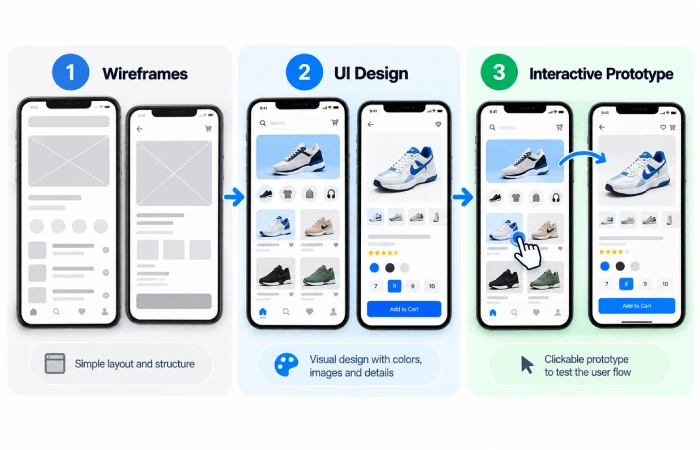
A prototype allows you to link your screens together and try out your app before you put it in to production.
Rather than providing different static screens, you can also test actions like clicking on a button, switching between screens, or finishing a checkout flow.
Figma now allows you to create interactive, no-code prototypes and allows them to be previewed on mobile devices.
Test the Design
Don’t assume a good idea works just because it looks good.
Get a user to perform common actions with the prototype.
Watch for problems such as:
- There is no prominent button that users can identify.
- Navigation is confusing.
- …Labels are inscrutable.
- There’s too much steps.
- The user has no idea how to proceed.
Low-impact usability issues are significantly less costly to resolve prior to the start of development.
Prepare the Developer Handoff
When the design is signed off and tested, prepare the files for the developer.
Make sure designers and developers have access to:
- Final screens
- Components
- Icons
- Colours
- Typography
- Interaction details
- Responsive behaviour
- Assets
A well-executed handoff discourages excessive iterations during development.
Common Beginner Mistakes
One mistake is to focus on visual details first, before identifying the user‘s problem.
Another is to try to include every feature from the start, which can lead to excessive screens and cluttered navigation.
A few of the critical area is skip testing too. Your simple test of your prototype can discover issues not readily apparent during design.
Final Thoughts
How to make mobile app design easier? Break it up into small actions as you normally would do.
Begin with the problem Know your audience Plan the flow Create the wireframes Design the interface Develop the prototype Test it Create the final design to hand off to the developer.
You don‘t want to build the most visually complex app. The goal is to create an experience that people can understand and use without unnecessary effort.
