



Best Laptops for Programming 2026
Selecting a laptop for programming is not the same when compared with choosing a common one to use every day.
Code editors, browsers, terminals, databases, documentation, communication tools, and a bunch of development services are kept open always by developers. Developers handle various other workloads such as using virtual machines, emulators, containers, local DBs, AI tools, or compiling huge projects too.
Essentially the top laptops for programming 2026 need to be selected based on your development workflow, not just one amazing offering of specs.
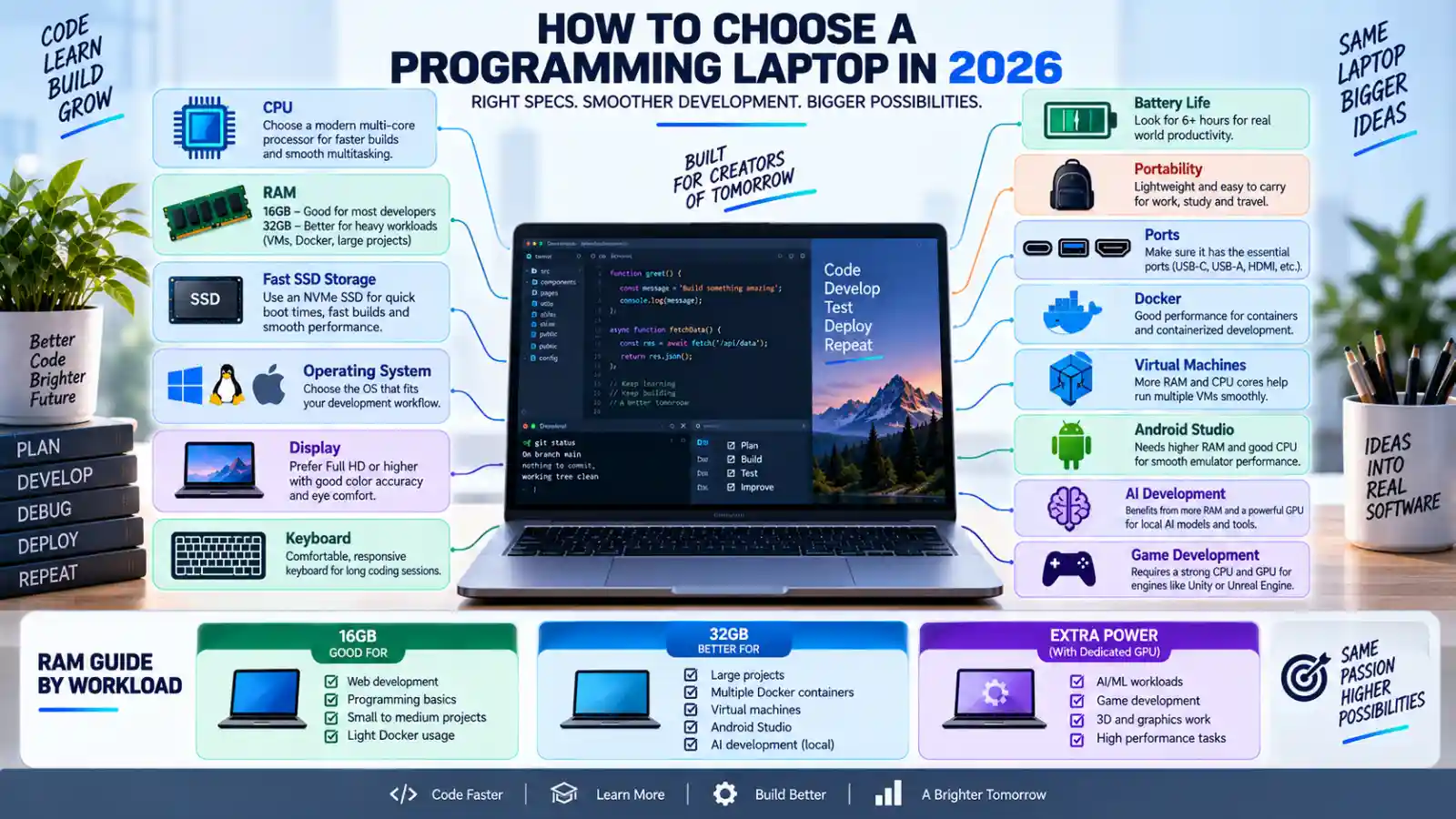
For most programmers, the key factors will include processor performance, a good amount of RAM, a SSD hard disk, a comfortable keyboard, clear display, sufficient battery life, a good number of ports, and compatibility with operating systems and upgradability.
The best laptop also forms on what you develop.
A web developer may care more about portability and longevity. An Android developer may need more memory and storage for the IDE and/or the emulators. A game developer may need a dedicated graphics card (GPU). An iOS developer needs macOS because Xcode is Apple‘s IDE.
This guide will show you what to look for when selecting the correct programming laptops 2026.
Table of Contents
What Makes a Good Programming Laptop?
The criterion for a good programming laptop is to be able to run your environment without interruptions.
Important areas include:
- CPU
- RAM
- SSD
- Display
- Keyboard
- Battery
- Operating system
- Connectivity
- Cooling
- Build quality
Think about how you conduct yourself and address yourself to the reader.
If you type six hours or eight hours a day then comfort at the keyboard could outweigh a slight edge in CPU benchmark scores.
For the average user that don‘t use virtual machines and Android emulators then RAM doesn‘t need to have much significance. However in the case of users that do then RAM becomes much more important,
Best Programming Laptop 2026: Quick Guide
| Developer Type | What to Prioritize |
|---|---|
| Web developer | 16 GB of RAM, fast SSD, comfortable keyboard, 0.2 sec. boot time. |
| Student programmer | 16 GB RAM, battery life and portability |
| Software developer | Strong CPU, 16GB–32GB RAM |
| Android developer | 32GB RAM which would be desirable for using live heavier emulators. |
| iOS developer | (Good) Mac with sufficient more unified memory and storage |
| Python developer | Strong CPU, RAM, SSD |
| Data science | More Memory(RAM), powerful CPU, dedicated GPU as required. |
| AI/ML developer | – dedicated GPU or Mac/Cloud high-end workflow |
| Game developer | Dedicated GPU, strong CPU, 32GB RAM |
| DevOps engineer | RAM, CPU, virtualization support, SSD |
These are examples. The relevant settings for your crew and for your job should be based on what it takes to get the job done with your equipment.
How Much RAM Does a Programmer Need?
RAM is also one of the most critical aspects of a developer‘s laptop.
It‘s hardly ever the case that you only want to run one single application from a program.
You might have:
VS Code + Chrome + Git + Docker + database + terminal + Teams + documentation
open simultaneously.
8GB RAM
8GB can work for:
- Basic coding
- HTML and CSS
- Lightweight Python
- Simple JavaScript projects
- School assignments
But. reduces responsiveness to other devices, menu items.
16GB RAM
16GB feels like a reasonable starting point to most programmers in 2026.
It is suitable for:
- Web development
- Software development
- Python
- Java
- C++
- JavaScript
- Most IDEs
- This is a very general development tool.
32GB RAM
32GB makes more sense for:
- Android Studio
- Docker
- Virtual machines
- Large codebases
- Data science
- AI development
- Game development
- Heavy multitasking
The current Android Studio requirements from Google state thatProjects that are bigger require more RAM and CPU power, and running many Android Virtual Devices can eat up a lot of free RAM. (developer.android.com)
For serious development work, 32GB of headroom will be useful.
Best Processor for Programming
The processor has an influence on the compilation, the application‘s execution, the virtual machine, on emulators and multitaskings.
You don‘t need to go for the most expensive processor.
In general 1modern mid-range or high-performance CPU is sufficient for the bulk of development.
Everyday Programming
Any current Intel Core/Core Ultra, AMD Ryzen, Apple silicon or comparable processor will suffice for most development.
Heavy Development
A stronger multi-core processor becomes more useful when you work with:
- Large projects
- Frequent compilation
- Android emulators
- Virtual machines
- Containers
- Local AI tools
- Game engines
The point is to find where CPU, RAM, storage, thermals and battery life comes to equilibrium.
A good CPU in a flightcased laptop, fitted with a heat sink, might struggle to sustain such speeds over long builds, however.
SSD Storage for Programming
I believe an SSD is a must for a so called modern development laptop.
Your storage may contain:
- Operating system
- IDEs
- Source code
- Dependencies
- SDKs
- Docker images
- Databases
- Virtual machines
- Android emulators
- Build files
512GB SSD
A logical default value for most programmers to begin.
1TB SSD
This is a good solution for developers who have several SDKs, containers, virtual-machines or even big development environments installed.
2TB SSD
Useful for:
- Game development
- AI models
- Large datasets
- Virtual-machines (virts; 12)
- Extensive local repositories Low. These are individual collections of some 400,000 items. They are individual collections, and thus there may be some though actually probably not overlap.
Storage can deplete surprisingly fast when working with virtual machines and development tools.
Best Laptop for Web Development
Web developers generally do not require a very powerful dedicated GPU.
For:
- HTML
- CSS
- JavaScript
- React
- Next.js
- Node.js
- PHP
- Python web frameworks.
A good CPU, 16GB RAM and a quick SSD are generally more practical than an expensive graphics card.
A good web-development laptop should also have:
- Comfortable keyboard
- Good display
- Strong Wi-Fi
- Are there any long-dated batteries?
- USB-C
- Reliable trackpad
The reason why portability is important, is because most web developers don‘t work from only one place.
Best Laptop for Software Development
Depending on the size of the projects and the number of components, the size of the IDE can be bigger. It will be needed to work with a larger IDE.
Common environments include:
- Visual Studio
- Visual Studio Code
- IntelliJ IDEA
- Android Studio
- Eclipse
- Xcode
- JetBrains tools
For this kind of workload, a configuration of 16GB–32GB RAM is a good starting point.
A faster CPU can also decrease the time required to compile, especially with large projects.
However, do not purchase hardware just because it gains you a couple of seconds!
A comfortable keyboard, a good screen and battery life will make a far more difference to your daily life.
Best Laptop for Coding Students
Students generally require an equilibrium. between price and portability.
A good student programming laptop should offer:
16GB RAM + 512 GB SSD + speedy processor + excellent batterylife
That is enough for many courses involving:
- Python
- Java
- C
- C++
- JavaScript
- Web development
- SQL
- Basic app development. A minimal app (with data entry and queries, and loading data files) was created for the project, but tests have revealed that the current version of the app crashes when provisioning levels are entered.
In case the course covers android development, machine learning or virtual machines it might be an idea to go for 32GB RAM.
See our Best Laptop for Students 2026 guide for more general student laptop advice.
Best Laptop for Android Studio
Developing for Android has been shown to consume over three times the amount of resources as simple coding.
According to Android Studio, which tells you that, “This is why larger projects would require more RAM and CPU when compiling and loading in the IDE.” Also, with respect to running multiple Android Virtual Devices, “This can take up at least 4GB of memory per AVD, plus storage for the image files.” (developer.android.com)
For serious Android development, consider:
- 32GB RAM
- Strong multi-core CPU
- 1TB SSD
- Good cooling
Additional memory and storage can be very helpful if you tend to run a number of emulators simultaneously.
Best Laptop for iOS Development
Xcode from Apple is the only official SDK available for the Mac OS X platform and is required for all Apple platforms.
Thus the MacBook Air and the Mac Book Pro become relevant alternatives for iOS and macOS development.
Apple Xcode documentation for newer releases shows that Xcode 26 and newer releases support recent versions of macOS and present Apple development SDKs. (developer.apple.com)
For iOS development, consider:
- Sufficient contiguous memory.
- Has at least 512GB of storage.
- The smartphone has a long battery life.
- External display support In a docked state, support for an external monitor at a resolution of 1024×768 (1, 2).
- Good keyboard
It may be enough for a lot of developers to have a Mac Book Air (especially with the currently prices).
A Mac Book Pro becomes much more reasonable if you plan to do: heavy duty projects, nightly builds, simulators or just generally work loads of heavy tasks.
MacBook Air vs MacBook Pro for Programming
MacBook Air
Good for:
- Web development
- Python
- General software development.
- Students
- Lightweight programming
- Travel
The great advantage is then the combination of the general features: portability, battery life and performance.
MacBook Pro
Better for:
- Major development projects
- iOS development
- Multiple simulators
- Heavy compilation
- AI development
- Professional workloads
The Pro models tend to provide additional performance headroom and active cooling on configurations that are intended for run through/long duration use.
Windows vs Mac for Programming
Both of two are appropriate for the program.
The right choice is the direction where your development stack lies.
Windows
Useful for:
- .NET development
- Visual Studio
- Game development
- General software development is a program that focuses on the development of general software programs such as a word processor. General software development is available with any of the above development tools and development platforms.
- (d) Have a wide selection of hardware options throughout the system, incorporating a diverse range of equipment and components.
- NVIDIA GPU workloads
Windows is also very tempting when you want to have gaming and development on the same computer.
macOS
Useful for:
- iOS development
- macOS development
- Unix-based workflows
- Web development
- Software development
- Creativity and development go hand in hand.
If you want Xcode, then a Mac is what you need.
Linux for Programming
If you are a developer and you want a Unix-like feel, then the Linux operating system deserves a consideration:
It is particularly popular with:
- Backend developers
- DevOps engineers
- System administrators
- Security researchers
- Open-source developers
Most Linux distros will work fine with the average laptop hardware, but make sure it is compatible beforehand.
Pay attention to:
- Wi-Fi support
- Graphics drivers
- 1.1.2.2 Returns fingerprint reader support
- Suspend/resume
- Webcam support
(If Linux is critical to your workflow) Do some research on the specific make and model of the laptop as bought as not everything will work. If the laptop is not specifically made for Linux then things like wireless, camera, sound, etc. may not work.
Best Laptop for Python Programming
The python code itself usually doesn‘t need such a powerful piece of hardware.
The requirements depend on the sort of job you are doing with Python.
Basic Python
For scripting, automation, web development, and learning:
16GB RAM + (contemporary CPU and) SSD
Usually suffices.
Data Science
For pandas, Jupyter, large datasets, and local analysis:
It is sometimes advantageous having 32GB RAM.
Machine Learning
Local machine-learning workloads may benefit from:
- Strong GPU
- More VRAM
- 32GB+ RAM
- Large SSD
In order to have a serious training, a lot of peoples are using Cloud GPU instead of a laptop.
Best Laptop for AI Programming
Artificial intelligence (AI) emerging is a large variety of things.
Writing a Python wrapper calling an API of an AI is, and will forever be, radically different from training, deploying and using a large neural network locally.
If you are API based development, a regular programming laptop would do the job.
For local ai workloads, GPU hardware becomes considerably more relevant.
This is especially true for many of the local machine-learning frameworks that favor NVIDIA GPUs in large part because of their Software ecosystem and CUDA support.
A laptop designed for local AI may therefore require:
- Dedicated GPU
- Large GPU memory
- 32GB–64GB RAM
- Fast SSD
- Strong cooling
The point about a premium AI laptop may seem to be to not buy it if you intend to execute most of the models over the cloud.
Best Laptop for Game Development
The difference between Game development and program development is tougher.
Game engines such as the Unreal Engine and Unity are resource intensive and utilize a lot of CPU, RAM, Hard Drive and GPU resources.
A good game-development laptop should usually have:
- Strong CPU
- Dedicated GPU
- 32GB RAM
- 1TB SSD
- Good cooling
- High-quality display
For 3D development to anything serious the GPU is one of the most crucial parts.
With recommendations for 2026 game dev laptops currently being based on high CPU performance, discrete GPUs, 32GB RAM for intense workloads and decent quality displays (creativebloq.com).
Laptop for Programming and Gaming
Gaming laptops can also be good programming laptops.
This makes sense for developers who:
- Daytime coding
- The game is held in the evening
- Use GPU-heavy tools
- Develop games
- Execute local AI workloads
The disadvantages are usually:
- More weight
- Louder fans
- Lower battery life
- Larger charger
If portability is on top of your mind, an ultrabook or a Mac Book would be more suitable.
Display for Programming
Developers spend most of their time looking at code.
The quality of the screen is important.
Look for:
- Sharp resolution
- Good brightness
- Acceptable viewing ranges
- Suitable size screen
- Well worded in the writing
A 14-inch display will provide a good balance between portability and the user experience.
A 15–16-inch display provides more room for:
- Code
- Browser
- Terminal
- Documentation
- Side-by-side windows
16:10 screens may be able to offer more vertical display space.
External Monitor Support
Eventually, most developers end up getting an external monitor anyway.
A laptop should ideally support:
- USB-C Display Port
- HDMI
- Thunderbolt/USB4 where possible
The actual specs must be checked as USB-C does not inherently support all of the display capabilities.
A properly implemented dock station can effectively make a mobile programming laptop into a desktop work station.
Keyboard: One of the Most Important Features
If the reader is a programmer then the quality of the keyboard should be an extremely important purchasing decision.
Each week you may write thousands of lines of code.
Look for:
- Easy and fluid key motion
- Good spacing
- Robust keys switches
- Firm keyboard deck
- Backlighting
- Helpful function keys
Even a good keyboard can make a huge difference, even in the face of a small performance difference in the processor.
Test the keyboard when possible before buying.
Trackpad and Mouse Support
A solid trackpad will make clicking less frustrating.
You could also consider connecting an external mouse, especially if working at a desk.
Mac Books are especially distinguished for offering outstanding trackpad experiences, and many Windows business laptops also provide great precision.
The key is that it shouldn‘t feel awkward after a long period of work.
Battery Life for Developers
Developers work in cafes, classrooms and offices. Wherever there is an internet connection and people are working, you can often find developers. On the trains, cafes and in the free desks in the open-plan offices.
So lithium battery life could be useful.
However, intensive workloads such as:
- Compilation
- Docker
- Virtual machines
- Android emulators
- Local AI
The execution of these battening functions can have a severe effect on the battery life.
Select a mobile development system: Ensure that when selecting a mobile development machine, the number of resources required are kept to a minimum and performance is retained.
Ports and Connectivity
Even more equipment can be easily connected by a programmer.
Useful ports include:
- USB-C
- USB-A
- HDMI
- Ethernet
- Headphone jack
- SD card reader.
Connectivity is something that developers who use Raspberry Pi boards, external drives, monitors, phones, cameras or network equipment need to consider.
Cooling and Sustained Performance
Programming is often regarded as something with an easy workload, but some development tasks can run for hours.
Examples include:
- Large builds
- Android compilation
- Docker workloads
- Virtual machines
- Game-engine builds
- AI model processing AI model processing Source: http://en.wikipedia.org/wiki[34] Source: http://en.wikipedia.org/wiki[34]
I would probably choose a well cooled laptop which will perform better under long running conditions.
The thins are easier to transport, but the larger systems tend to have more room for cooling.
Upgradeability
Before buying, check whether you can upgrade:
- RAM
- SSD
There are a few laptops with soldered RAM, just hard-coded on the motherboard.
Others supply SSHD slots that are easy to access.
Upgradeability is valuable if you anticipate your development workload increasing.
Today: 16GB may seem like a lot for a laptop but in the future it may be restrictive if it could not be upgraded.
Developer Laptop Storage and Cloud Workflows
Developing for the cloud saves having to keep everything locally.
Services like git hub, cloud databases, remote development environments and cloud compute can take some of the work away from the laptop.
But local storage still matters for:
- Repositories
- SDKs
- Dependencies
- Docker images
- Build files
- Test databases
- Virtual machines
For many programmers, 1TB seems a natural long-term objective.
Security for Programming Laptops
Developers often have access to:
- Source code
- API keys
- SSH credentials
- Cloud accounts
- Customer information
- Production systems
The one thing your laptop security should certainly be part of your decision.
Useful features include:
- A hardware security modules or TPM
- Fingerprint authentication
- Secure Boot
- Device encryption
- Biometric authentication
- Frequent updates made to the firmware.
Good security are just as important as hardware security.
Avoid storing anything sensitive in plaintext files.
Best Programming Laptop by Developer Type
Web Developer
16GB RAM, 512GB SSD, decent keyboard, and a battery time longer than a few hours.
Software Developer
16GB–32GB RAM + rugged CPU + 1TB SSD;
Android Developer
32GB RAM, powerful CPU, 1TB SSD
iOS Developer
A Mac + 16 GB or more RAM + 512 GB+ SSD
Data Scientist
32GB RAM + powerful CPU + graphics card where required
AI Developer
Depending on local workloads, 32GB–64GB of RAM, a separate GPU and a large SSD]
Game Developer
32G of RAM + 1+ GHz potent GPU + powerful CPU + 1+TB SSD.
DevOps Developer
16GB–32GB RAM + powerful CPU + Linux/virtualization support is excellent this is what we use. If you are wondering how to support multiple VM’s a large RAM will help.
Current 2026 Programming Laptop Examples
Laptop recommendations can be very fleeting, so the above individual machines should not be viewed as a definitive ‘best’ solution from this article, but only as a current example.
By Sept 2026, 91mobiles’ India programming-laptop testing provide tailored suggestions for developers ranging from general software development, web development to AI& game development. In its review, the memory capacity, keyboard quality, screen workspace and workflow are considered as important as CPU speed. (91mobiles.com)
As for game development alone the current 2026 suggestions are: ASUS ProArt P16, Lenovo LOQ 15i Gen 10, Dell Pro Max 18 Plus, Razer Blade 18, Mac Book Pro configurations etc. They are a handful of power from within the large spectrum of the game development package. (creativebloq.com)
The key is not to blindly copy a list of a model.
Prices or configurations are subject to change and availability can fluctuate.
Common Programming Laptop Buying Mistakes
Buying Based Only on CPU
A quick processor is no substitute for poor-quality RAM, hard drive, monitor or keyboard.
Choosing Only 8GB RAM
8 GB may be enough for simple programming, however, developers are nowadays using far more memory.
Buying Too Little Storage
So, how do we eat up the storage? SDKs, Docker images, vms, and repositories;
Ignoring the Keyboard
Programmers spend incredible amounts of time typing.
Choosing a Gaming Laptop for Web Development
Building websites and web applications can make it unnecessary to have a powerful GPU, for instance.
Buying a Mac Without Checking Software
There are still some tools which only run under Windows some development environments.
Buying Windows for iOS Development
If you require Xcode for native Apple development. Then you will require macOS. Apple‘s current documentation for the Xcode development environment and available Apple SDKs has been confirmed to be native on the macOS operating system.
Ignoring Linux Compatibility
If using Linux seriously. I recommend you to verify hardware support before buy.
How to Choose the Best Laptop for Programming 2026
Use this process:
Step 1: Identify the kind of programming you perform.
2: What are the main tools you use for your development process?
Step 3 Decide whether you require Windows, macOS, or Linux.
Step 4: 16 GB RAM is recommended for general development.
5: Select 32GB for emulators, containers, VMs, AI or other intensive projects.
Step 6: 512gig SSD will take up very little space, so consider selecting a 512GB or larger SSD storage.
Step 7. Upgrade to 1TB+ if you have a more heavy weight development environment.
8. Skim the keyboard and display.
9. Ensure battery can last long if you are to go away.
10] Check portss and external-monitor support.
Step 11. Look for the upgrade options of RAM and SSD.
D. Step 12: Rather than one specification, compare the entire system.
Programming Laptop Buying Checklist
Before purchasing, check:
Performance
- Modern CPU
- Equal to/above 16GB RAM
- Fast SSD
- Performance GPU if is needed.
Development
- IDE compatibility
- Operating-system compatibility
- Docker support
- Virtual-machine support
- Emulator requirements
Comfort
- Good keyboard
- Accurate trackpad
- Sharp display
- Screen size needs to be justifiable. If the screen is too small, it will be difficult for the user to see what they are doing, and the user will have problems getting their information onto the screen. If the screen is too large, then it will take up too much space on the desk and be a nuisance.
Portability
- Battery life
- Weight
- Charger size
Connectivity
- USB-C
- USB-A
- HDMI
- Ethernet (if required)
- Supporting an external display
Long-Term Value
- Upgradeable RAM?
- Upgradeable SSD?
- Warranty?
- Software support?
- Repair availability?
FAQs About Programming Laptops
What is the best laptop for programming 2026?
There is no “best” programming laptop. Selecting the best laptop will vary based on your stack, OS, workload, mobility requirements, and budget.
Is 16GB RAM enough for programming?
Yes. 16GB is a good initial amount for most developers. For users running Android emulators, using Docker or virtual environments, AI software, or working on large projects, 32GB or greater can be very helpful.
Is 8GB RAM enough for coding?
Handles the basics of programming, but offers slightly less space for developing tools and multitasking. 16GB is a more comfortable target for a new laptop.
Is MacBook good for programming?
Yes. Mac Books can be one of the best development machines. They are especially great for web development, software development, Unix environments and Apple platform development.
Can I use a Windows laptop for iOS development?
Native iOS development with Xcode is not possible without macOS. The current Apple Xcode requirements for mac OS are available at (developer.apple.com)
Is a gaming laptop good for programming?
Yes, in particular for game development, AI, 3D or developers also playing games. This extra GPU performance is probably not needed for normal web development.
How much storage should a programming laptop have?
For basic development, 512GB may be enough, 1TB is more comfortable when working with SDKs, Docker, VM, emulators, and big repositories.
Do programmers need a dedicated GPU?
Most programmers don‘t. Instead, a dedicated GPU is more beneficial for game development, AI/ML, 3D, rendering, and GPU accelerated workloads.
Which screen size is best for programming?
If portability is important to you, a 14 laptop is a reasonable compromise between space and size. If you want more space for code and multitasking, go for a 15 16.
Is Linux good for programming?
Yes. Linux is great for development in many cases, particularly for backend, DevOps, system or open source work. Make sure the laptop you choose will work with the Linux distribution you plan to use.
Final Thoughts
The top laptops for programming 2026 are not the most powerful laptops in the world.
For most developers, a well-balanced configuration is more useful:
Current-generation CPU + 16GB RAM + 512 GB or 1 TB solid state drive + comfortable keyboard + sharp screen + good battery life
Upgrade to 32GB or more when you use Android emulators, virtual machines, Docker, AI, game design, data science, or large professional projects. The current minimum requirements for Android Studio clearly demonstrate that the memory and CPU requirements increase as projects become more complex and you run multiple emulators. (developer.android.com)
The operating system you use has an effect on high quality broadband.
Select macOS if you work in native Apple development, Windows if you need a large vast majority of available software (This is a personal opinion, as I know very little about the history of the software, it may be true for Windows, as well) or GPU-accelerated development, or Linux if development in a Unix-like environment is a major part of your workflow.
D’s and G’s. Buy for the work you actually do, not the work you think you might do one day.
A laptop that features a comfortable keyboard, plenty of memory, fast disk, dependable battery life, and the correct operating system is often a far more effective developer machine than an expensive one built on hardware you seldom use.
For other laptop categories, continue to our Best Laptop 2026 guide.
