



Table of Contents
Introduction
Having an efficient day plan is not as complex as you believe that it is.
What most people really want is an easy-to-use method of reminding themselves what has to get done and prioritizing it while not forgetting any critical things. Daily planner software can help accomplish this by providing a virtual environment to keep track of todo lists, reminders, calendars, and notes.
The top productivity apps for day planning aren’t the most feature-heavy options available. An uncomplicated, usable app that you actually use every day may be more effective than a complex solution that’s hard to sustain.
What Should a Daily Planning App Do?
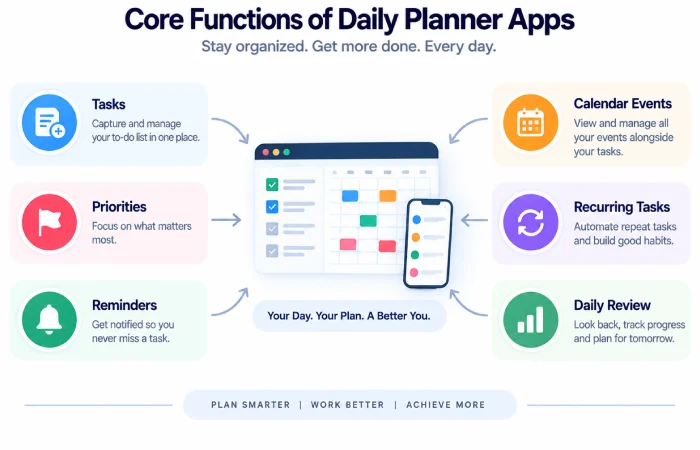
A useful daily planning app should make it easy to:
- Add task fast
- With deadlines.
- Create reminders
- Focus on high-leverage work
- Review & Edit the Day
- 2. Move unfinished items
- The ability to link tasks to a calendar.
There are some apps that concentrate on task lists primarily; and others that have a mixture of tasks, notes, calendars, and project management.
Best Productivity Apps for Daily Planning
Microsoft To Do
Microsoft To Do is a great pick if you prefer a minimal daily task list.
My Day: This gives you a place to curate the tasks you want to focus on each day. Tasks that aren’t completed will still live in the main task list, and they can be recommended again at a later time. Microsoft also integrates To Do with Outlook tasks, which some users may find handy. already using Microsoft services.
It works well for:
- Daily checklists
- Personal tasks
- Reminders
- Recurring tasks
- Outlook users
Todoist
Todoist is mainly a task management tool and provide its users with better control on the projects, priorities, labels, filters and dates.
The current Quick Add system allows users to enter tasks with natural-language dates, and emerging calendar views can display tasks using color for Priority, Project or Label.
Todoist has its uses when there is a need to link the daily plan with the long term projects and thus going beyond a mere list of “to dos”.
Google Tasks
Google Tasks is most suitable for those familiar with Gmail and Google Calendar.
Actions are designed natively within Google docs, such as Gmail, Calendar, Chat and Docs.
Thus it is very handy when you have an email that has to turn into an imminent task.
Notion Calendar
Notion Calendar is more appropriate for a person who prefers both the schedule information and project information show up at the same window.
Additionally, It can display deadlines and project schedules together with calendar items and can integrate with services such as Google Calendar, Outlook Calendars, and Apple Calendar.
It is especially effective for existing Notion users who have the tendency to store projects and other notes there.
Daily Planner Apps: Which Type Do You Need?
| Planning need | Suitable app type |
|---|---|
| Simple daily checklist | Microsoft To Do |
| Detailed task management | Todoist |
| Gmail and Google Calendar workflow | Google Tasks |
| Calendar + projects + notes | Notion Calendar |
| Larger project planning | Project management app |
The right choice depends on how much structure you need.
How to Use a Daily Planning App Properly
You won‘t be productive because of the application.
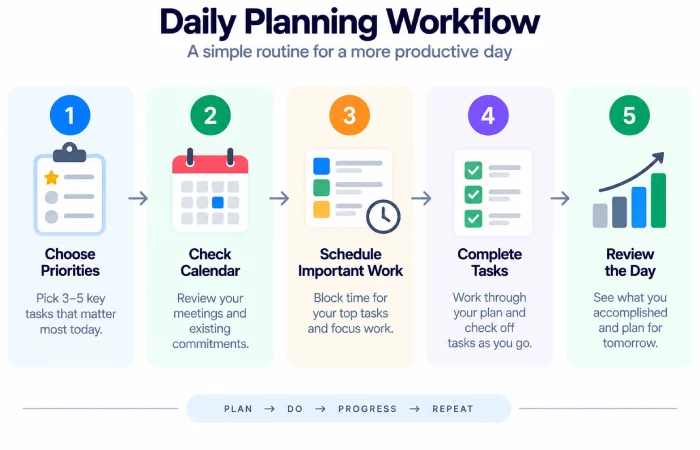
A simple daily planning process works better:
Start With Your Important Tasks
Select the only tasks that truly count that day.
Add Time-Sensitive Work
Have the appointments, deadlines, meetings and similar fixed commitments visible.
Keep the List Realistic
A list of only 25 important things to do in a day is hard to manage. A shorter list is easier to do.
Review at the End of the Day
Purposefully switch to incomplete terms rather than letting yourself do every old task.
Common Mistakes
Avoid:
- May be excessively detailed by including each little thought as a task
- Alphabet of too manycategoriesentre.
- Ever Changing Systems
- Craving to do additional work than the day permits
- Disregard of the calendar
- Concurrent usage of multiple task apps
Eliminate mental clutter, not build another one.
FAQs
Which app is best for simple daily planning?
If you mainly want tasks, reminders and a to do list for the day then Microsoft To Do is a simple choice.
Are daily planner apps useful for work?
Yes, they are very useful. They can help make deadlines, meetings and recurring jobs and copying tasks.
Can daily planner apps replace a calendar?
Not necessarily. Calenders are more useful for fixed time commitments, whereas task applications are tend to be more useful for flexible work.
Should I use more than one planning app?
For most people, usually, just one main task system and one calendar cover the entire work load.
Final Thoughts
The productivity apps that help organise our daily schedule are the ones that can help visualise your priorities on a daily basis, but also allow you to take action.
Each of these tools,Microsoft To Do,Todoist,Google Tasks, andNotion Calendar,plan very differently. Choose one of them according to your needs for simplicity, more advanced task management, some Google integration,or a more complete Workspace.
Start with one system and stick to it.
