



Introduction – best free productivity apps
There is no need to have lots of subscriptions to set your work out.
Most free productivity apps will support all the usual suspects, like to-do lists, reminders, notes, calendars, planning and some work-type collaboration. Some have a free plan with no strings attached, and others have a freemium model with high-end features/needs paid for.
The top free productivity apps are those that simply do the task you need.
Table of Contents
What Can Free Productivity Apps Do?
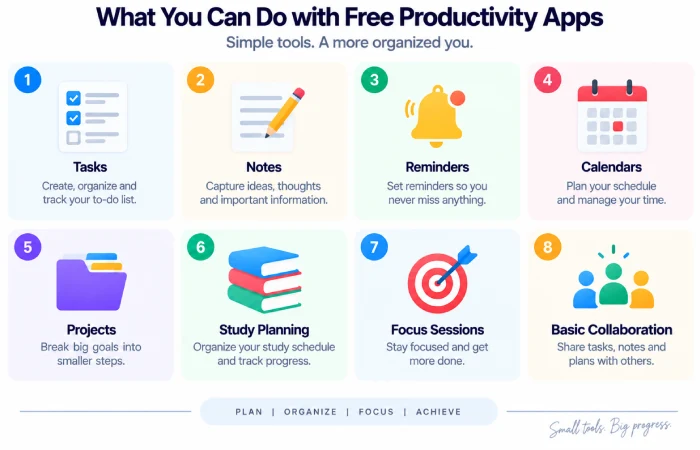
Free organization apps can help with:
- To-do lists
- Daily planning
- Notes
- Reminders
- Calendars
- Personal projects
- Study planning
- Focus sessions
- Basic collaboration
Different limits for each application and these limits are also subject to change over a period of time.
Best Free Productivity Apps
Microsoft To Do
Microsoft To Do is a free app that offers task management, reminders, due date support, lists, and daily planning with My Day. It works on Windows, Android, iOS, Mac, and the web, and it integrates with Outlook tasks.
It is perfect if you mainly need a reliable task manager.
Google Keep
Use it when you need a simple note, to make checklists, jot down quick ideas, or set reminders.
“Keep syncs notes across all your devices and allows notes, lists, photos, drawings, and audio to be shared with friends and colleagues for collaboration.”
Works particularly well when the focus is on collecting as much information as quickly as possible rather than putting together big projects.
Google Tasks
Google Tasks works well for those who live directly in Gmail and Google Calendar.
The tasks (signified as ‘Tasks’) can be created from within Gmail, Calendar, Chat and Docs, which is a great way to convert a message or file into urgent work.
Notion
Notion offers a free plan for an individual account and it can be used for tasks and notes, documents and database.
Students can also have free use of Notion through the Education Plan for students and teachers with a qualifying email address.
Free Productivity Apps Compared
| App | Best for | Main strength |
|---|---|---|
| Microsoft To Do | Tasks | Simple daily planning |
| Google Keep | Notes | Fast information capture |
| Google Tasks | Task management | Gmail and Calendar integration |
| Notion | Organization | Notes, databases, and projects |
Microsoft’s current Store listings also show Microsoft To Do among free productivity applications available on PC.
Free Does Not Always Mean Unlimited
This is vital before selecting an app.
A free plan may limit:
- Users count
- Storage
- Project size
- History
- Advanced features
- AI usage
- Integrations
Notion for instance has a Free Plan however features from AI are restricted for free & Plus members.
So always verify the present free-plan limits beforehand, before constructing your entire workflow around a given feature.
How to Build a Free Productivity Setup
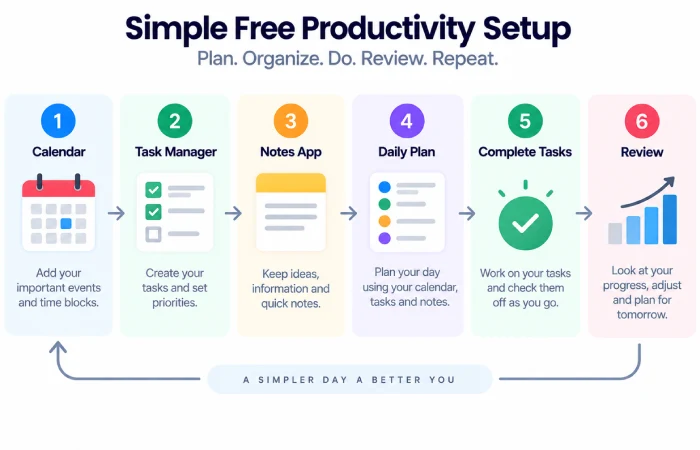
You do not need five or ten applications.
A simple setup can be:
Calendar + task manager + notes app
For example:
Google Calendar + Google Tasks + Google Keep
or:
Outlook + Microsoft To Do
.This suffices for planning everyday activities and self-organization.
Common Mistakes
Avoid:
- Using excessive free apps
- Testing the exact same task in several locations, Angles ()96.1 and ()20.9
- Not taking note of sync and backup
- Back to top Following the simple tasks with high-end instruments
- Selecting an app based solely on the indication that it is free
The aim is a simplified workflow, not to have a more complex system.
FAQs
Are free productivity apps good enough?
A lot of the time, free applications are all you need for everyday tasks, notes, planning, and organization.
What is the best free app for task management?
Microsoft To Do and Google Tasks are easy, and Notion offers a little more freedom for people seeking a larger workspace.
Is Notion free?
Yes. However to individual users, Notion has a Free Plan, but certain features such as API calls are limited.
Should I use several free productivity apps?
Only when they have a distinct purpose.
Final Thoughts
The best free productivity apps don‘t need to be complicated.
Microsoft To Do, Google Keep, Google Tasks, and Notion can meet most target daily organizer needs without multiple paid subscriptions.
Begin with the core workflow you actually require. Bring in an additional tool only if the existing configuration fails to solve the issue.
