




Table of Contents
Introduction
AI chatbots are no longer just an easy way for people to get simple questions answered on the website they’ve become a practical business tool.
Contemporary solutions for business chatbots software are able to respond to customer inquiries, assist in lead generation and qualification, help out employees, gather information, and integrate with different business systems. A few of these new generation solutions are even able to perform actions rather than only create a response.
But the key is selecting the bot that you want based on what you need for your organisation.
Both a team for customer service, an e-commerce shop and a sales team might be in need of an AI chatbot, but their needs are very different.
What Is an AI Chatbot for Business?
What is an AI Chatbot? An AI chatbot is a piece of software that employs artificial intelligence to have a conversational interface with your customers or employees.
Depending on the platform, it can:
- Address popular queries
- Offer details of a product or a service
- Capture leads
- Ascertain that the clients are the right ones
- Schedule appointments
- Summarize conversations
- Create or modify support tickets
- Engage with business solutions
- Hand over to human agents for transfer discussions.
Early versions of chatbots relied on static rules and keywords. More advanced AI-powered systems can interpret natural-language queries and leverage business data to generate more dynamic answers.
What Are the Best AI Chatbots for Business?
No one chatbot is ideal for all company… The optimal one varies according to the job, the communication channels, the current software used and the extent of automation needed.
ChatGPT
ChatGPT as AI Helper for Your Business It can be used as a general AI helper for your research, writing, analysis, preparation for customer support, and internal business processes.
OpenAI has made ChatGPT Business available with workspace agents that can handle repeatable tasks, leverage connected applications, execute on schedules, and run with admin permissions and approval gates. (openai.com)
Therefore it is handy if the company requires more than just a basic website chatbot.
Microsoft Copilot
Microsoft 365 Copilot will be focused on work and business data.
Copilot has integrations with business data and connected applications and Microsoft offers connectors enabling organizations to search across Microsoft 365 and other business applications. (microsoft.com)
Remaining with the existing platform can prove to be a cost-effective solution for establishments already fully utilising Microsoft 365.
Google Gemini
16. Other general platforms with business and workplace features. Gemini.
Google‘s Gemini Enterprise for Customer Experience is designed for customer-facing AI agents. It provides conversational applications, customer-service workflows, and human handoff, while enabling agents to access business systems and customer context. (cloud.google.com)
Intercom Fin
In terms of structure, Fin is primarily built for customer service and support chat conversations.
It is more favourable for organisations to want an AI agent connected to a support environment rather than a general-purpose AI assistant.
Tidio Lyro
Tidio’s Lyro focuses on customer support and website conversations, making it relevant for smaller businesses that want a simpler customer-facing chatbot setup.
Specialized platforms such as these can be easier to deploy when the business has one clear goal instead of needing a general AI assistant.
Key Features to Compare
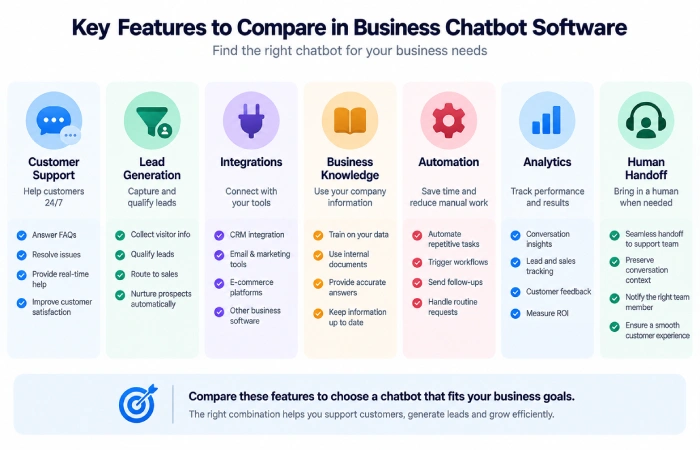
Compare when evaluating business chatbot software the features that directly impact the workflow.
Customer Support
A support chatbot will be able to answer typical questions with 100% accurate business data, and knows when to hand over to humans.
More and more new platforms are now making human handoff available when automation fails. Google, for example, offers the ability to document an end-user’s foray into a chatbot-to-human handoff, in a single conversational experience. (support.google.com)
Lead Generation
A sales-focused bot gathers information about website visitors and qualifies leads prior to forwarding them to a sales agent.
Useful fields might include:
- Name
- Contact details
- Product interest
- Budget
- Location
- Buying timeline
This can then be passed onto the relevant team as a qualified lead.
Integrations
Integration tends to be among the most substantial features.
A chatbot becomes more useful when it can connect with:
- CRM software
- Help desks
- E-commerce systems
- Calendars
- Knowledge bases
- Messaging platforms
In the absence of integrations, this could require manual copying of data.
Knowledge and Context
The chatbot must be able to take reliable business information.
This might include:
- Product documentation
- FAQs
- Pricing information
- Policies
- Support articles
- Internal knowledge
The accuracy of the chatbot‘s responses will be greatly influenced by the data it uses.
Automation and Actions
Modern AI agents are capable of acting as well as conversing.
For example:
Customer inquires regarding a purchase → AI retrieves the summary of the details → status of the order discussed
A more advanced workflow might be:
Request from customer → Interpretation of the request by the computer, leading to a search of relevant information regarding this request → Request is actioned and customer is advised.
Google and OpenAI are both moving their business AI products toward these multi-step workflows. (cloud.google.com)
AI Chatbots by Business Need
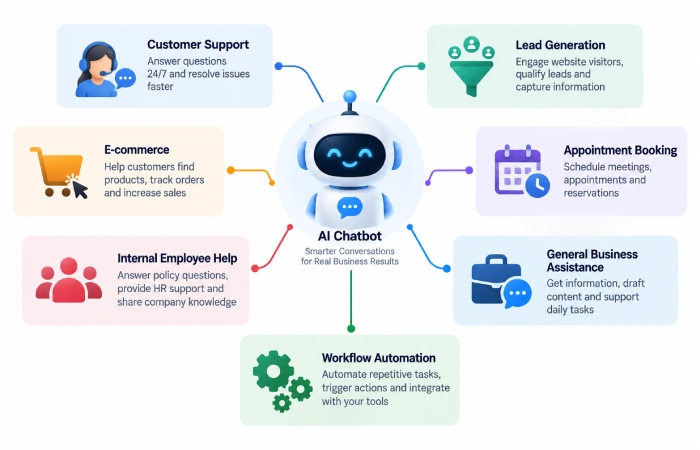
| Business need | Useful chatbot type |
|---|---|
| Customer support | Support-focused AI agent |
| Lead generation | Sales chatbot |
| Online store | E-commerce chatbot |
| Appointment booking | Booking assistant |
| Internal employee help | Workplace AI assistant |
| General business tasks | General-purpose AI assistant |
| Complex automation | AI agent platform |
This is a better way to evaluate chatbots than simply looking at which platform has the most features.
How to Choose the Right Business Chatbot Software
Start With the Main Goal
Set yourself out a task for your chatbot to perform.
If the pain is most about the same customers asking the same questions, then look at support features. If the pain is mainly around lead capturing, look at sales & CRM integrations.
Check Your Existing Systems
Investigate the applications your business already has.
Implementation is minimized by a chatbot that connects to your current CRM, help desk, and communication platforms.
Test Real Conversations
Seek not to pass a simple demonstration but make a thorough test of the chatbot.
Test real questions customers have asked you such as: questions that weren’t understood, a customer follow-up message, and cases where the chatbot should hand control of the conversation back to a person.
Check Human Handoff
The customer must be able to reach people when the problems can’t be solved by the automation.
Review Security and Permissions
Prior to connecting data related to customers or the company, review the platform‘s data handling, permissions, and administration controls.
Common Mistakes to Avoid
Organizations occasionally select a chatbot, relying on marketing statements and ignore workflow needs.
Common mistakes include:
- Framing the application before selecting a chatbot
- You can expect an AI to answer anything.
- 3. Employment information derived from recent rather than historical sources
- Omitting a human handoff
- Using features you don’t need
- Linking other sensitive information without evaluating controls
- Focusing on chatbot activity rather than business outcomes
To have a Chatbot that Capably Handles Smaller Volumes of Operational Conversational Flows.
FAQs
What is the best AI chatbot for a business?
The right decision is a matter of business need. Customer support, lead generation, e-commerce, and internal productivity all have different requirements.
Can AI chatbots generate leads?
Yep. Sales chatbots are perfectly capable of scraping visitor details, asking qualifying questions and forwarding qualified leads onto the sales team.
Can AI chatbots replace customer service agents?
They can supplement routine transactions, but they can‘t replace human contact, so human staff are valued for sensitive, and as well as unorthodox, complaints.
Do AI chatbots need a knowledge base?
They perform best when there is specific knowledge of what the entire company offers, how it does everything, and how it can help you.
Are AI chatbots suitable for small businesses?
Yes. It can be easy for a small business to begin using a basic customer-support or lead-generation automated bot and scale up the system when demand warrants.
Final Thoughts
The best AI chatbot for business is not the one with the most features.
The chatbot that is suitable for the business problem is the right one.
Begin with your core use case, verify integrations with your current software, test on actual customer conversations, and ensure there is a robust escalator to human.
What will happen in the future with Business Ai: And onward to agents that can harness company data and perform multiple steps It’s very easy to turn a customer question into a one-stop-shop. (openai.com)
