





Introduction – AI automation ideas for small business
Despite the many sound reasons provided for using team working, staff in small business often have to spend a lot of time doing the same thing over and over again.
Replying to emails, making calls to schedule meetings, inputting data onto excel sheets, following-ups, drafting invoices, and repeat questions of the same customers may results to more time towards less significant work.
AI automation can ease some of that burden.
It is actually very straightforward: identify a routine activity, associate it with appropriate application, and then use automation for the repetitive activity. The U.S. Small Business Administration enumerates activities like reminders on calendars, management of emails, updates on inventories, summaries of meetings, and customer support as possible applications of AI to small-scale enterprise.
Table of Contents
What Is AI Automation for Small Business?
What is AI automation? The integration of artificial intelligence with business processes that allow various task to be performed with minimum human intervention.
Conventional automation typically operates with set rules. It can be applied where a workflow requires the understanding of text, categorization, summarisation or pattern detection.
For example:
Customer email→AI picks up the request→ information is grouped together→ response is drafted→ employee checks it
The employee still decides the key aspect but the AI executes the monotonous step.
AI Automation Ideas for Small Business
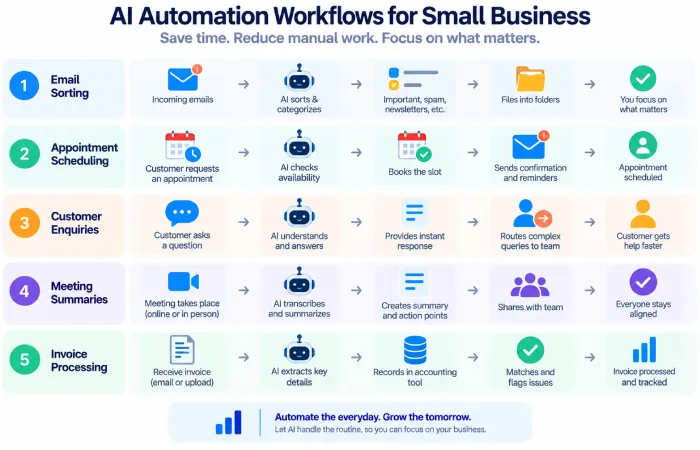
It isn‘t necessary to automate everything all at once. The most convenient place to start is generally with a task that occurs many times and has a fairly straightforward process.
1. Automate Email Sorting
Inboxes for small businesses may become overwhelmed quickly.
AI can help classify incoming emails into categories such as:
- Sales enquiries
- Customer support
- Billing
- Orders
- General requests
Additionally, it is capable of summarizing long messages and prioritizing pending emails.
Allows you to easily identify anything that requires attention without having to manually search through every message.
2. Automate Appointment Scheduling
It may also include several message exchanges.
Assistants using AI and rate balancing schedule system, can provide the customer with available time, send reminders and updating the calendar.
All of these points are also likely to be extremely beneficial to consultants, clinics, agencies, repair businesses, salons and other appointment based businesses.
3. Automate Customer Follow-Ups
Follow-up is a frequent small-business pitfall.
A simple workflow can be:
New lead → initial contact+follow-up reminder → second message + sales task created
Our AIs can also help develop a personalized follow-up based on the customer‘s last feedback.
The business owner remains in control of scheduling the action and determining the way in which it is performed.
4. Automate Customer Questions
A chatbot on your website could answer general questions about products, prices, shipping, opening hours, bookings or other simple information.
If the question gets more complex, a member of staff can take over the dialogue.
This reduces repetitive customer-service work while keeping a human involved where necessary.
5. Automate Meeting Notes
Meetings may put a burden of administrative work on top of the actual conversation.
AI meeting tools can:
- Transcribe conversations
- Summarize the discussion
- Identify decisions
- Extract action items.
- Draft follow-up messages.
- Update all related records:
Have led Microsoft to describe some workflows where you can link as notes or action items to a CRM system. This eliminates redundant updates after the meetings.
6. Automate Invoice and Receipt Processing
Administration of finance is an additional field that can be automated.
It can retrieve data from receipts & invoices, categorize expenditure & transfer the data to accounting or spreadsheets.
Employees can check extracted data and fix any incorrect fields, so they do not have to type everything in:
7. Automate Inventory Updates
Online retail companies those that commerce physical goods are two implementing automation tools to track inventory.
A workflow alone could also be set up to notify when stock levels reach below a specific point and then activate a reminder to either order.
However, even more sophisticated systems can also utilize past sales history to assist business owners in estimating future demand. Microsoft points out inventory management and demand forecasting as AI use cases for small businesses.
8. Automate Marketing Tasks
The most common work process in marketing: frequent repetitions.
AI automation can help with:
- Social media scheduling Time saving tips and tools.
- LACK OF VARIATION IN THE CHOICE OF CONTENTS. In order for users to indulge in what they want, the system needs to have a variety of choices to offer. It must be flexible. If the choices don’t satisfy users, they will shop else where and the shopping system will fail.
- Getting started by sending a wele comer email.
- The procedure of following upwiththe leads
- Segmenting customers
- Campaign drafts creation.
For example, if a new customer joins the mailing list, an automated introductory email can then be sent to the customer. can then enter a longer email sequence.
9. Automate Document Processing
Businesses often receive forms, applications, invoices, contracts, and other documents.
AI can extract relevant information and organize it into the correct system.
For example:
Document received → information extracted → document classified → record created → employee notified
This can reduce repetitive data-entry work while keeping a person available to check important documents.
10. Automate Internal Tasks and Reminders
AI can also help with small internal tasks that are easy to forget.
Examples include:
- Employee reminders
- Recurring reports
- Task assignments
- Deadline notifications
- Restocking reminders
- Meeting preparation
These tasks may not seem important individually, but automating them can make daily operations more consistent.
How to Choose the Right Automation
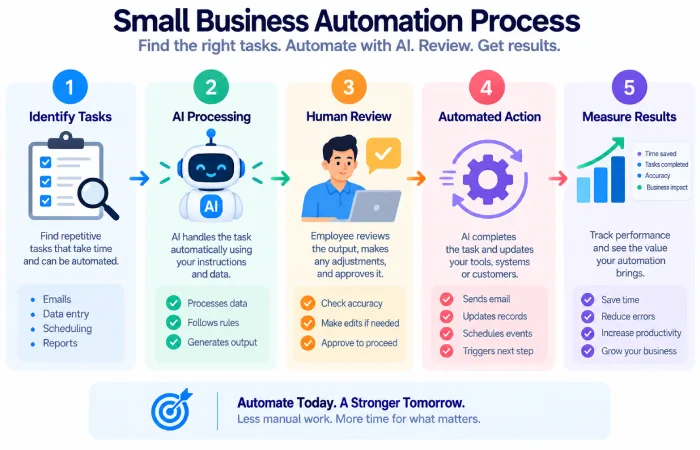
There are some tasks that, may not lend themselves well to a solution being delivered by AI.
Start by looking for work that is:
- Repetitive
- Frequent
- Time-consuming
- A suggestion that, for the time being, we work on a based on a reasonably clear process
- Measurability Ease of use.
It may not be the place to begin.
Microsoft‘s advice is to identify repetitive tasks which consume significant time, conduct a pilot to evaluate results, and then roll it out across the business.
A Simple AI Automation Workflow
A small business can start with a workflow like this:
Step 1: Select one repetitive task.
2: Record the current completed method in more detail.
Step 3: Recognise which components can be automated.
Step 4: finish up and link the essential tools.
5: Use real cases to see how it works.
Step 6: Allow human assistance for most crucial actions.
Step 7: Calculate time saved, errors eliminated.
Once the first workflow is working reliably, it can be implemented to another part of the business.
Common Mistakes to Avoid
The most common error is to automate any process that AI can perform.
Automation won‘t hide a bad workflow. It can even be more difficult to notice in a badly designed process.
Other common problems include:
- Automating too many tasks simultaneously
- Utilizing a variety of tools to perform the same task.
- When you do not perform an assessment of the AI information,
- Providing AI with access to private and confidential information without appropriate safeguards.
- Eliminating human intervention in key decisions
- Rather than on concrete business outcomes, for example…
The SBA suggest that outputs should be checked especially if general use – free AI (e.g. Chat-GPT) is used.
FAQs
What are the easiest AI automation ideas for a small business?
Easy areas of getting started include sorting messages, reminders for appointments, meeting summaries, customer frequently asked questions, follow-up reminders, and simple document processing.
Does AI automation require coding?
Not necessarily. Many business applications nowadays comes with flow automation or low-code workflows which you can optimize by making such configuration without the programming.
What should a small business automate first?
Choose a repetitive task that occurs frequently, takes a reasonable amount of time, and has a tangible, quantifiable outcome.
Can AI automation completely replace employees?
While AI can certainly minimize constant, monotous work, numerous business functions still lean heavily on judgement, interpersonal communication, relationship management, and responsibility.
Final Thoughts
Ideas for AI automation for a small business do not have to be complex. The automations are often the simplest: they sort your email, schedule your appointments, prepare your follow-ups, recap your meetings, handle the documents, or keep the inventory data fresh.
Begin with any one of the workflows and find out what goes on.If it just saves time and doesn‘t generate new complications, grow it out. In small, digestible chunks, keeping the technology manageable while deriving concrete business benefits from the AI.
