



Best AI Tools for Small Business
Managing a small business is multitasking. If you are a small business owner you might be sales department in the morning, customer care in the afternoon, social media team in the early evening and then suddenly the next thing you know you are behind that accounting table for few hours.
Here are some of the best types of AI for your small business.
Suppose AI can support writing, research, designing, talking with customers, accounting, marketing, efficiency and automation. Then, it is to find a solution to solve the problem, not another subscription for everyone where no one uses.
In this guide I will list some interesting AI tools for various business requirements along with advice on how to select appropriate tools for your business.
Table of Contents
What Are AI Tools for Small Business?
AI tools are software solutions that employ artificial intelligence in order to allow their users to be more productive in their tasks, inform their decisions, analyze data,produce content, automate processes etc.
For a small business, an AI tool might help you:
- Draft emails, letters, and business documents.
- Design some marketing textiles!
- Create social media graphics
- Analyze spreadsheets
- Create a new customer.
- Automate other repetitive tasks.
- Customer questions of reply.
- Handle the accounting.
- Research products, competitors
- Provide summaries of meetings and documentation
What is the best option really relies on what your business truly requires.
A local service business would derive more benefit from an AI writing tool, and automation platform such as: while an ecommerce company may benefit more from AI for marketing, customer support, recommendations, and analytics.
Best AI Tools for Small Business
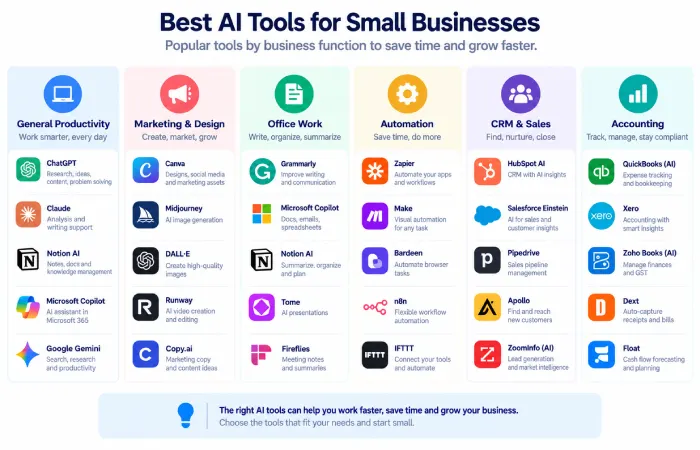
There is no single tool that is best for every business. The following options are useful for different types of work.
| AI Tool | Best For | Why Small Businesses May Use It |
|---|---|---|
| ChatGPT | Writing, research, analysis, everyday work | General-purpose AI assistant |
| Canva AI | Marketing and design | Creates and adapts visual content |
| Microsoft 365 Copilot | Office productivity | AI inside Word, Excel, PowerPoint, Outlook, and Teams |
| Google Workspace with Gemini | Google-based work | AI assistance across Workspace workflows |
| Zapier | Automation | Connects apps and adds AI to workflows |
| HubSpot | Marketing, sales, CRM, support | AI connected to customer and business data |
| QuickBooks | Accounting | AI-assisted accounting and financial tasks |
These tools overlap in some areas, but they are designed for different jobs.
1. ChatGPT for General Business Work
ChatGPT is the most flexible option available to small businesses.
This write tool can write emails, do mind maps, extract facts, gather research, produce web copy, do file analysis, draft business documents, and process complex instructions.
OpenAI currently markets ChatGPT Business strictly to small teams, and claims it can be used for customer work, financial reports, marketing material, and operations. Business workspaces also include administrative and security controls.
Best for
- Writing/editing
- Research
- Brainstorming
- Data analysis
- Business planning
- Customer communication
- Everyday productivity
It is a good starting point because many tasks can be done using one equipment.
2. Canva AI for Marketing and Design
Canva is a good tool for small companies which always require visual content.
The AI functions of Canva would assist in designing and customizing whereas Canva small business offering concentrates on producing content, establishing brand uniformity, and generating cross-channel marketing collateral.
Canva can be useful for creating:
- Social media posts. Posts on Facebook, twitter, Instagram and other sites and services are an example of people expressing opinions, sharing ideas or self presentations.
- Advertisements
- Presentations
- Flyers
- Posters
- Videos
- Marketing graphics
Canava now supports integrations with AI assistants so that conversations with the AI can be turned into editable designs.
Best for
Points to the small business that has a need for polished marketing material, but does not employ a design staff.
3. Microsoft 365 Copilot for Office Work
Organizations using Microsoft 365 business will potentially use Microsoft 365 Copilot because of the existing users.
Microsoft now offers Copilot options on a wide range of applications, like Word, Excel, PowerPoint, Outlook, and Teams. The business plans are including these Copilot items, as well as research, analysis, and workday productivity.
It can help with tasks such as:
- Drafting documents
- Summarizing emails
- Analyzing spreadsheets
- Preparing presentations
- Organizing meetings
- Handling business data; This project gives you the manipulation of data by using computer and the handling of business information in a strategic perspective.
Best for
Small enterprise which are already using heavily Microsoft 365.
4. Google Workspace with Gemini
AI can be used to make daily work easier also by those working in Google Workspace:
Google touts Workspace with Gemini for small business and gives examples of use cases including sorting information, getting a handle on business performance, creating content, and working from or through Gmail and other Workspace apps.
Best for
Businesses that already work primarily with:
- Gmail
- Google Docs
- Google Sheets
- Google Drive
- Google Calendar
- Google Meet
If your team is already comfortable with the tools suggested above, then introducing them to AI will not be too hard.
5. Zapier for AI Automation
Zapier is handy if your aim is a flow of work, not only information produced.
The Zapier is marketing its platform as an ‘AI-enabled automation infrastructure, connecting apps, data, workflows and AI models’. It supports no-code, low-code, and full-code implementations and integrates with thousands of other apps.
For example:
New website form→ Customer info appears in CRM→ AI summarizes the inquiry→ Sales is notified
Other possibilities include:
- Lead routing
- Customer onboarding
- Data entry
- Notifications
- Document workflows
- Email processing
Best for
Small businesses that spend too much time transferring information from one application to another.
6. HubSpot for Marketing, Sales, and Customer Management
Works well when AI is used in conjunction with customer and sales data, worth evaluating is HubSpot.
Its platform now integrates a CRM database with AI-driven marketing, sales and customer service. It offers some free tools and a package targeted at small businesses.
Depending on the setup, businesses can use it for:
- Lead generation
- Email marketing
- Customer management
- Sales workflows
- Customer support
- Content creation
- Analytics
Best for
Small companies that require CRM, marketing, sales and customer care tools all integrated together in a single system.
7. QuickBooks for AI-Assisted Accounting
Another is accounting. AI could ease work here as well.
Intuit Ai QuickBooks‘s supporting artificial intelligence releases to be used in financial calculations and the automation of financial tasks, including transaction processing and business intelligence is Intuit Ai. The Intuit Intelligence is their integration of artificial intelligence along with business intelligence with integrated accounting, payments, payroll data in supported QuickBooks products.
Best for
Intended for existing QuickBooks users who are seeking AI support integrated with their existing accounting processes.
AI should facilitate the work of the accountant, not take over relevant financial review and sound advice.
How to Choose the Best AI Tools for Your Business
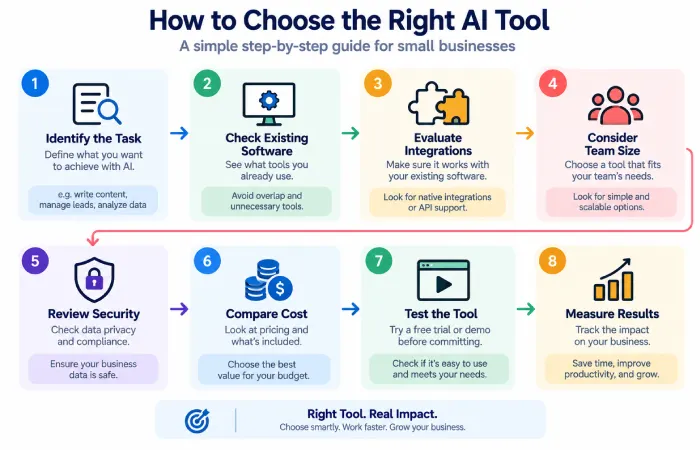
The right tool depends on the problem you‘re trying to solve.
Start by asking:
What takes the most time?
Identify tasks that you can regularly do daily or weekly.
Perhaps if you have an analyst team writing the same stuff hour after hour an automated AI Writing Assistant tool could help.
Automation platform might be of greater value where employees regularly perform copying between applications.
What tools do you already use?
This is something,, doesn‘t allow to do.
A business currently using Microsoft 365 might find it a preferable user experience to integrate Copilot over importing an entirely different third party product.
On the same note, users of the existing Google Wokspace might also find it convenient to integrate Gemini-focused capabilities.
How many people need access?
One business owner needs one tool, but a team will have more then one.
Make sure the software provides the appropriate collaboration, user administration, billing and security capabilities.
Does it connect to your existing systems?
Integration can be just as important as AI capability.
Before buying a tool, check whether it works with your CRM, email, accounting software, website, spreadsheets, or other systems.
Free AI Tools vs Paid AI Tools
There are also several free tools, either available for free, offered as trials, or offering limited access.
Free tools are also a good place to start if you are testing an idea or trying to understand how AI could fit into your business.
Paid plans can become more useful when you need:
- Higher values of usage limits
- Team features
- Administration
- Better integrations
- More sophisticated components.
- Business security controls’ down to manned or automated security systems and procedures that are put in place in the firm‘s objective to safeguarding its assets.
- Larger workflows
The cheaper tool may not always be the best.
A tool which eliminates hours of work every month may be more valuable than a free tool that few people use.
How Small Businesses Should Start Using AI
The number of AI tools you can juggle at one time:…do NOT attempt to introduce ten AI tools at once!
Begin with a single well-defined issue.
For example:
Problem: The owner spends an hour each day writing emails and social posts.
AI solution: Employ an AI assistant to generate initial drafts and brainstorm ideas.
Then see if it indeed is a time saver.
The second tool may be added down the line for a different problem.
A simple approach is:
Identify task→Select instrument→Test→Evaluate outcomes→maintain, replace, or expand
This helps stop AI spending spiraling out of control.
Common Mistakes When Choosing AI Tools
Buying Too Many Tools
Having many subscriptions can generate greater complexity and less value.
Choosing Based on Hype
Your Favorite AI assistant may not be the best tool for you.
Ignoring Integration
A good robust standalone tool will, however, generate additional work if it takes a lot of dragging and dropping to transfer the data to and from it. manually.
Sharing Sensitive Information Carelessly
Before putting business information into an AI service, understand its privacy, security, access, and data-handling policies.
Expecting Perfect Results
AI-generated content and analysis should be reviewed, especially when the output affects customers, finances, legal matters, or important business decisions.
Focusing Only on Cost
The goal should be useful business results, not simply finding the lowest subscription price.
Best AI Tools for Small Business by Need
| Business Need | Good Starting Point |
|---|---|
| Writing and research | ChatGPT |
| Social media graphics | Canva AI |
| Office productivity | Microsoft 365 Copilot |
| Google-based work | Google Workspace with Gemini |
| Workflow automation | Zapier |
| CRM and marketing | HubSpot |
| Accounting | QuickBooks |
| Multiple business needs | A combination based on workflow |
This approach is usually better than looking for one tool that tries to do everything.
FAQs
What are the best AI tools for small business?
In general, the best tool will be task specific, ChatGPT will be valuable for general business tasks, Canva for graphics, Microsoft 365 Copilot and Google workspace with Gemini for productivity, Zapier automation, Hubspot for customer-facing work and Quck books for accounting.
Are AI tools useful for small businesses?
Yes. Small businesses can use AI for writing, research, marketing, design, customer support, accounting, productivity, and automation of repetitive tasks. The benefit is dependent on whether the available AI tool truly solves a business problem.
What is the best AI tool for small business owners?
No common winner. An all-rounder like ChatGPT can be an overall good first-aid since it covers many sort of tasks at least in the mind of the user, while more specialized tools may be preferable for accounting, design, CRM or automation.
Are there free AI tools for small businesses?
Yes. Several AI providers offer free accounts or a free trial. Paid plans may have higher limits, collaborative controls, integrations or other business features.
How many AI tools should a small business use?
Begin with a few known tools that address clear issues. Introduce additional tools only when they have an immediate utility.
Is AI safe for small business data?
The safety is varied according to the service, plan, setting and data type. Business need to compare privacy/security policies from every provider and should not send any private data until knowing how the information is managed.
Can AI replace employees in a small business?
And perform some tasks automatically; however, many business actions still have to be: human judgment, communication, creativity, and accountability. It is often more useful to think of AI as a tool that helps employees work faster.
Final Thoughts
The best AI tools for small business are not the biggest or most popular tools. They are the ones which just fixed useful problems without making irrelevant problems.
Begin by analyzing where your team is wasting the most time.
Utilize ChatGPT for business tasks, Canva for visual artifacts, Microsoft 365 Copilot or Google Workspace with Gemini in terms of productivity, Zapier in terms of automations, HubSpot in terms of customer operations, and QuickBooks in terms of bookkeeping if such features suffice your business needs.
The best advice for entrepreneurs interested in artificial intelligence for entrepreneurs is a pragmatic one: begin small, measure returns, and expand only when AI has been demonstrated to make running the business easier.
For a broader overview, read our AI for Small Business pillar guide.
