
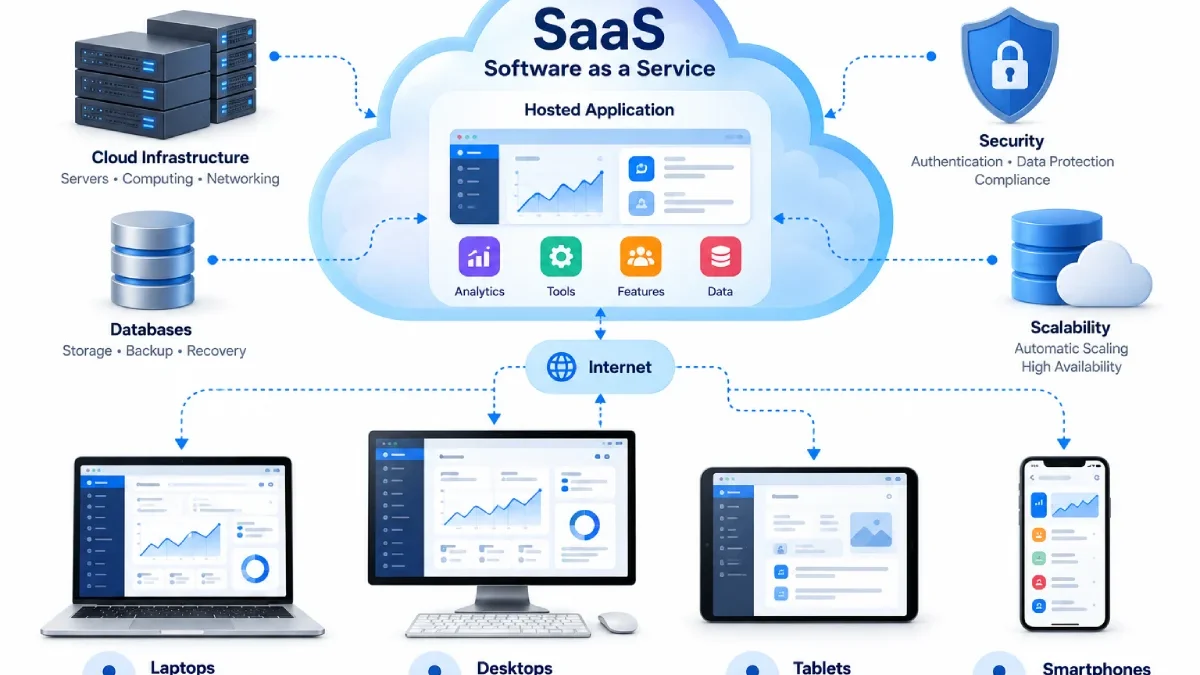

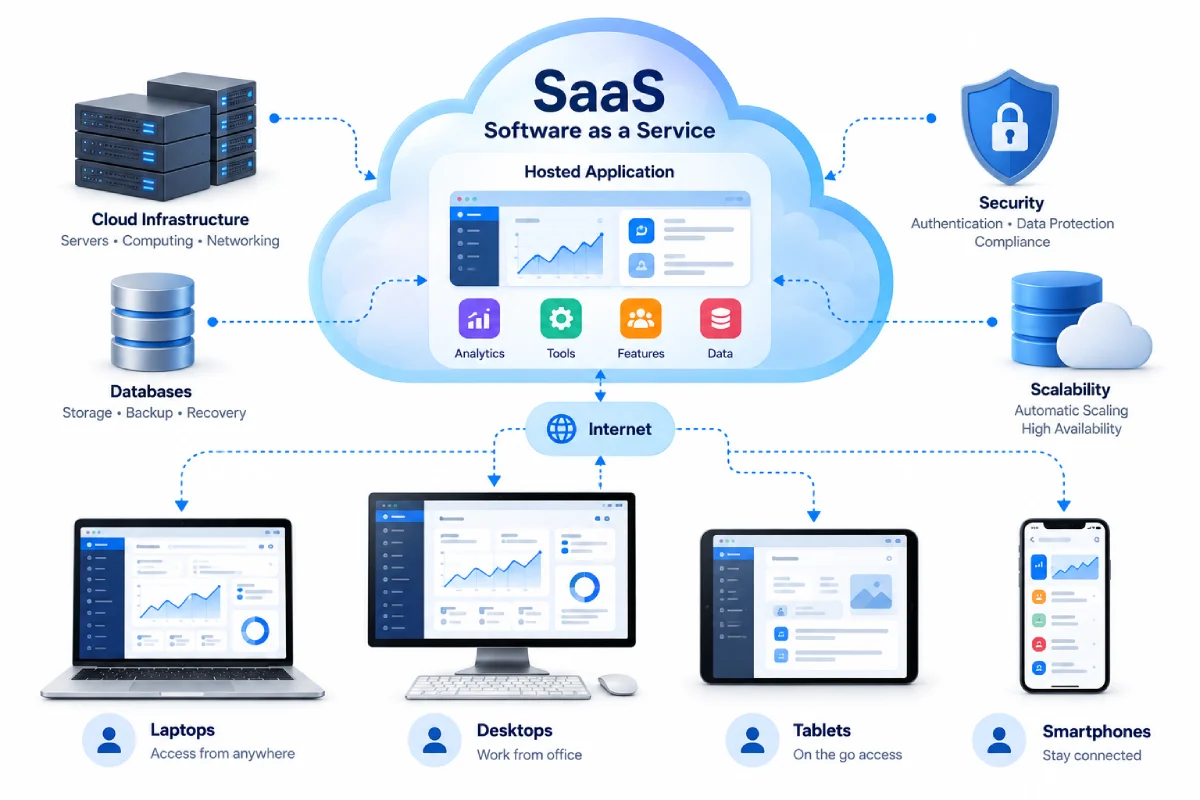


Sometimes, software doesn‘t need to be installed on a computer before using it. SaaS or Software as a Service allows applications to be delivered over the internet, accessed from any supported device.
This model has revolutionized the way in which business and individuals use software. Customers no longer have to handle the entire software installation and infrastructure themselves but run the application that is externally hosted and managed by a service provider.
Table of Contents
What Is SaaS?
SaaS is the abbreviation of Software as a Service.
Under the SaaS model, the application (software) is hosted by a provider and made available to users over a network, most probably the internet.
Users tend to log into applications through a browser or application rather than download and store entire applications on their local systems. They then use the application online.
Such as: web based email services, Project management softwares, Internet based accounting systems, Customer relationship management tools, Internet based document management tools etc.
How Does the SaaS Model Work?
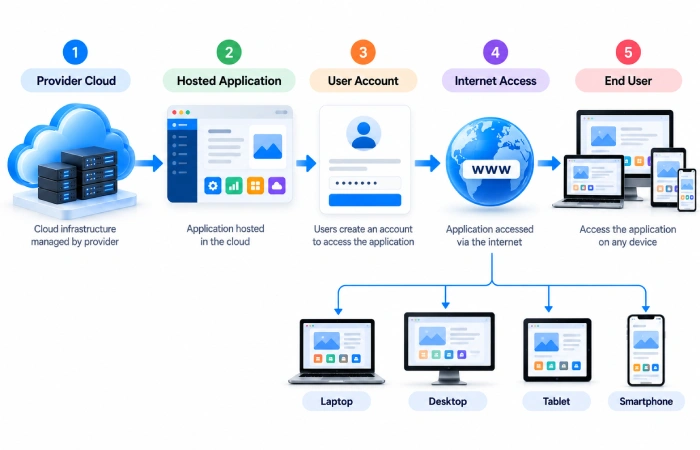
Usually, a standard SaaS architecture comprises three main components:
1. The Provider Hosts the Software
The SaaS Provider is the operator of the application. This is the cloud application provider.
An infrastructure is the hardware and software component required for operation, such as servers, storage, networking, databases, etc.
2. Users Access the Application
The client primarily communicates with the service either through its web browser interface or by one of the dedicated clients.
User does not take responsibility for any server needed for the service.
3. Data Is Stored in the Cloud
Ideally, application data resides on the cloud of the hosting provider.
This allows for information to be accessed easily and on many supported devices (this is service dependent).
4. The Provider Manages Updates
The provider takes care of the application‘s maintenance, bug fixing, updates and other backend work.
In general, the user will not have to manually install each updated version.
5. Access Is Controlled Through Accounts
Individuals will generally log on using an account.
Permissions allow certain functionalities or pieces of data to be made available to users.
For example, an employee might be able to access sales information whereas an administrator can create and maintain users and the system.
How SaaS Differs From Traditional Software
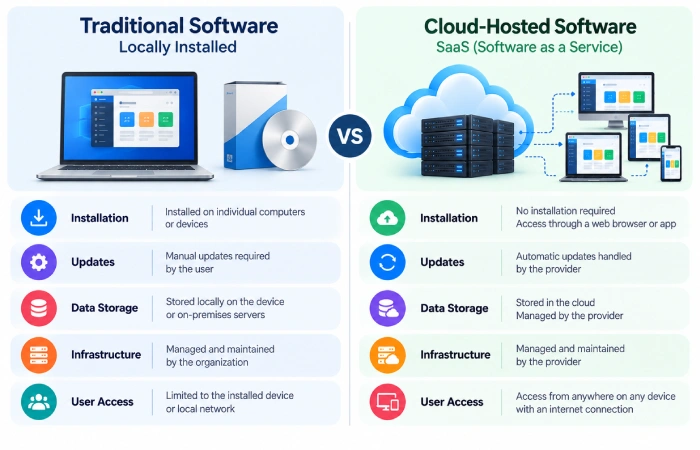
Office 365 is often used for local installation and management of software.
A SaaS application is usually provisioned/consumed as a web application.
| Traditional software | SaaS |
|---|---|
| Installed locally | Hosted by provider |
| Updates may require manual action | Provider manages updates |
| Data may be stored locally | Data commonly stored in cloud infrastructure |
| Infrastructure may be managed by customer | Infrastructure managed by provider |
| Purchase may involve a license | Often subscription-based |
The precise model will differ from product to product, but the fundamental distinction is: who takes care of the software platform.
How Users Pay for SaaS
Recurring billing is the norm for many SaaS products.
Common approaches include:
- Monthly subscriptions
- Annual subscriptions
- Per-user pricing
- Feature-based plans
- Usage-based pricing
- Freemium and subscriptions for free and for a price.
Some services additionally provide enterprise schemes with further support and controls.
What Happens When the Software Is Updated?
One of the main advantages of the SaaS model is that updates can be made by the provider.
All the users will not have to download and install a new version of the software. Instead, the software administrator (the provider of the software) can modify how the service works.
But they can also change features or flow or interface, so admin should always notice the important product change.
Is SaaS the Same as Cloud Computing?
SaaS is one of the ways in which cloud computing services are provided.
Cloud computing is part of the broader concept of infrastructure that provides servers, storage, databases, networking, software etc. over the internet.
SaaS is concerned solely with the provision of applications that are cloud based.
SaaS in Business
The applications of SaaS are so diverse.
Common examples include:
- Accounting
- CRM
- Project management
- Communication
- Human resources
- Marketing
- File sharing
- Customer support
- Collaboration
This costs something to the consumer, but it allows companies to use the software without having to builds the whole host of items needed to run it.
What Should You Check Before Using a SaaS Product?
Before choosing a SaaS application, check:
- Security controls
- Data storage and backup procedures
- User permissions
- Integration options
- Pricing
- Support
- Export options
- Availability requirements
It is helpful to know what you can do with your data if you decide to end the use of the service.
Final Thoughts
SAAS (software as a service), is a model for providing information technology services and applications delivered via cloud computing instead of through a direct application.
Most of the hosting, upgrades, maintenance and the majority of the supporting infrastructure are used by the provider, while the end user simply uses the application through a supported device.
Having this model in mind makes it simple to us by trying to set the features of a SaaS product in relation to what is needed for a particular workflow.
