



Table of Contents
Introduction
The cost of the software can be quite high when a small business company subscribes to separate applications for accounting, CRM, PM, communication, marketing, and document management.
Free business software options are available for a new or small business to help address some of these needs without yet incurring that additional monthly expense.
The next problem: free does not necessarily mean free of limits. Many of the products impose limits on people, storage, automation, integrations or accelerators and advanced features.
What Should Free Business Software Provide?
Definitely, the best free product must solve a real business issue and should not impose only driven limitations.
Depending on the category, useful features may include:
- Contact management
- Task management
- Team communication
- Document storage
- Invoicing
- Marketing
- Scheduling
- Project management
- Basic reporting
Free Software Options for Small Businesses
HubSpot Free CRM
Hubspot offers a free CRM, targeting startups and small business.
Its free CRM allows customer information to be integrated within one system and unlike using the traditional trial, the data does not expire.
This is also great if someone has a new business and wants to keep records of contacts, customers, etc but isn‘t ready to pay to have a CRM.
Bitrix24
To offer a free business work space with CRM, task planning, online meetings, calendars, and business tools.
The available free product aims to offer a comprehensive suite of business functionalities within a single workspace.
This may be useful for very small teams who would like fewer tools.
Trello
Trello offers a very simple way to visually manage projects and tasks.
Its simple board-and-card system is efficient for small teams seeking a straightforward way to track projects without constructing a complex project management platform.
Google Workspace Tools
Google also offer free business services for email workflow, documents, spreadsheets, calendars, file management and sharing and collaboration, however the business-oriented Workspace plans offer further controls and functionality.
What really matters then is the distinction between truly free services versus free tiers for the purpose of upselling mostly.
Free Software by Business Function
| Business need | Free software category |
|---|---|
| CRM | HubSpot Free CRM |
| Team workspace | Bitrix24 |
| Project tracking | Trello |
| Documents | Cloud document tools |
| Communication | Chat and meeting tools |
| Marketing | Free email/content tools |
| Finance | Free or limited accounting tools |
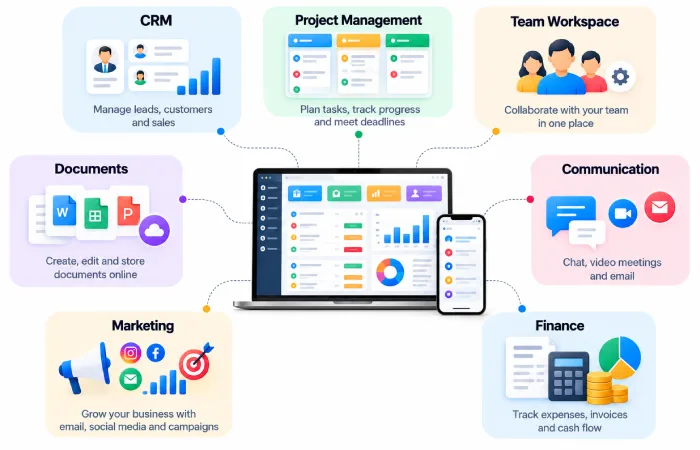
A 2026 comparison of free small-business software included free offerings for accounting, CRM, marketing, scheduling, payroll, and more. And it also warned that free plans frequently have restrictions on number of users, features, or usage.
Free Software vs Paid Software
When the business needs are as simple as they get, then free software just makes sense.
Paid software becomes more useful when the company needs:
- More users
- Larger storage
- Advanced reporting
- More automation
- Better integrations
- Customer support
- ‘Weaker regulatory regimes ’
- Security modes that are more familiar to us.
Hence, the free plan can then be assessed according to the predicted use of the business instead of its $0 value.
How to Build a Free Software Stack
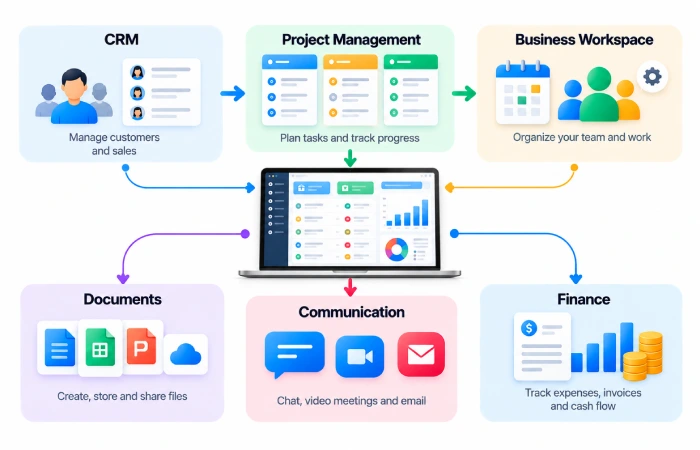
A small company can begin with a small set of tools.
For example:
CRM → HubSpot Free CRM
Project management =>Trello
Business workspace →Bitrix24
The formula will vary depending on the actual business.
You will not have to automatically install dozens of tools just because they are free.
Common Mistakes
Avoid:
- Use a large number of free softwares.
- Duplicating information in a computer system. When the same data is entered into multiple applications or stored in multiple databases.
- Ignoring free-plan limitations
- Choosing software without checking for integrations
- Submitting sensitive information in error. Inadvertently giving away secure details.
- Developing a workflow around a feature that may just become part of the paid plan
A free tool is not worth the trouble if its maximum capacity is too small for the business.
FAQs
What is the best free software for small business?
No one solution is for every business. Free tools such as HubSpot Free CRM, Bitrix24, Trello and others can help the various needs of business.
Is free business software safe?
The safety is on the provider and the product! Company must take a look to security, permission, privacy, back up and data‘s policy before using free soft for sensitive data.
Can a small business run entirely on free software?
Certain smaller businesses may still use the free tools for the majority of its needs, while those that are expanding may later utilize the paid features, more tools, storages, integrations or customer service.
Is free software better than paid software?
Not automatically. Free software cuts the cost, but a paid solution could have features that may cut significantly more time or allow the business grow.
Final Thoughts
The best free software for small business is the software that has all the functionality required and doesn‘t create any problems of its own.
Begin with the key business processes: customers, tasks,communications, documents, and money.
Use free plans when they are enough. Do not spend on a feature until you actually need it.
