



Introduction – How to Use Productivity Apps Effectively
Installing a productivity app is easy.
Using it effectively is harder.
Many people download task managers, note-taking apps, calendars, focus tools, and project software but continue struggling with the same problems. The issue is usually not the software. It is the way the system is being used.
Learning how to use productivity apps effectively means creating a simple workflow that helps you decide what to do, when to do it, and where important information belongs.
Table of Contents
Start With One Problem
Before choosing an app, identify the problem.
- Are you forgetting tasks?
- Are deadlines getting missed?
- Are you spending too much time in meetings?
- Are you distracted?
- Are your notes difficult to find?
Each problem may need a different solution.
A task manager will not fix poor scheduling, and a focus timer will not solve a badly organized project.
Give Each App One Main Job
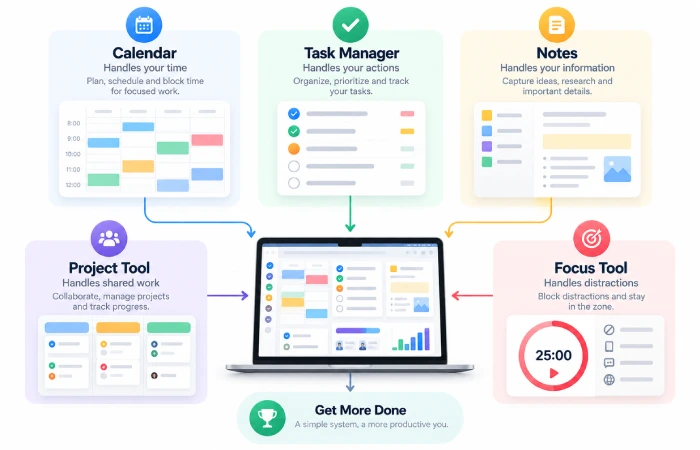
One of the most useful productivity app techniques is to assign a clear purpose to every application.
For example:
Calendar → appointments and fixed time
Task manager → things that need to be done
Notes app → information and ideas
Project tool → shared work
Focus app → distraction control
This makes it much easier to know where information should go.
Keep Your Task List Small
A huge task list can become another source of stress.
Instead of creating hundreds of tasks for one day, separate:
- Today
- This week
- Later
- Waiting for
Microsoft To Do’s My Day is designed around selecting the tasks you want to focus on each day rather than treating the entire task database as today’s work.
Use Your Calendar for Time
Tasks and calendars serve different purposes.
A task says:
Write the report.
A calendar says:
Write the report from 10:00 to 11:00.
That difference matters.
Use your calendar for meetings, appointments, deadlines, and protected work periods.
Google Tasks can also connect tasks directly with Google Calendar and Gmail, which makes the transition from message to scheduled work easier.
Prioritize Instead of Collecting
Productivity apps make it very easy to collect tasks.
That does not mean all tasks matter equally.
Use priorities to distinguish important work from tasks that can wait.
Todoist, for example, supports priority-based filtering so users can create views focused on higher-priority work.
The important part is to use priorities sparingly. If everything is urgent, nothing is.
Review Your System Regularly
A productivity system should be reviewed.
Once a week, check:
- Completed work
- Unfinished tasks
- Upcoming deadlines
- Projects that need attention
- Tasks that no longer matter
Delete or archive anything that is no longer useful.
This keeps the system trustworthy.
Reduce Notifications
Too many notifications can destroy the benefit of a productivity app.
Turn off alerts that do not require immediate action.
For communication apps, use notification settings, scheduled review periods, or focus modes where appropriate.
Productivity is not about responding faster to everything. It is about giving attention to the right things.
Use Automation Carefully
Automation can reduce repetitive work.
For example:
Email arrives → task created → reminder set
Or:
Meeting ends → notes created → follow-up task added
Automation is useful when the process is predictable.
Do not automate everything simply because an app supports it.
Avoid Building a Complicated System
A common mistake is creating a productivity system that takes more time to maintain than the work itself.
If your system requires:
- Ten categories
- Twenty labels
- Multiple dashboards
- Several daily reviews
- Complicated rules
it may be too complicated.
The best system should be easy to understand when you are busy.
A Simple Productivity App Workflow
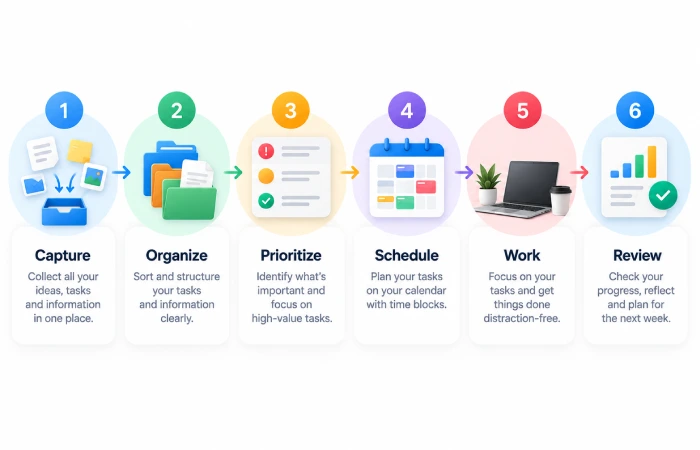
A practical setup can look like this:
Capture → Organize → Prioritize → Schedule → Work → Review
Capture
Write down tasks and ideas immediately.
Organize
Put them in the correct project or list.
Prioritize
Decide what matters most.
Schedule
Put important work into available time.
Work
Focus on one meaningful task at a time.
Review
Clean up the system and prepare the next day.
Common Mistakes
Avoid:
- Using too many productivity apps
- Keeping duplicate task lists
- Turning every task into a high priority
- Ignoring the calendar
- Leaving notifications on all day
- Creating overly detailed dashboards
- Never reviewing old tasks
A productivity app should reduce mental load, not increase it.
FAQs
What is the best way to use productivity apps?
Give each app a clear purpose, keep tasks organized, prioritize important work, schedule time for it, and review the system regularly.
How many productivity apps should I use?
There is no fixed number, but a simple system with a calendar, task manager, and notes app is enough for many people.
Should tasks and calendar events be separate?
Usually yes. Tasks represent work, while calendar entries represent time commitments. Connecting the two can make planning easier.
Why do productivity apps stop working for me?
Often the problem is not the app. The system may be too complicated, full of outdated tasks, or disconnected from your actual schedule.
Final Thoughts
Learning how to use productivity apps effectively is mostly about building good habits.
Choose a small number of tools, give each one a clear purpose, prioritize realistic amounts of work, and connect your task list with your calendar.
Do not spend your productive hours constantly adjusting your productivity system.
The system should support the work, stay simple, and get out of the way.
