





Table of Contents
Introduction
Customer Service teams spend a large proportion of their day responding to repeated questions.
Your customers might inquire about pricing, order status, product delivery and returns, product information, working hours, or account concerns. Customer service chatbots with AI may be used to automate a large portion of these day-to-day conversations, freeing your human representatives up to take on more complex topics.
Contemporary customer service automation is about robots that understand how to ask and answer customer questions beyond stock responses. They can comprehend questions posed in natural language, leverage business data, the conversation flow and maneuver accordingly.
What Are AI Customer Service Chatbots?
An AI customer service chatbot is a piece of software that interacts with customers on websites, applications, messaging platforms, or other digital interfaces.
A traditional bot would likely rely very heavily on a set of predefined buttons and rules, whereas an AI bot can handle a much broader scope of natural-language queries, and reply to them with information by access to the company‘s knowledge base and other connected systems.
Common tasks include:
- Some common questionsanswered
- Describing products and services
- Verify order details
- Responding to basic support queries
- Gathering customer data
- Routing conversations
- Provide an overview of earlier discussions
- The problem of whether to escalate complex issues to human agents
How AI Chatbots Improve Customer Support
Faster Responses
Generally, user does not like to wait for a staff to answer the trivial question.
A chatbot can offer an answer right away when the info is ready.
This makes it especially beneficial when normal working hours are over and a lone support team member may be unavailable.
Less Repetitive Work
Customer Support Agents often spend a lot of time answering the same questions.
A chatbot can churn out answers and handle mundane enquiries freeing agents up to spend time on cases requiring judgement.
Zendesk outlines the evolution of AI customer-service systems from simple FAQ answering bots that proactively push questions, to systems that could resolve the issue, access backend systems, and know when to escalate to a human.
More Consistent Support
If an AI chatbot operates with a controlled knowledge base, it can give customers more uniform responses to frequent questions.
But they still have to verify and check whether the information has been correctly and accurately entered before analyzing it.
Common Uses of AI Customer Service Chatbots
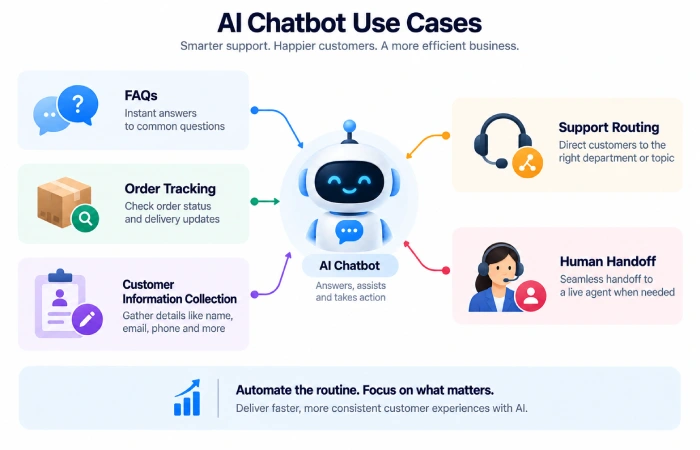
Frequently Asked Questions
Chatbots can answer questions about:
- Pricing
- Business hours
- Shipping
- Returns
- Products
- Services
- Appointments
- Account procedures
This is usually the best place to begin for a business.
Order and Delivery Questions
An ecommerce business would be more likely to apply this scale where: Customers constantly ask “Where is my order?”
At the moment that’s hooked up to relevant order or tracking details, the chatbot should have the ability to give an update – automagically – saving somebody clicking through tracking systems and updating systems manually.
Customer Information Collection
A chatbot refers information to an employee.
For example, it can ask for:
- Customer name
- Order number
- Contact information
- Reason for contacting support
- Product involved
This gives the human agent useful context before the conversation is transferred.
Human Handoff
Not every problem should be automated.
A good customer-service chatbot should recognize when the request is outside its knowledge, too sensitive, or too complicated.
The conversation can then be transferred to a human agent along with the available context.
AI Customer Service Chatbots vs Traditional Chatbots
Rule-based chatbots tend to be rule driven.
For example:
Choose Product → Choose Order → Check Status
AI customer service chatbots are able to manage more natural conversation.
A customer might simply write:
“I was supposed to get my parcel yesterday, please could you find out what happened?”
The AI will understand the request and when connected to the right system will locate the information you need.
It is primarily how the system interprets and manages the conversation.
Customer Support Automation Workflow
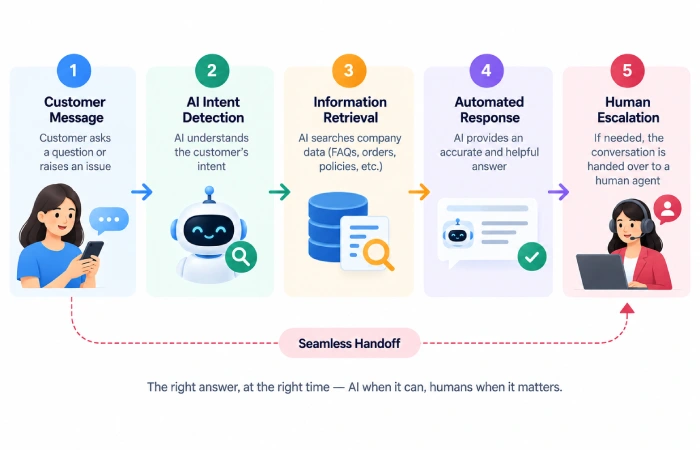
A basic setup can look like this:
Customer message ,- ai processes request,- information retrieved,- ai response,- human escalation.
For more advanced workflows:
Customer message → AI senses intent → CRM order sent/emergency order required → action taken → customer notified → conversation documented
This early on eliminates any manual steps ahead of the support process.
How to Implement AI Customer Service Chatbots
Begin with the hot questions your customers are asking.
Step 1: Review Support Requests
Examine emails, chats, calls and tickets to capture repetitive questions.
Step 2: Create Reliable Answers
Provide the correct information for the chatbot to input.
Step 3: Connect Relevant Systems
Tip 4: Integrate the system, if necessary, with your help desk, CRM, order system, or knowledge base.
Step 4: Define Escalation Rules
Choose what conversations need escalate to a human.
Step 5: Test Real Questions
Avoid using only ideal sentences of a question Make use of real customer! messages,weird signings and ambiguous cases.
Step 6: Measure Results
Track response time, resolution rate, escalations, customer satisfaction and agent workload.
Common Mistakes
Companies tend to fall into the trap of trying to automate everything.
Other problems include:
- Providing missing data to the chatbot.
- Enabling human access: making human support/facility difficult to find.
- A paper trail To gain permission to connect systems.
- . Respecting sensitive decisions made by AI.
- 3. Overlooked Lives Past failures in conversation9
- Focusing only on use of chatbot rather than on customer results
Automation shall save human conversation, not increase.
FAQs
Can AI customer service chatbots replace support agents?
They are able to handle many day to day conversations without human intervention, but agents are still needed for the more complex, sensitive and exceptional problems.
Are AI chatbots available 24/7?
Yes. Automated chatbots are able to deliver help beyond traditional working hours (and depending on the channel and configuration).
Can AI chatbots check order status?
Yes, if they are linked through the relevant ecommerce, CRM or order-management systems.
Are AI customer service chatbots suitable for small businesses?
Q: Can I begin with simple questions and increase automation? Yes. Small business can begin with more common questions and increase automation as the system proves more useful.
Final Thoughts
AI customer service chatbot AI chatbots can take away a lot of repetitive work involved with customer service.
The most straightforward approach is just to start with what are the most common questions that come in and be as accurate as possible in providing answers with a well-defined pathway to a human.
As AI customer support becomes increasingly integrated with business systems, chatbots have the potential to evolve from answering queries to assisting users in executing real-world service workflows.
