
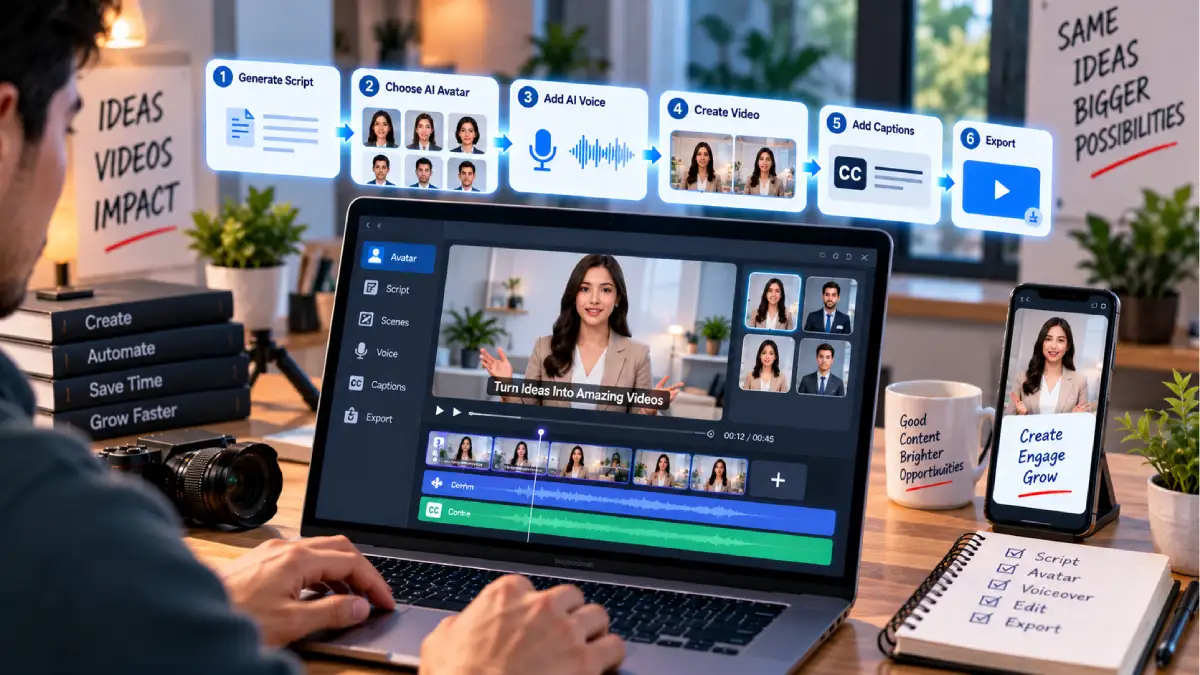



How to Create AI Avatar Videos for Free
No longer do you need a camera, studio, actors, or expensive video equipment to produce a presenter-style video.
AI avatar video generators can have a digital presenter read a script. Select an avatar, type in your words, choose a voice and the program will produce the AV.
This is great to use in: YouTube videos, tutorials, product descriptions, training materials, Facebook and Twitter posts or even business presentations.
The most difficult task would be to get a free AI avatar video generator that actually is helpful. Usually the free plans include some limitations as a certain amount of video minutes, a watermark, limited avatars or limited export options.
This user guide describes the best way to make free AI avatar videos, which matters, free plan features, and how to be successful as a beginner.
Table of Contents
What Is an AI Avatar Video?
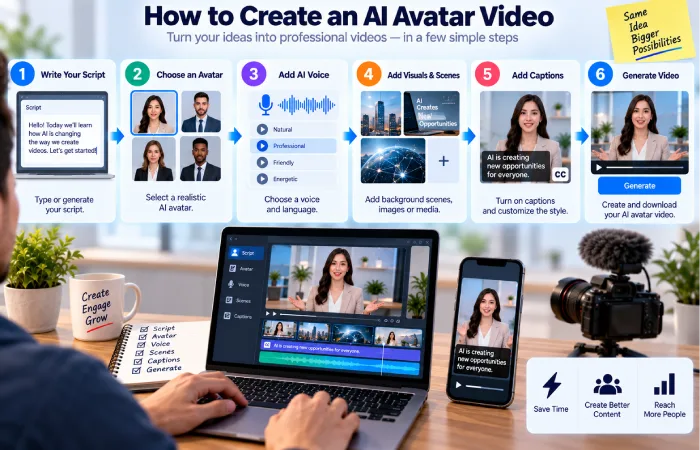
An AI avatar video is a piece of communication that features a virtual human body or avatar human.
You normally provide:
Script → Avatar → Voice → Video
The avatar will perform the script you gave it in its artificially synthesized voice and facial or body animation.
Others feature stock presenters, and others create an avatar in the likeness of your own photo or video.
AI avatar videos are distinct from regular text to video generation.
A text-to-video system generates a series of video scenes according to a prompt.
The scope of the avatar system is concerned with a digital presenter speaking to the user.
What Can You Use AI Avatar Videos For?
Many of the kinds of videos are suitable for using AI avatar videos.
YouTube Videos
You can create:
- Tutorials
- Explainer videos
- Educational content
- News-style presentations
- Short videos
Business Videos
Businesses can use avatars for:
- Product demonstrations
- Employee training
- Onboarding
- Customer education
- Internal announcements
Social Media
Short avatar videos can be used for:
- TikTok
- YouTube Shorts
Online Courses
An AI presenter can present lessons, explain a topic, and give instructions, instead of having the presenter record every lesson.
Best Free AI Avatar Video Generators
It all comes down to the amount of video needed and whether a realistic presenter is required or an innovative design.
HeyGen
Of all of the different AI avatar platforms, the one that is probably the most widely known is HeyGen.
Their Free Plan is free to use with 3 videos per month. They have unlimited videos of 1 min length or less. Over 500 stock video avatars are included, as well as some access to Avatar IV. Exports for free are Watermarked.
Best For
- Beginners
- Presenter videos
- Marketing content
- Social media
- Quick experiments
Pros
- Quick and easy to set up
- Avatars of a lot of stock capital or air are available I think there are plenty on the site.
- Creating videos from a script
- No camera necessary
Cons
- Free video quote is finite
- The watermark on free exports is the base price, denoted in the diagram by the horizontal line. In the presence of trade distortion, this free export price shifts from the world price.
- You‘ll need a paid subscription for videos of this length.
If you would like to test the AI-avatar workflow before you decide to pay, it can be a suitable option.
Synthesia
Synthesia is very heavily targeted on professional avatar videos for business, training, and education.
The platform‘s present free basic plan is for $0/month and gives 1,200 credits that can be used for 10 minutes of video per month. It gives 160+ language AI avatars and voice-overs.
Best For
- Training
- Business presentations
- Educational videos
- Professional explainers
Pros
- Workfl0w focused on professional avatar.
- Wide choice of language
- Test free plan
- Business uses
Cons
- Free plans have monthly limits.
- Paid features are advanced features.
- The workflow is business-oriented.
How to Create AI Avatar Videos for Free
Step 1: Choose Your Topic
Begin with a single, obvious premise.
For example:
How do you go about choosing a laptop for university?
Concentrating on the one topic will make the script easier to write and ultimately, easier to watch.
Step 2: Write a Short Script
Do not begin with a 10 minute spiel.
Your first video should ideally be about 30–60 seconds long.
Example:
Picking a good college laptop can be easy. First look at battery life, RAM, storage and weight. Having enough space for files on a compact machine can be very helpful for school life.
Short scripts are more simple to test, and modify.
Step 3: Choose an Avatar
Choose a an avatar that is suitable for the target audience
For example:
Professional presenter → Business video. Short video for small business use: promote business, introduce business and product. We offer professional presenters in high quality video; use a professional presenter to introduce your company, product or service.
Easy-going and welcoming presentor => Educational film
Younger presenter → social media stuff
Select a natural looking avatar, not one that is bizarre, unfamiliar and distracting.
Step 4: Select a Voice
The tone should be consistent with the content.
Consider:
- Speed
- Accent
- Tone
- Gender
- Language
- Pronunciation
Hear the snippet before producing the full video.
Step 5: Add Your Script
Paste your script into the platform.
Use brief sentences to split up lengthy passages.
For example:
Bad:
“One thing you should know before buying a laptop is that battery life, performance, portability, display quality, storage, and price need to be taken into account collectively.”
Better:
Don‘t have just one specification.
Check the level of battery.
Now compare its performance, portability, display quality, storage, and price.
The sentences are shorter (like the one at the beginning of this paragraph). This is a more natural sounding speech for an AI avatar.
Step 6: Add Visuals
Many AI avatar platforms allow you to add:
- Images
- Video clips
- Backgrounds
- Text
- Icons
- Screenshots
Employ images where appropriate.
For instance, a tutorial about using a laptop could display the image of a laptop as the avatar talks about RAM or storage.
Step 7: Add Captions
Subtitles allow videos to be more accessible especially when being watched on a mobile.
Check automatically generated captions for:
- Spelling
- Timing
- Names
- Numbers
- Technical terms
There are errors in AI-generated captioning as well.
Step 8: Generate the Video
Create the video, view the full video.
Check:
- Pronunciation
- Facial movement
- Timing
- Pauses
- Scene changes
- Text
- Visual quality
Do not submit the first generation to publication without verification.
How to Write a Better AI Avatar Script
The importance of the script often is much higher than what one imagines.
All that can be said is that an AI avatar will be able to say only what you have written.
Keep Sentences Short
Replace way by term Use natural speech.
Instead of:
We will discuss a large range of benefits that Artificial Intelligence video generation has to offer.
Use:
This guide examines how AI video generation works.
Write Like People Speak
Please do not sound like it is a formal report.
The presenter must sound natural.
Add Natural Pauses
The short sentences give natural transitions.
Using punctuation, use also punctuation to control your pacing.
AI Avatar Video Features to Compare
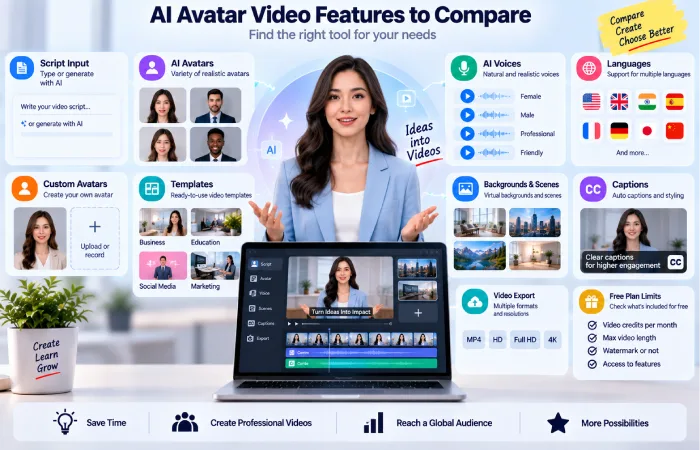
It is not the number of avatars you see which should influence your platform choice.
Avatar Quality
Do you feel the presenter appears authentic?
Monitor facial expressions, lip movement and gestures.
Voice Quality
The voice should have a clear and natural tone.
Language Support
This is important if you are producing videos for diverse audiences.
Custom Avatars
Some websites allow you to build an avatar out of yourself.
Check with the platform of your chosen provider about its own consent requirements before actually building one.
For instance, Synthesia needs to get a live consent video when creating a photo-based personal avatar, and does not enable the creation of an avatar of a public character or a person without previous agreement.
Templates
Templates save you time when you are developing similar information.
Backgrounds and Assets
Verify if the platform (or the template) offers an abundant selection of stock media (images, videos, sounds etc.), backgrounds and layouts.
Free AI Avatar Video Pricing
The Free may signify multiple items.
Free Videos Per Month
The current free version of HeyGen gives you 3 videos per month with a 1-minute duration per video.
Free Video Minutes
A standard plan for Synthesia now offers up to 10 minutes of video monthly under its credit system.
Free Trial or Credits
Alternatively, the platform may not give a recurring monthly budget. They may offer temporary credits instead.
Always check the current pricing page before starting a major project.
AI Avatar Videos for Beginners
AI avatars are potentially convenient for the uninitiated since they can eliminate a number of conventional production steps.
You do not need to:
- Prepare lighting
- Take several recordings
- Hire a presenter
- Edit lip-sync
- Record each lesson for yourself
The basic process is:
Type in your message → Select an avatar → Select a voice → Include visuals → Produce → Approve
That renders it accessible to people who were a paid up member of the first time filmmakers club.
Benefits of AI Avatar Videos
Faster Production
A presenter-led video can be made without recording yourself.
Consistent Presentation
The same avatar can also be used for a number of videos, and the same voice can be utilized in these videos.
Multiple Languages
A few platforms may have on a hundreds of languages and many voices to make it easy to deliver various versions.
Currently Synthesia sells AI avatars and voiceovers in over 160 different languages.
Lower Production Requirements
It‘s possible to make simple videos without camera, microphone, lights and studio space.
Limitations of AI Avatar Videos
AI avatars have a number of uses but are not as flawless.
You may notice:
- Robotic delivery
- Limited gestures
- Unnatural expressions
- Pronunciation mistakes
- Repetitive design and layout
- Less rapport with audience than a live presenter
This can be extremely good for education/business content.
This is definitely one instance where a live presenter, one which is human, might do better for really personal matter.
Create AI Avatar Videos for YouTube
For use on YouTube and AI avatars, the primary concern is content quality.
Don‘t just make hundreds of filmed out to camera videos with the same script/menu.
Add:
- Original research
- Examples
- Commentary
- Useful visuals
- Real explanations
- Human editing
Should the avatar be the way it is delivered, not the whole value of the video.
Can You Create an AI Avatar of Yourself?
In some platforms, a personalized avatar can be created by the users.
This might be helpful if you‘re glad to have a digital version of you that replicates your TV personality but not happy to record all the videos you make.
Consent is relevant, however.
Only use a custom avatar that depicts either yourself or another individual if you have been given permission to do so.
Under Synthesia‘s current policy, live consent is required for personal photo avatars, and unauthorized avatars of other people are prohibited.
Common Mistakes
Using a Very Long Script
Long scripts can become cost-effective. They can also be boring videos.
Start short.
Choosing an Avatar That Does Not Fit
A presenter that looks corporate may seem out of place in a fun entertainment video.
Make avatar match your audience.
Using a Robotic Script
Write conversationally.
Ignoring Visuals
The talking avatar on its own can get dull.
Include relevant images, screen recordings, diagrams, or video clips
Not Checking Pronunciation
A problem with technical terms, even obscure ones can occur, that they can be pronounced wrong.
Review and preview prior to publishing.
Ignoring Free Plan Restrictions
Check video limitations, watermarks, quality and terms for commercial use.
Simple AI Avatar Video Workflow
For your first video, follow this:
1. Choose a topic.
2. Write a 30–60 second script.
3. Choose an avatar.
4. Select the voice.
5. Add your script.
6. Add supporting visuals.
7. Add captions.
8. Generate the video.
9. Watch it from beginning to end.
10. Edit and publish.
This workflow should be sufficient for you to determine whether AI avatar videos are suitable for your content or not.
FAQs
How can I create AI avatar videos for free?
Pick a platform with a free plan, write a quick script, choose an avatar and voice, upload your content, create the video and check it before uploading.
What is the best free AI avatar video generator?
HeyGen and Synthesia are a good couple to try AI avatar videos with. HeyGen offers three 1 minute videos per month on its current free plan.synthesia offers 10 minutes per month with its basic plan.
Can I make AI avatar videos without a camera?
Yes, the Stock AI avatars are able to say the script without you having to record yourself.
Can I create an avatar of myself?
The platform will allow you to use an custom avatar. adhere to the platform‘s requirements in regard to permission and identification.
Can I use free AI avatar videos commercially?
This depends on the platform and your specific plan. Review the specific license and commercial use terms currently in effect to determine if it is permissible to use a video downloaded from a free-plan plan for a commercial or paid job.
Are AI avatar videos good for YouTube?
They could work for tutorials, explainers, education videos, and similar formats. However, the material must offer real value and can‘t just be based on the AI presenting it.
Final Thoughts
Learning how to create AI avatar videos for free is relatively simple.
Start with a short script, choose a suitable avatar and voice, add useful visuals, generate the video, and review the result carefully.
HeyGen is a practical option for beginners who want to test avatar-based video creation, while Synthesia is particularly suited to professional training and presentation-style content. Their current free plans have different limits, so compare the actual allowance before choosing.
Do not focus only on making the avatar look realistic.
A useful script, clear voice, good visuals, accurate information, and thoughtful editing matter much more.
For the broader topic, continue with How to Use AI Tools to Make Videos for Free.
