

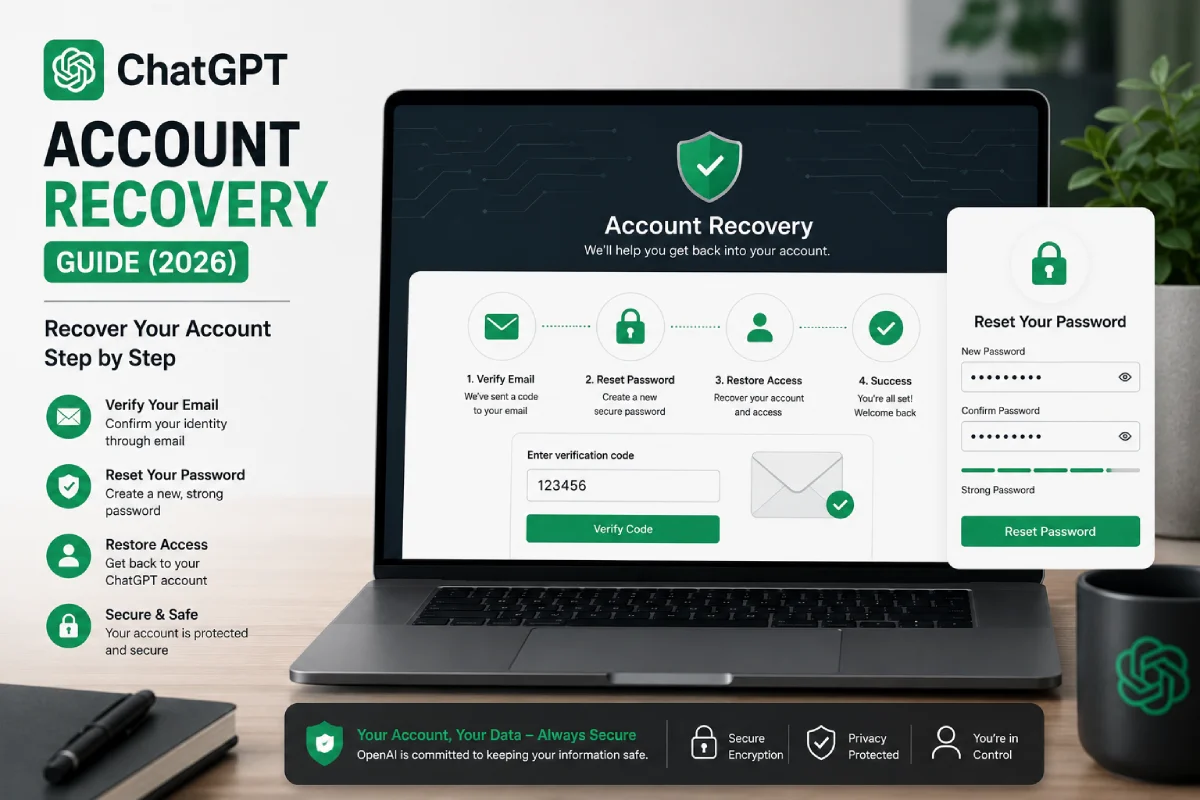


ChatGPT Account Recovery Guide (2026): Recover Your Account Step by Step
Introduction
Having a ChatGPT account blocked or suspended can be really frustrating, particularly if you rely on it for work, college, or daily life. Fortunately, in most cases, ChatGPT account recovery is straightforward, provided you take the relevant actions.
Want to get your Account back? Whether you lost your password, can’t access the email addremailssociated with your Account, your Account has been locked, or you just can’t log in, we’ll walk you through how to recover your ChatGPT account.
By the time you finish this guide, you’ll know the right steps to regain access to your Account, how to fix common recovery issues, and, most importantly, how to prevent them in the future.
TECH HUB
Table of Contents
This Article Is Part of the Technologies Hub
Explore AI tools, cloud computing, ChatGPT guides, automation, future technologies, software innovations, and digital transformation resources inside our
Technologies Hub.
What Is ChatGPT Account Recovery?
Recovering your ChatGPT account means regaining access if you are no longer able to log in.
Recovery may involve:
- Resetting your password: I have a “Forgot my “assword” function.”It is straightforward to use. Click the link, fill in a few details, and you will be sent an email with a new password.
- Email Ad Email Confirmation
- Can you sign in? With Google, Apple, or Microsoft
- Regaining access to your email account
- Contacting OpenAI Support if needed
The recovery steps are determined by who created your account.
Need account Accounty when:
You may need to recover your account if:
- You’ve lost your password
- Your password is not functioning.
- You do not have access to the email on your own.
- It seems that your account has been locked; you’re being denied access
- You believe someone has gained entry into your account.
- You accidentally opened two accounts and don’t know which one to use.
If any of these situations apply, don’t create a new account. It will generally be better to recover your existing account.
Before You Begin: Before beginning the recovery process, make sure you have:
- The email address associated with your ChatGPT account.
- Access to the email account.
- A working internet connection.
- Either a web browser or the ChatGPT app.
If you can’t recall which email you used, check your inbox for emails from OpenAI (welcome emails, billing emails, password reset emails); they may include your details to Recover Your ChatGPT Account.
ChatGPT Account Recovery Steps
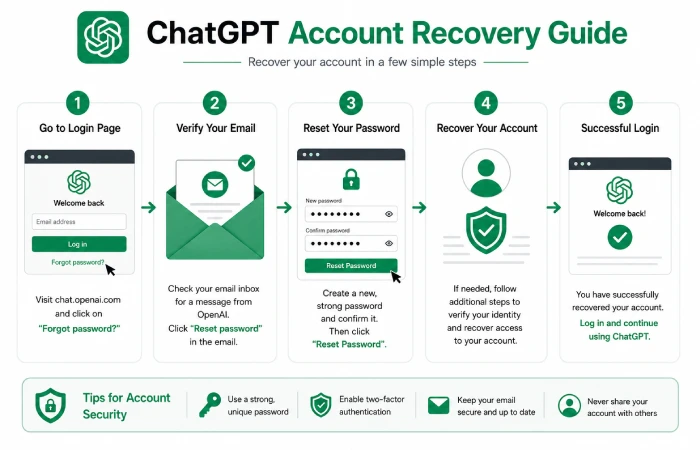
Step 1: Go to the ChatGPT Login Page
Log on to the ChatGPT web page. Or you can log in using the Link you’ll be directed to.
Clickyou’lln.
Step 2: Enter Your Email AddrEmailnter the email addremailssociated with your account
Make sure there are no spelling errors, then wait for the cursor to go back to the blinking position.
Step 3: Reset Your Password (If Needed)
If you don’t remember your password, click Forgot password?
- If it’s your email address
- If you are still in the process of performing the request, wait for the email with the password reset link.
- Click the reset link.
- Make a new password.
After you set your new password, test your new login.
Step 4: Check Your Email
WWhen promptedto cconfirm youremail aaddress, checkyour einbox forthe confirmation message.
If you don’t see it:
- Ensure that the email has been moved out of your Spam folder.
- Have you checked your Junk folder?
- Come back a few minutes later.
- Ask for a new email if necessary.
Step 5: Sign In Again
After completing the recovery steps:
- Navigate back to the login page.
- Provide your email here and your new password.
- Login.
If it all went well, you will see your chats and log in to your account settings.
What if I signed up for Studious using Google, Apple, or Microsoft?
If you used one of these providers when signing up, then that sign-in has been linked to your Studious account.
Some users have no password for ChatGPT.Account signed up using:
- Apple
- Microsoft
Always use the same sign-in button that you used to create your account.
For example:
- Using Google? Select Continue with Google.
- For those who signed up via Apple, select Continue with Apple.
- If you registered with a Microsoft account, select Continue with Microsoft.
If you’ve forgotten the password to either of these accounts, then you will need to recover that account first before you can use ChatGPT.
Will Your Account Keep Your Chats?
No.
Recovering your account does not delete:
- Your chat history.
- SavedAccountsations
- Custom GPTs
- Subscription
- Account settings
All should be fine when you sign back in, as long as you retrieve the correct account.
Tips for a Smooth Recovery
To make the recovery process easier:
- Use the same email address you signed up with.
- If unavoidable, do not create handfuls of new accounts.
- This is the most current email we have for resetting a password.
- Complete each step of the recovery phase as quickly as you can.
- Never leave your email account unprotected.
Use the above tips to avoid slowing down and regain access to your account.
Common ChatGPT Account Recovery Problems and How to Fix Them
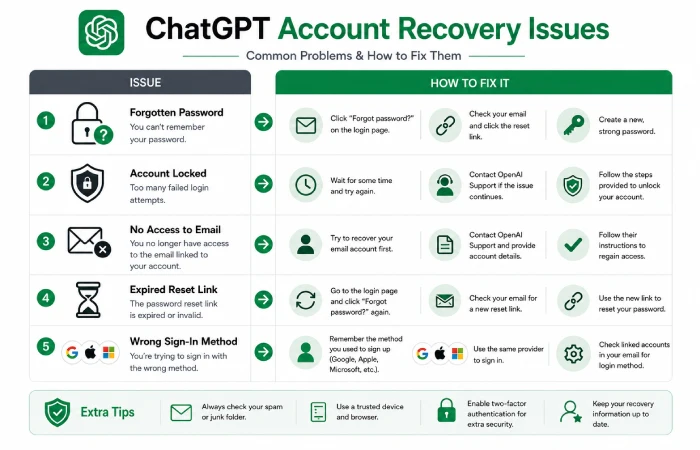
Most counter problems can be quickly repaired once the cause is known. What follows are some of the most common issues with a counter and how to fix them.
Problem 1: I Forgot My Password
This is by far the most usual reason why people are unable to get into their account.
How to Fix It
- Access the ChatGPT sign-in website. Enter your email address
- Click) Forgot password?
- Open the email with the password reset.
- Phone/Email: DefEmail password.
- Please log in once more.
If you do not receive the email, please check your Junk or Spam folder.
Problem 2: I Can’t Access My Email
Can Emailo help if you have lost access to the Email associated with your ChatGPT account? If so, you will need to recover your email account first.
For example:
- If you have Gmail, restore it.
- If you use Outlook, follow this method to recover your account.
- If you use Yahoo Mail, recover your account here.If you have access to your email, you can reset your password.
Problem 3: My Account Is Locked
There are times when your account might get locked out temporarily for security reasons. Account lockouts can happen if:
- Too many failed login attempts.
- Alert:correlation_rule. Unusual activity or a user logging in from their location is being observed.
- Security checks to be done.
What You Can Do
- Wait a few moments, then try again.
- Reset a password.
- Ensure that you are using the right email address
- Haven’t tried logging in from this computer or browser before?
Contact OpenAI Support if the issue persists.
Problem 4: Password Reset Isn’t Working
Occasionally, the reset email gets sent to you, but the link no longer works.
This usually happens because:
- The connection has expired.
- You open an older email that has already been opened.
- The link already exists.
Solution
- Send me a new password reset email.
- Ensure that the email has just the latest e-mail
- Click on the new link immediately.
Problem 5: I Signed Up with Google, Apple, or Microsoft
If you created your ChatGPT account using:
- Apple
- Microsoft
You won’t be able to reset a separate ChatGPT password.
Instead:
- Use the sameign-in option you used when you set up your account.
- Who else? If you no longer remember the password for your account, restore it directly with Google, Apple, or Microsoft.
Account 6: I Think Someone Accessed My Account
If unusual activity occurs, it is important to act swiftly.
You should:
- Think about changing your password.
- Verify your email account security.
- Log off shared devices.
- Check your account details.
- If you believe your account was compromised, please get in touch with OpenAI Support early; you are protecting your account and yourself:
Problem 7: I Accidentally Created an Account
This is more common than many realize.
For example:
- The first time you signed up, you used Google.
- Then at a later time, you registered another account with your email and Emailord.
This could be why your old chats have gone.
How to Fix It
Try signing in using every method you’ve used before:
- Email and Emailord.
- Apple
- Myou’veft
Your messaging history is associated with the account you signed up with.
Tips for Faster Account Recovery
Hopefully these simple tips will allow you to get back into your account more quickly.
Use the Correct Email
Most login problems occur when users enter an email address other than the one used to register.
Always verify your address before requesting a password reset.
Check every email folder; check your mailbox.
Also check:
- Spam
- Junk
- Promotions
- Updates
It can also sometimes happen that the password reset messages are automatically filtered away.
Use One Browser
Do not switch between several browsers while retrieving your data.
However, using the same browser throughout your session also avoids many login problems.
Keep Your Browser Updated
An old browser can cause login or security problems.
Update your browser to the latest version available.
Keep Your Account Safe After Recovery
Once you’ve recovered your account:
- Develop a robust password.
- Avoid sharing your passwords across different websites, as other sites may have a lexicon containing your password.
- Make sure your email account is protected.
- Share your login information?
- Log off from any public or shared login computer.
Developing good security practices reduces the chances of running into problems with accounts down the road.
Quick Recovery Checklist
If you still can’t get in, run through this checklist.
Use the proper email address. Do not remember your password.
Please note we recommend checking your spam/junk folders.
Utilize the newest password reset email. Congratulations! You are now ready to sign in by logging in in the same way as you did when you registered for the very first time.
Others: be cautious about extensions such as ‘Readability’, add-ons that deactivate/activate cookies, ‘dblock’, and ‘Spy-Der’. Value your frustration if you encounter problems. I am sure you will find the solution to unlock this application.
£ Delete your browser cache and cookies, if any. (enEnablerowsing history in your browser while logging into your account)
Iv) Please switch your device off and log in again to see if this fixes the issue.
In the majority of cases, users will regain access to their account by going through this process.
Frequently Asked Questions
What can I do to get back into my ChatGPT account?
If you can’t access your account:
- Access the login page of ChatGPT and enter a valid account
- Click Email Login Password if necessary.
- Reset your password by following the link in the email you received
- Log in once more, using the new password.
If you registered with Google, Apple, or Microsoft, use the same option to sign in, rather than resetting your ChatGPT password.
What do I do if I can’t remember the email address I used?
If you don’t remember your email address
- Make sure to check your email for an account from ChatGPT.
- Check for the old Welcome or Billing emails.
- View the passwords you saved in your web browser.
- Attempt to log on with all the emails you normally use.
Using the correct email is important because your chats and Account Settings are attached to that account.
What is Accountson behind my ChatGPT account lAccount
Your account may be temporarily locked if:
- There were X unsuccessful login attempts.
- Something odd has happened with your login history.
- Security checks have beeninitiated. In most cases, giving it some time and resetting the password will do the trick.
If I get my account back, will the conversations disappear?
No.
Recovering your account does not delete:
- Chat history
- Saved conversations, GPTs
- Account settings
- Active subscription
If you later recover the correct account, you should still have access to your data.
Can Accounty recover an account with no email? Use email no.
Your email account is used to validate your identity and retrieve your account.
If you can no longer access your email, you’ll need to recover your email before trying to open ChatGPT again.
I signed in with Google or Apple. How do I proceed?
If you created your account using:
- Apple
- Microsoft
Never use a different account sign-in button than the one you used to create your account.
First, if there is an account you registered for on the site but have forgotten the password to, recover that account before this one.
Quick Troubleshooting Checklist: If you’re still struggling, use the following checklist: Ensure you’re using the correct email.
To email your MFA, go to: My settings with the arrow on the top right of the screen. Under Business Travel Administration, click Edit on the right, then select 1- Power up MFA.
(Make sure to check your Spam and Junk folders.
PerPerfect. The password reset email: in the email body, the link should set the password; use the most current password reset email. Ask email: Can you try in a different browser?
- Clear the cache and cookies of your web browser.
Power off and on your device.
Please sign in with the same authenticator you were using before (Email, Google, Apple, or Microsoft).
These simple measures take care of the bulk of issues you’ll encounter with account recovery.
How often should you get in touch with OpenAI Support?
If you’ve tried all the above recovery methods without success and still don’t have access to your account, the final step is to contact OpenAI Support. You should contact OpenAI Support if:
- You have not received an email with a reset password
- Your account is still locked.
- You think there has been unauthorized Access to your account.
- You are logged in, but you keep receiving login errors even after resetting your password.
- Your email account is not working anymore, and you require a little extra assistance.
Before reaching out, have this information ready:
- Your email address associated with your account.
- Any error messages you may be receiving.
- The browser or app you are using.
- A summary of the problem.
This documentation may help the support team diagnose your problem faster.
Conclusion
Getting back into your account can be a fairly straightforward process. If you’ve been locked out of your account, your credentials are not working, or you’ve lost access to your login, there are a few steps you can take to recover your ChatGPT account.
Many problems are resolved by resetting your password, checking your spam/junk folders, trying to log in again using the correct login method, or using another web browser. If you registered using a Google, Apple, or Microsoft account, there is no need to create a new password.
To prevent issues down the line, use a secure password, safeguard your email account, and steer clear of establishing multiple ChatGPT accounts using various login options. These minor measures can spare you a lot of hassle.
ChatGPT Login Hub
Discover how to log in to ChatGPT, troubleshoot login issues, create a new account, reset your password, recover your account, and access ChatGPT on mobile devices.
